Introduction to JavaScript Variables and Assignment
Read at your own pace. Code execution, quizzes, progress tracking, and the AI tutor are available in the interactive view with JavaScript enabled.
Introduction
This lesson is intended for web and frontend engineers. For the general purpose version of this lesson, please click here.
During any real-life work, we need to store a piece of information somewhere and refer to it later. We encounter these situations while creating a program and doing computation as well, where we often need to store some information or data temporarily somewhere. For this specific purpose, variables are used.
These variables can store almost any type of data, whether they are numbers, strings, or lists. Data is stored in variables by assigning data values to them. This lesson will expand on this topic and discuss in detail variables and their assignment.
Variables
Variables
As discussed above, variables can store and manipulate data. Data values can be assigned to a variable by using the assignment operator which is the equal sign (=). Once a value is assigned to the variable, it corresponds to that value unless it is reassigned. Suppose we assign a value 5 to a variable a. This concept can be visualized as below.

This ensures that whenever we use the variable a in our program, we will get a value of 5. Let's understand this with code examples in JavaScript.
Variables in JavaScript
Variables in JavaScript
Variables in JavaScript are commonly declared by using a var keyword, followed by a variable name, assignment operator (equals sign =), and a corresponding value. For example, a variable of type int is declared as follows.
var number = 10;
Since this code line was a statement, it will produce no output. It only created the variable number in memory and assigned it the value 10. To check if the value was stored in the variable number, we use console.log(), which displays the variable value on the console.
var number = 10;
console.log(number);
This will display the value 10, and we can see that the value was correctly assigned.
Note! We can declare variables in JavaScript without using the
varkeyword before the variable name as well. However, in that case, the variable, regardless of where you define it, will become aglobal variable.
Interesting! Let's explore further.
A
global variablemeans that they can be accessed anywhere in the program-- that is, they can also be modified anywhere in the program (inside functions and classes, which we'll learn about in the next lessons). This may lead to a change in the value of the variable in places where you don't want to change it. Hence, to ensure that this does not happen, JavaScript provides additional keywords to declare variables. Sincevarkeyword is more prone to errors, there are two other keywordsletandconstthat can also be used for variable declaration.
Const and Let
Const and Let
The problem with just using var is that this is valid:
var firstTime = "something original";
var firstTime = "overwriting the original";
This example is easy to understand, but imagine a huge codebase with several thousand line files. If firstTime is declared on line 1, and then redeclared on line 1800, it can be easy to miss.
let and const are block-scoped. A block is simply a chunk of code wrapped by curly braces { and }. This means that any variables declared using either let or const are only available for use within the { and } symbols.
if (true) {
  let onlyHere = "this is only available here";
}
console.log(onlyHere); // Uncaught ReferenceError: onlyHere is not defined
Important Rules while Creating Variables
Important Rules while Creating Variables
Programming languages understand instructions only if they are given in a specified format (or syntax). When creating variables, we need to be careful of these rules, or the variables will not be created properly, and the program may give errors.
- Variable names can be created using
alphabetical letters(a-z and A-Z),digits(0-9), orunderscoresymbol (_). Special symbols are not allowed. For example,abc&defis an invalid variable name. - Variable names can begin with the underscore symbol or alphabetical letters only, not digits. For example,
123abcis an invalid variable name and will give you an error. - Variables in JavaScript are
case-sensitive. This means that if we declare two variablesscoreandScorewith different values assigned to them, then they are two different variables (not the same variable!). - Every programming language has certain
keywords, that define in-built functionality in the language. These should not be used as variable names. Since it has a different meaning in the language, declaring variables with already existing keyword names will cause an error. These keywords will be highlighted with a different color whenever you type them, so it is easy for you to distinguish. For example,newis a keyword in JavaScript, hence declaring a variable with that name would raise an error. - Be careful about the assignment of values to variables! JavaScript allows creating variables without assigning them values. However, if that same variable is used somewhere in the program without being assigned a value, it may lead to undefined behavior.
Now that we know how to create variables, let's see if we understood them properly.
Variable Creation Checklist
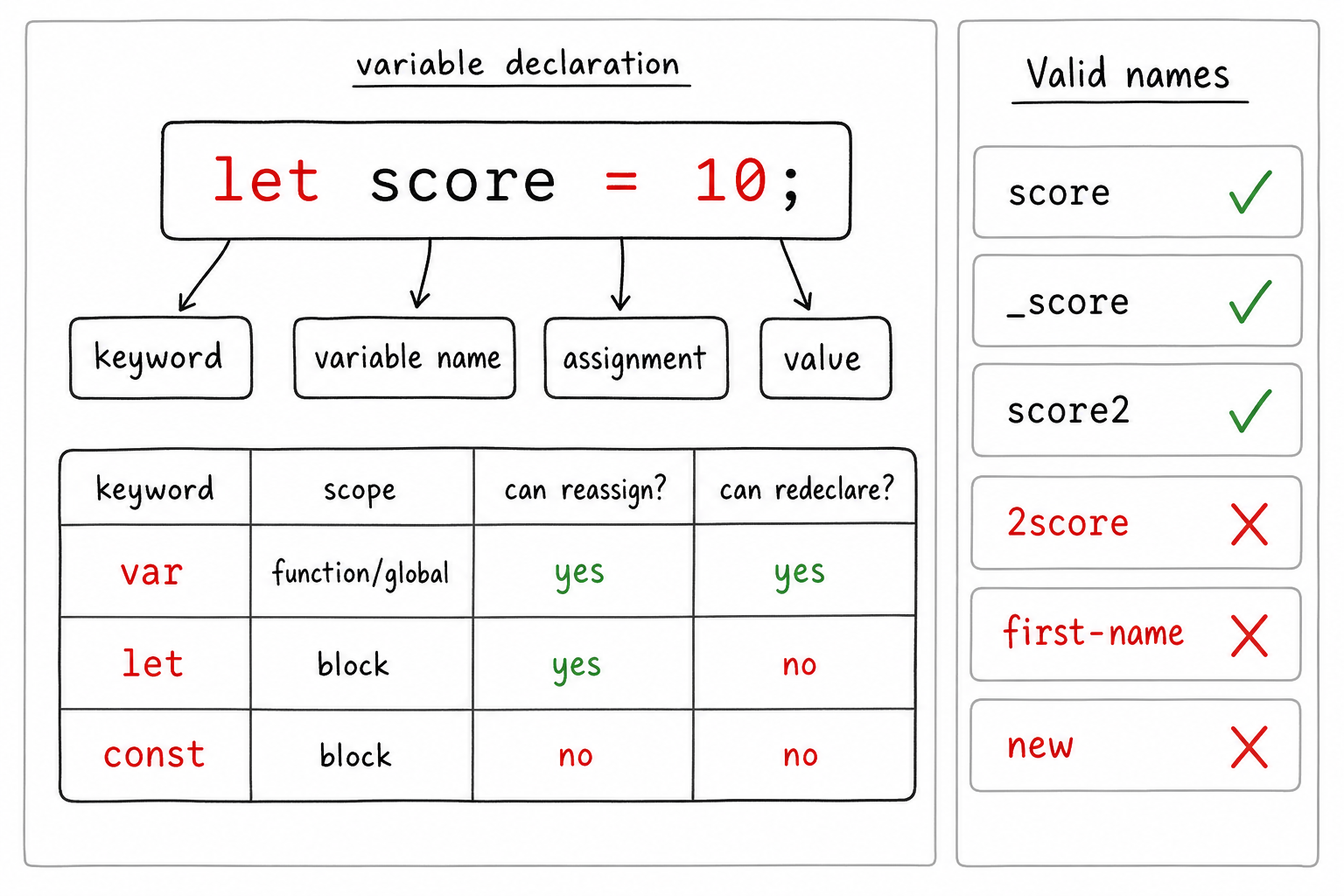
Before you write a variable, run two quick checks: how should it be declared? and is the name valid?
Use this visual as a fast mental model: pick const when the binding should not be reassigned, let when it may change, and avoid accidental globals or confusing names.

Variable Declaration Map
Before we practice, connect the rules into one mental model: a variable declaration has three parts — the keyword, the name, and the assigned value.
Use the visual to compare var, let, and const, then scan the naming checklist. In interviews and real code reviews, most beginner variable bugs come from scope confusion, accidental redeclaration, or invalid names.
True or False
Is the following code snippet a valid way to declare a variable in JavaScript?
js
var words: "Hello World!"
True or False
Is _name a valid variable name?
Reassignment of Variables
Reassigning variables
Values can be reassigned to variables in JavaScript (except const variables, which we will discuss later). When variables are reassigned, their value changes to that of the newer value specified, and the previous value is lost.

Let's look at an example.
Variables can be reassigned in JavaScript by assigning a new value to the variable without using the var keyword.
var a = 10;
a = 34;
Initially, when creating the variable we used the var keyword, but when reassigning there is no need to use the keyword again. We only provide a different value than what was stored before. The value of a is reassigned from 10 to 34.
Operations on Variables
Operations on Variables
Using variables in the program makes it easy for us to perform various operations on data. Different types of variables support different types of operations. For simplicity, let's consider the type integer. On this type of variable, all mathematical operations are valid.
Let's consider a code example.
var a = 5;
var b = 10;
var result = a + b;
console.log(result);
// prints 15 in console
This code block shows that if we have two integer variables, we can add them and get the result. Similarly, other mathematical operations such as subtraction, multiplication, and division are also supported.
Now let's consider if we had a variable of type string. In this case, the operations are defined differently. Here, a + symbol between two variables will join the two strings together. Consider the following example.
var prefix = 'un';
var root = 'clear';
var word = prefix + root;
console.log(word);
// prints the string 'unclear' on console
Here, the two strings are joined together to produce a new string. This operation is called concatenation. There are several other operations that we can perform on strings, integers, and other types of variables, but we will discuss them in later lessons.
Time for some practice questions!
Fill In
What will be the final value of variable a below?
var a = "Hello"
var b = a
a = "World"
Multiple Choice
What will the following program output?
var firstName = "Anna";
var lastName = "Green"
var name = firstName + lastName;
console.log(name);
Summary
Summary
In this lesson, we talked about a basic concept in programming, about the creation of variables and assigning values to them. A useful tip for creating variables is to use meaningful names while creating them. If you have a lot of variables in your program and you don't name them properly, there is a high chance that you'll get confused about which variables were supposed to store what value!
One Pager Cheat Sheet
One Pager Cheat Sheet
- This lesson explains how to use
variablesand theirassignmentto store data in a programming language. - A variable
acan be assigned a data value using theassignment operatorequal sign(=), and for the duration of the program, it will correspond to that value unless reassigned. - Variables in JavaScript can be declared with the
varkeyword, and stored in memory with a value which can be displayed withconsole.log(). Additionally,letandconstare also used to declare variables in order to avoidglobal variablemodification. - Using
letandconstinstead ofvaris a good way to prevent confusing variables in larger codebases because they are block-scoped and can only be used within specific{and}symbols. - Carefully following rules such as variable names only containing alphabetical letters, digits or underscore symbols, being aware of case-sensitivity and not using language-specific keywords will help to create variables correctly and avoid errors.
- - Prefer
const, useletwhen reassignment is needed, and make sure names follow JavaScript identifier rules. - - A safe JavaScript variable starts with the right keyword, uses a valid name, and follows scope/reassignment rules.
- No, this code snippet is not valid for declaring a variable in JavaScript, as the syntax
var <variable name>(for example,var myVariable) is not followed. - No valid JavaScript variable name can contain characters, so
var words: "Hello World!"is invalid, whereas_nameis valid. - Variables can be reassigned in JavaScript by assigning a new value without using
var, resulting in the change of their value. - Different types of variables can be used to perform different kinds of operations, such as mathematical operations for numbers and concatenation for strings.
- The value of
ahas been changed from "Hello" to "World". - The code
concatenatesthestringsstored infirstNameandlastNamein to a newvariablename, which is thenconsole.logged to outputAnnaGreen. - Creating variables with meaningful names is an important step in the programming process to avoid
confusionof which variables is used to store what value.