Lesson 2: Game Client - Basics
Read at your own pace. Code execution, quizzes, progress tracking, and the AI tutor are available in the interactive view with JavaScript enabled.
Client Begins
From toolchain to playable window
In Lesson 1: Setting up the Development Environment, you got the compiler, build flow, dependencies, and smoke test under control. Now we can stop asking, “Can C++ run?” and start asking, “What is a game client?”
For our MMORPG, the client is responsible for:
- Opening a window and owning the local process lifecycle
- Reading input from the player
- Updating a local view of the world
- Rendering frames smoothly
- Managing assets like textures, maps, fonts, and sounds
- Eventually talking to a server — but that is Lesson 3: Game Client - Networking
Today’s goal is not fancy graphics. It is the shape of the client: the loop, boundaries, timing, and small pieces of architecture that will survive as the project grows.

The Main Loop
The client heartbeat
Most game clients are built around a loop:
while game is running:
    read input
    update simulation
    render frame
Coming from Java web/server work, this is a shift. A Spring or Netty app usually waits for events. A game client actively produces time by advancing frame after frame.
A basic loop must answer:
- Should the game keep running?
- How much time passed since the previous frame?
- What needs to update this frame?
- What should be drawn now?
This example is console-only, but the structure is the same loop you would later wrap around SFML, SDL, OpenGL, or Vulkan.
```cpp
#include <chrono>
#include <iostream>
#include <thread>

int main() {
    using clock = std::chrono::steady_clock;

    bool running = true;
    int frame = 0;
    auto previous = clock::now();

    while (running) {
        auto now = clock::now();
        std::chrono::duration<double> elapsed = now - previous;
        previous = now;

        double dt = elapsed.count();

        // 1. Input phase: placeholder for keyboard/mouse/window events.
        std::cout << "[input] frame=" << frame << "\n";

        // 2. Update phase: advance the local simulation.
        std::cout << "[update] dt=" << dt << " seconds\n";

        // 3. Render phase: draw the current state.
        std::cout << "[render] drawing frame " << frame << "\n\n";

        ++frame;
        if (frame >= 5) {
            running = false;
        }

        // Pretend the display or OS pacing limits the loop.
        std::this_thread::sleep_for(std::chrono::milliseconds(16));
    }

    std::cout << "Client shut down cleanly.\n";
    return 0;
}
```
Loop Purpose
In a game client, why is the main loop usually organized into input, update, and render phases?
Subsystem Boundaries
Avoid the “everything object”
A beginner client often becomes one giant class:
Game.cpp knows about windows, input, textures, monsters,
network packets, UI buttons, file formats, and camera math.
That works for a weekend prototype. It collapses under an MMORPG.
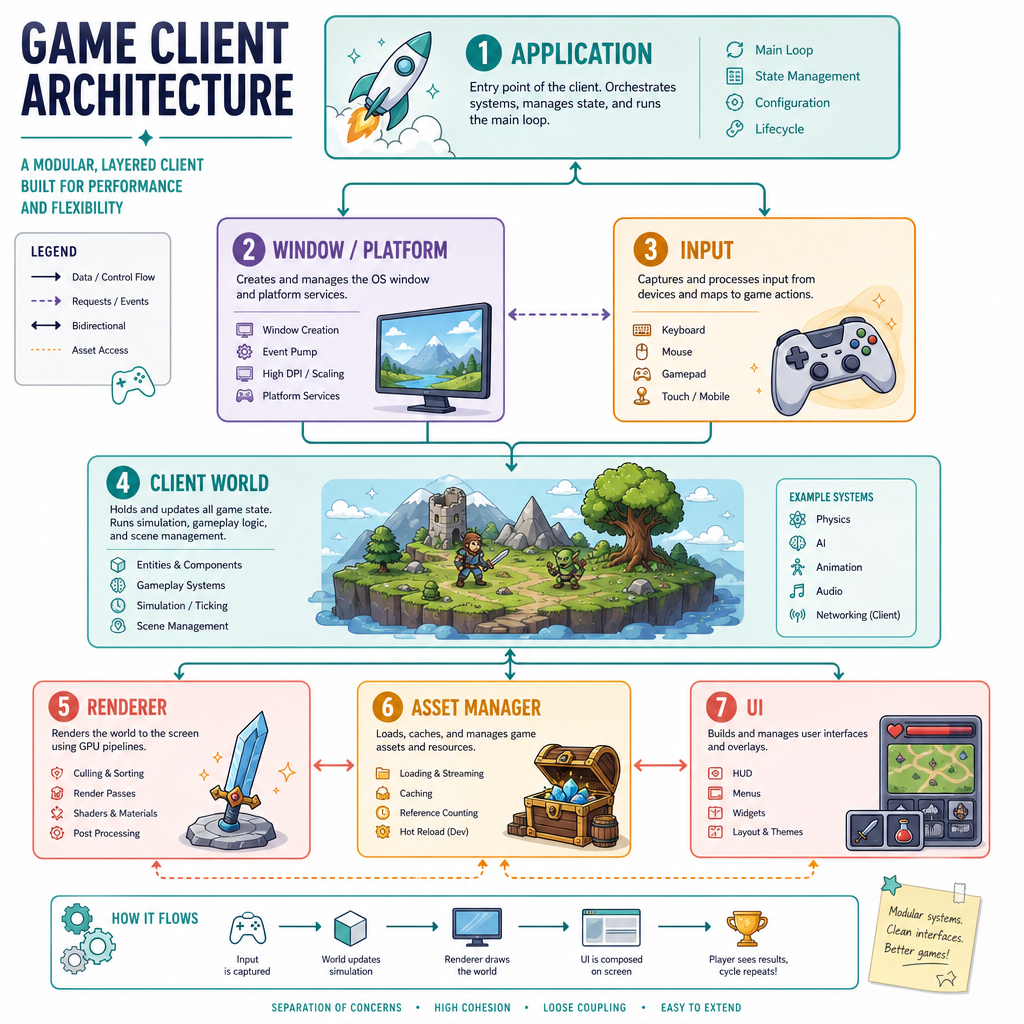
Instead, think in boundaries:
Application
  ├─ Window / Platform Layer
  ├─ Input System
  ├─ Client World
  ├─ Renderer
  ├─ Asset Manager
  └─ UI Layer
For now, these can be small C++ classes. The important part is that each subsystem has a reason to change.
Examples:
- Renderer changes when you move from simple sprites to OpenGL batching.
- Asset manager changes when you add hot-reloading for god-mode tools.
- Client world changes when entity state becomes more complex.
- Input system changes when you add rebinding or controller support.
This keeps the client flexible without prematurely building an engine.
Render Mutations
True or false: the render phase should generally mutate core gameplay state, such as moving the player or spawning monsters.
World State
A client needs a local world
Even before networking, the client needs a model of “what exists.”
For an MMORPG, that eventually includes:
- The player character
- Other characters
- Monsters
- Projectiles or abilities
- Tiles, props, portals, and interactables
Do not overbuild an ECS today. But do start with a habit: keep world data separate from rendering code.
A renderer can draw a player at (x, y), but it should not be the owner of the player’s position. The world owns the state; the renderer observes it.
```cpp
#include <iostream>
#include <string>
#include <vector>

struct Vec2 {
    double x = 0.0;
    double y = 0.0;
};

struct Entity {
    int id = 0;
    std::string name;
    Vec2 position;
    Vec2 velocity;
};

class ClientWorld {
public:
    void add(Entity entity) {
        entities.push_back(entity);
    }

    void update(double dt) {
        for (auto& entity : entities) {
            entity.position.x += entity.velocity.x * dt;
            entity.position.y += entity.velocity.y * dt;
        }
    }

    void debugPrint() const {
        for (const auto& entity : entities) {
            std::cout << entity.name
                      << " at (" << entity.position.x
                      << ", " << entity.position.y << ")\n";
        }
    }

private:
    std::vector<Entity> entities;
};

int main() {
    ClientWorld world;

    world.add(Entity{1, "Player", {10.0, 5.0}, {2.0, 0.0}});
    world.add(Entity{2, "Training Slime", {3.0, 7.0}, {0.0, -1.0}});

    std::cout << "Before update:\n";
    world.debugPrint();

    world.update(0.5); // Half a second passes.

    std::cout << "\nAfter update:\n";
    world.debugPrint();

    return 0;
}
```
Delta Blank
Fill in the conventional two-letter variable name often used for “time elapsed since the previous frame”:
update(___);
Fill in the blank: _____________
Input As Intent
Input should become intent
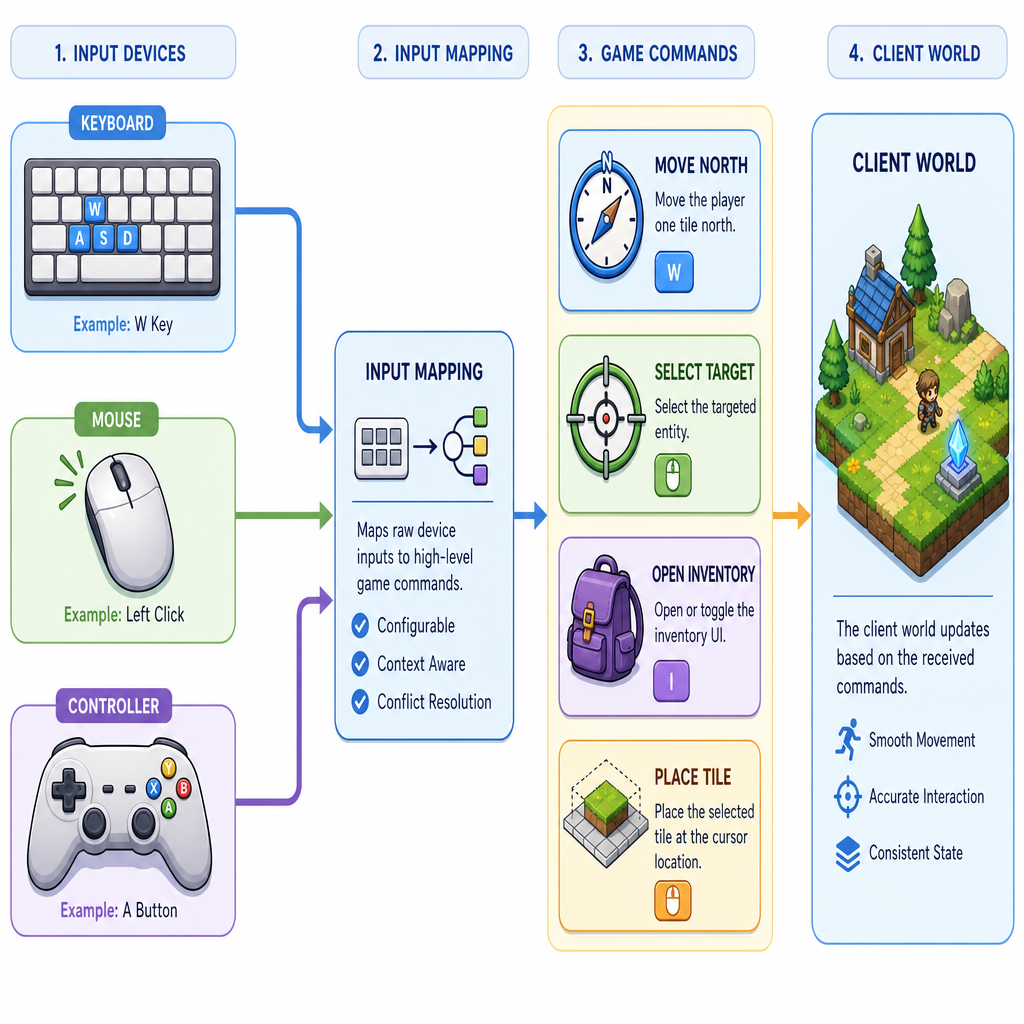
Raw input is hardware-specific:
W key pressed
Left mouse button down
Gamepad axis moved
Game logic wants intent:
Move north
Select target
Open inventory
Confirm placement
That translation layer is small but powerful. It prevents the world update from caring whether movement came from WASD, arrow keys, a controller, or an editor tool.
A useful mental model:
Hardware Events → Input Mapping → Commands/Intent → World Update
This will matter later when the same client grows a god-mode editor. A map editor click and a gameplay click are both input, but they mean different things depending on client mode.
Client States
The client is not always “in game”
Even a simple MMORPG client has modes:
- Booting
- Main menu
- Character select
- Loading world
- In game
- Exiting
Later, god-mode editing adds more modes, but the basic idea starts now: state controls what input means and what gets updated/rendered.
For example, pressing Escape in the main menu may exit the client. Pressing Escape in game may open a pause/options overlay.
Here is a tiny state-machine-style example. It is not a full engine; it is a habit of making transitions explicit.
```cpp
#include <iostream>
#include <string>

class ClientApp {
public:
    enum class State {
        Booting,
        MainMenu,
        LoadingWorld,
        InGame,
        Exiting
    };

    void transitionTo(State next) {
        std::cout << "Transition: " << name(state)
                  << " -> " << name(next) << "\n";
        state = next;
    }

    void tick() {
        switch (state) {
            case State::Booting:
                std::cout << "Checking local config...\n";
                transitionTo(State::MainMenu);
                break;
            case State::MainMenu:
                std::cout << "Showing menu buttons...\n";
                transitionTo(State::LoadingWorld);
                break;
            case State::LoadingWorld:
                std::cout << "Preparing assets and world data...\n";
                transitionTo(State::InGame);
                break;
            case State::InGame:
                std::cout << "Updating player, camera, and world...\n";
                transitionTo(State::Exiting);
                break;
            case State::Exiting:
                std::cout << "Saving settings and closing window...\n";
                break;
        }
    }

    bool isRunning() const {
        return state != State::Exiting;
    }

private:
    State state = State::Booting;

    static std::string name(State s) {
        switch (s) {
            case State::Booting: return "Booting";
            case State::MainMenu: return "MainMenu";
            case State::LoadingWorld: return "LoadingWorld";
            case State::InGame: return "InGame";
            case State::Exiting: return "Exiting";
        }
        return "Unknown";
    }
};

int main() {
    ClientApp app;

    while (app.isRunning()) {
        app.tick();
    }

    app.tick(); // Let Exiting state log its cleanup message.
    return 0;
}
```
Architecture Check
Which responsibility best belongs to the client world rather than the renderer?