Lesson 8: Client Editor - Monster Editor
Read at your own pace. Code execution, quizzes, progress tracking, and the AI tutor are available in the interactive view with JavaScript enabled.
Monsters Need Tools
From tiles to living content
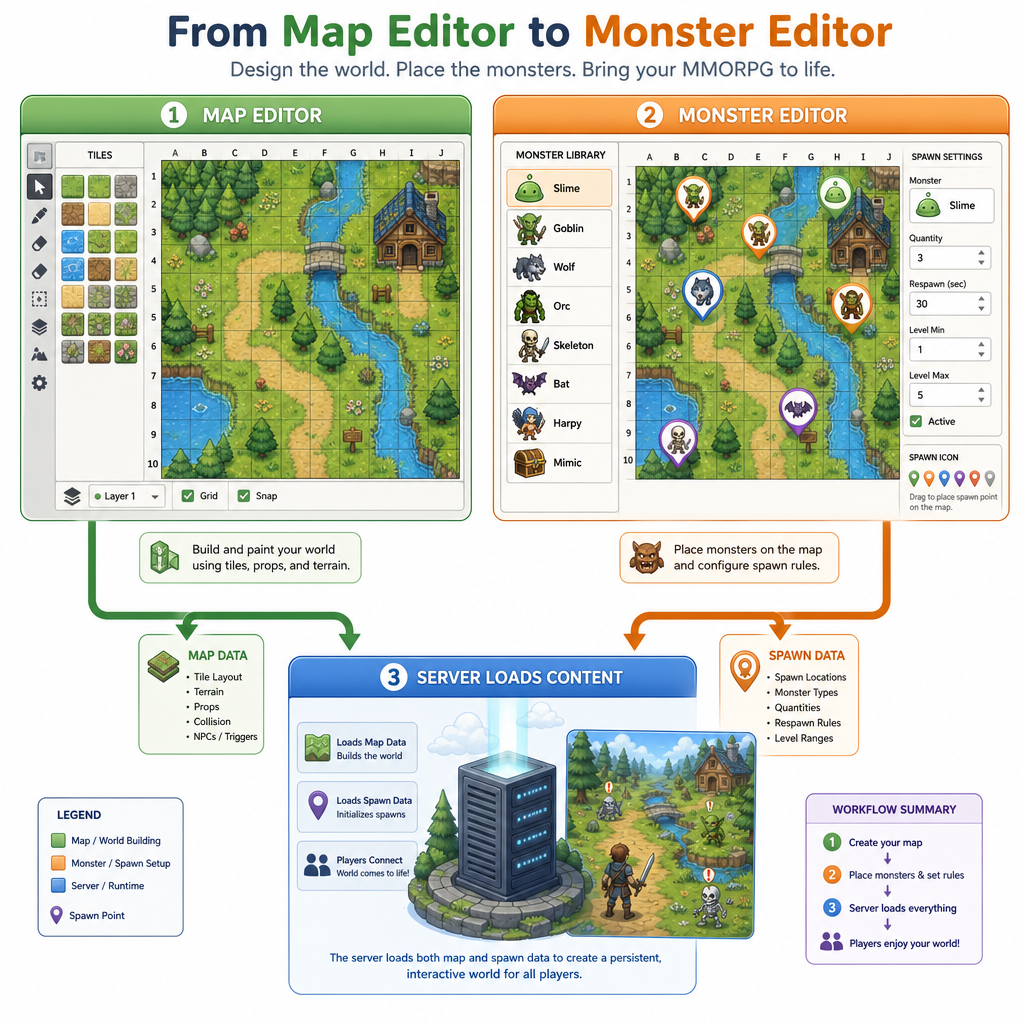
In Lesson 7: Client Editor - Map Editor, you built the first half of god-mode: editing the physical world. Now we add the layer that makes the world feel alive: monster spawn editing.
A monster editor answers questions like:
- What monster type appears here?
- Where can it spawn on the map?
- How many can be alive at once?
- How long after death should it respawn?
- Is this spawn valid for the terrain?
The key design rule: the editor creates content data, not live gameplay authority. The server from Lesson 4: Game Server - Basics still owns combat, HP, movement truth, and player interactions.
Think of this as building the internal tool a designer would use before shipping a zone.
Spawn Data Model
Separate template from placement
A common beginner mistake is storing everything directly on each spawn: name, max HP, damage, sprite, respawn time, position, loot table, and behavior flags.
Instead, split the data:
MonsterTemplate
  Defines what a monster is.

SpawnPoint
  Defines where and how that monster appears.
This mirrors patterns you likely know from Java/Spring or TypeScript systems: reusable configuration plus many concrete references.
For example, one Wolf template can be reused by 100 spawn points across multiple maps.
```cpp
#include <iostream>
#include <string>
#include <vector>

struct MonsterTemplate {
    int id;
    std::string name;
    int maxHp;
    int attack;
};

struct SpawnPoint {
    int id;
    int monsterTemplateId;
    int mapId;
    int tileX;
    int tileY;
    int respawnSeconds;
    int maxAlive;
};

int main() {
    MonsterTemplate wolf{1, "Forest Wolf", 35, 6};

    std::vector<SpawnPoint> spawns = {
        {100, wolf.id, 1, 12, 8, 30, 2},
        {101, wolf.id, 1, 18, 9, 45, 1}
    };

    std::cout << "Template: " << wolf.name
              << " hp=" << wolf.maxHp
              << " attack=" << wolf.attack << "\n";

    for (const SpawnPoint& spawn : spawns) {
        std::cout << "Spawn " << spawn.id
                  << " uses template " << spawn.monsterTemplateId
                  << " at map " << spawn.mapId
                  << " tile(" << spawn.tileX << "," << spawn.tileY << ")"
                  << " respawn=" << spawn.respawnSeconds << "s"
                  << " maxAlive=" << spawn.maxAlive << "\n";
    }

    return 0;
}
```
Content Or Runtime
Which field most clearly belongs in monster editor spawn content, rather than live runtime monster state?
Placement Workflow
Editing flow
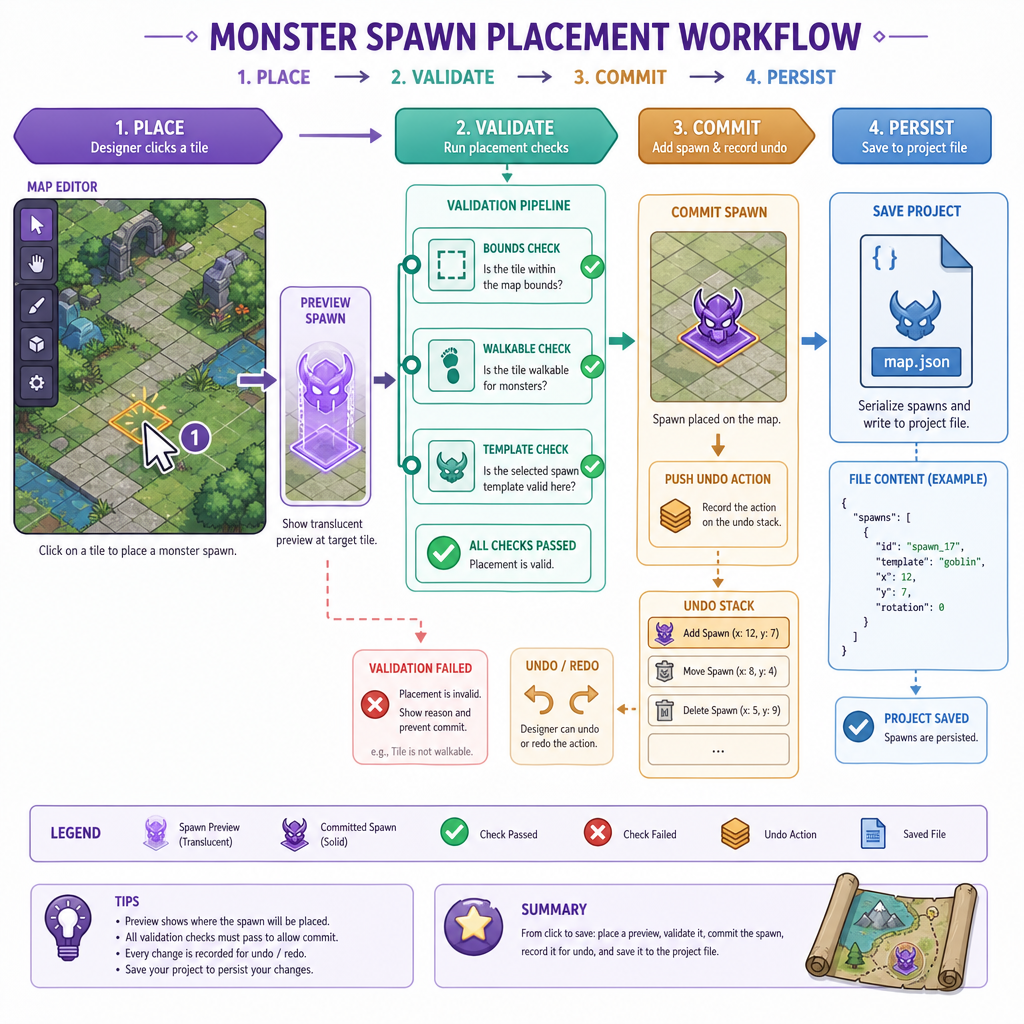
The monster editor can reuse much of the structure from Lesson 7: Client Editor - Map Editor:
Mouse click -> pick tile -> preview marker -> apply edit -> push undo command -> save content
But monster placement adds semantic checks:
- Is the tile inside the map?
- Is the tile walkable?
- Is the monster type valid?
- Is the spawn too close to a blocked area?
- Does this spawn overlap another spawn marker?
A practical editor mode might have tools like:
- Place Spawn: click a tile to create a spawn point.
- Select Spawn: inspect and edit properties.
- Move Spawn: drag to another valid tile.
- Delete Spawn: remove from the map.
- Paint Spawn Group: place several related spawns quickly.
Keep the UI friendly, but keep the data strict.
Validate Before Saving
Bad content becomes bad gameplay
Your server can be robust, but it should not need to compensate for sloppy editor output.
Before saving spawn data, validate it. Validation is cheap compared to debugging a monster stuck inside a wall after deployment.
Good validation catches:
- Out-of-bounds spawn positions
- Spawns on blocked terrain
- Duplicate spawn ids
- Invalid respawn values
- Unknown monster template ids
This is similar in spirit to the persistence safety checks from Lesson 5: Game Server - Persistence: protect the boundary where data becomes durable.
```cpp
#include <iostream>
#include <set>
#include <string>
#include <vector>

struct SpawnPoint {
    int id;
    int monsterTemplateId;
    int x;
    int y;
    int respawnSeconds;
};

struct MapGrid {
    int width;
    int height;
    std::vector<std::string> rows; // '.' walkable, '#' blocked

    bool inBounds(int x, int y) const {
        return x >= 0 && y >= 0 && x < width && y < height;
    }

    bool walkable(int x, int y) const {
        return inBounds(x, y) && rows[y][x] == '.';
    }
};

int main() {
    MapGrid map{5, 4, {
        ".....",
        "..#..",
        ".....",
        ".#..."
    }};

    std::set<int> validTemplates = {1, 2};
    std::vector<SpawnPoint> spawns = {
        {10, 1, 0, 0, 30},   // ok
        {11, 2, 2, 1, 30},   // blocked tile
        {10, 1, 4, 2, 0},    // duplicate id, bad respawn
        {12, 99, 8, 8, 60}   // unknown template, out of bounds
    };

    std::set<int> seenIds;
    int errors = 0;

    for (const SpawnPoint& s : spawns) {
        if (!seenIds.insert(s.id).second) {
            std::cout << "Error: duplicate spawn id " << s.id << "\n";
            ++errors;
        }
        if (validTemplates.count(s.monsterTemplateId) == 0) {
            std::cout << "Error: spawn " << s.id << " has unknown template "
                      << s.monsterTemplateId << "\n";
            ++errors;
        }
        if (!map.inBounds(s.x, s.y)) {
            std::cout << "Error: spawn " << s.id << " is out of bounds\n";
            ++errors;
        } else if (!map.walkable(s.x, s.y)) {
            std::cout << "Error: spawn " << s.id << " is on blocked tile("
                      << s.x << "," << s.y << ")\n";
            ++errors;
        }
        if (s.respawnSeconds <= 0) {
            std::cout << "Error: spawn " << s.id << " has invalid respawn\n";
            ++errors;
        }
    }

    std::cout << "Validation finished with " << errors << " error(s).\n";
    return 0;
}
```Undo For Spawns
Reuse the command idea
In Lesson 7, map edits became safer once they were undoable. Monster edits need the same discipline.
A spawn edit is usually small, but mistakes are frequent:
- Placing the wrong monster type
- Dragging a spawn to the wrong tile
- Deleting a rare boss spawn accidentally
- Changing respawn time across a group
Represent edits as commands with execute() and undo(). This keeps editor behavior predictable and makes future batch tools easier.
```cpp
#include <iostream>
#include <memory>
#include <vector>

struct SpawnPoint {
    int id;
    int templateId;
    int x;
    int y;
};

void printSpawns(const std::vector<SpawnPoint>& spawns) {
    std::cout << "Spawns:";
    if (spawns.empty()) {
        std::cout << " <none>";
    }
    for (const SpawnPoint& s : spawns) {
        std::cout << " [id=" << s.id << " type=" << s.templateId
                  << " tile=" << s.x << "," << s.y << "]";
    }
    std::cout << "\n";
}

class Command {
public:
    virtual ~Command() {}
    virtual void execute() = 0;
    virtual void undo() = 0;
};

class AddSpawnCommand : public Command {
public:
    AddSpawnCommand(std::vector<SpawnPoint>& spawns, SpawnPoint spawn)
        : spawns_(spawns), spawn_(spawn), added_(false) {}

    void execute() override {
        if (!added_) {
            spawns_.push_back(spawn_);
            added_ = true;
        }
    }

    void undo() override {
        if (added_ && !spawns_.empty()) {
            spawns_.pop_back();
            added_ = false;
        }
    }

private:
    std::vector<SpawnPoint>& spawns_;
    SpawnPoint spawn_;
    bool added_;
};

int main() {
    std::vector<SpawnPoint> spawns;
    std::vector<std::unique_ptr<Command> > undoStack;

    printSpawns(spawns);

    std::unique_ptr<Command> cmd(new AddSpawnCommand(spawns, SpawnPoint{200, 1, 7, 3}));
    cmd->execute();
    undoStack.push_back(std::move(cmd));

    printSpawns(spawns);

    undoStack.back()->undo();
    printSpawns(spawns);

    return 0;
}
```
Reusable Monster Kind
A reusable definition of what a monster is, referenced by many spawn points, is commonly called a monster ______.
Save And Load
Treat spawn data like content assets
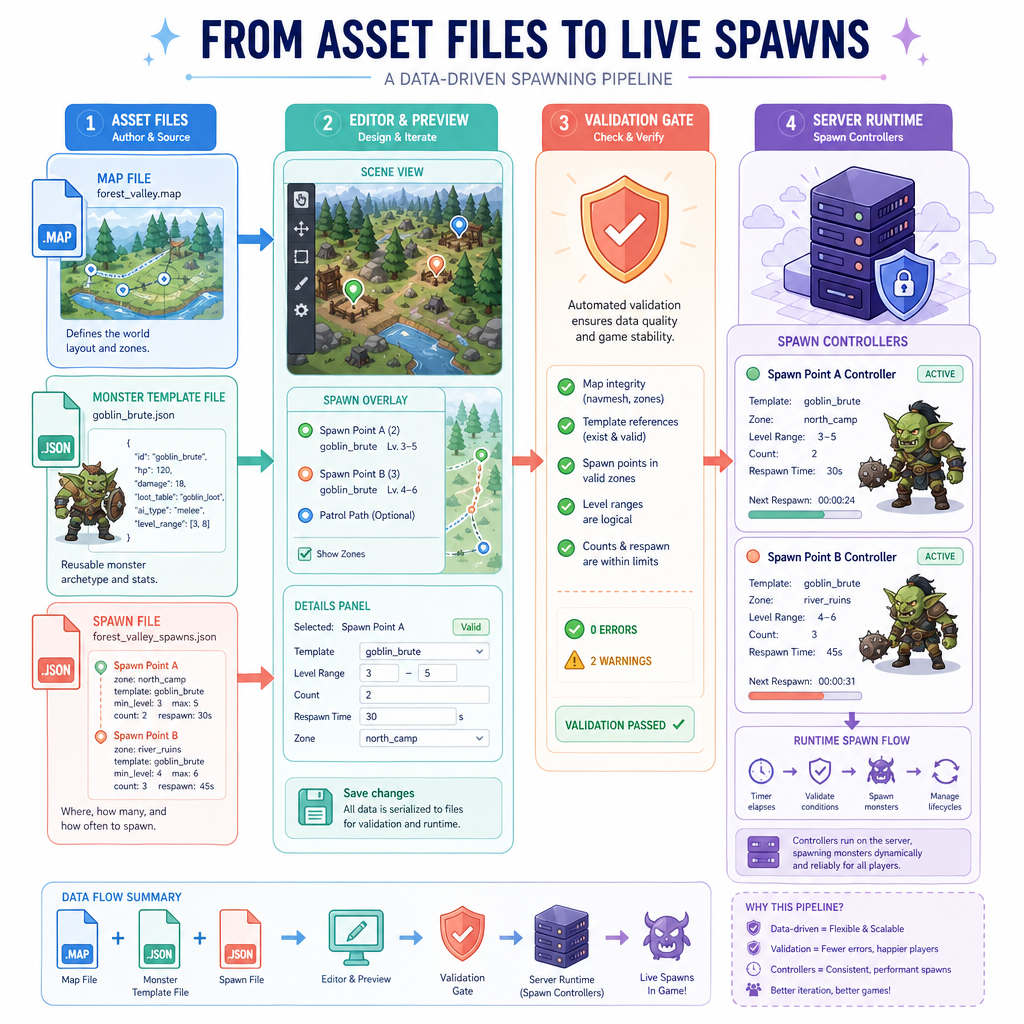
Your map editor already has a save pipeline. Monster spawns should join that pipeline cleanly, not become hidden state inside the client.
A simple content layout might look like:
assets/
  maps/
    forest.map
  monsters/
    monster_templates.json
  spawns/
    forest_spawns.json
At editor time:
Load map -> load templates -> load spawns -> edit -> validate -> save
At server boot or zone load:
Load map -> load spawn content -> validate again -> create spawn controllers
The second validation matters. Editor validation improves workflow, but the server must still reject broken or tampered content.
In Lesson 9, we will look at keeping this kind of project structure comfortable across platforms without changing the editor design.
Editor Responsibility Check
Which responsibility is the best fit for the monster editor, rather than the live game server?