Normalizing Page Text for Spellchecking
Read at your own pace. Code execution, quizzes, progress tracking, and the AI tutor are available in the interactive view with JavaScript enabled.
Why Normalize Text
Now that we've covered Building a Webpage Spellchecker, our Django app can send text to LanguageTool and get spelling feedback.
But raw webpage text is messy.
A page is not just paragraphs. It can include:
- navigation labels
- cookie banners
- JavaScript snippets
- CSS text
- repeated footer links
- weird whitespace
- hidden content
- product names and URLs
If we send all of that directly into a spellchecker, we get noisy results. A startup engineer cares about this because noisy reports reduce user trust.
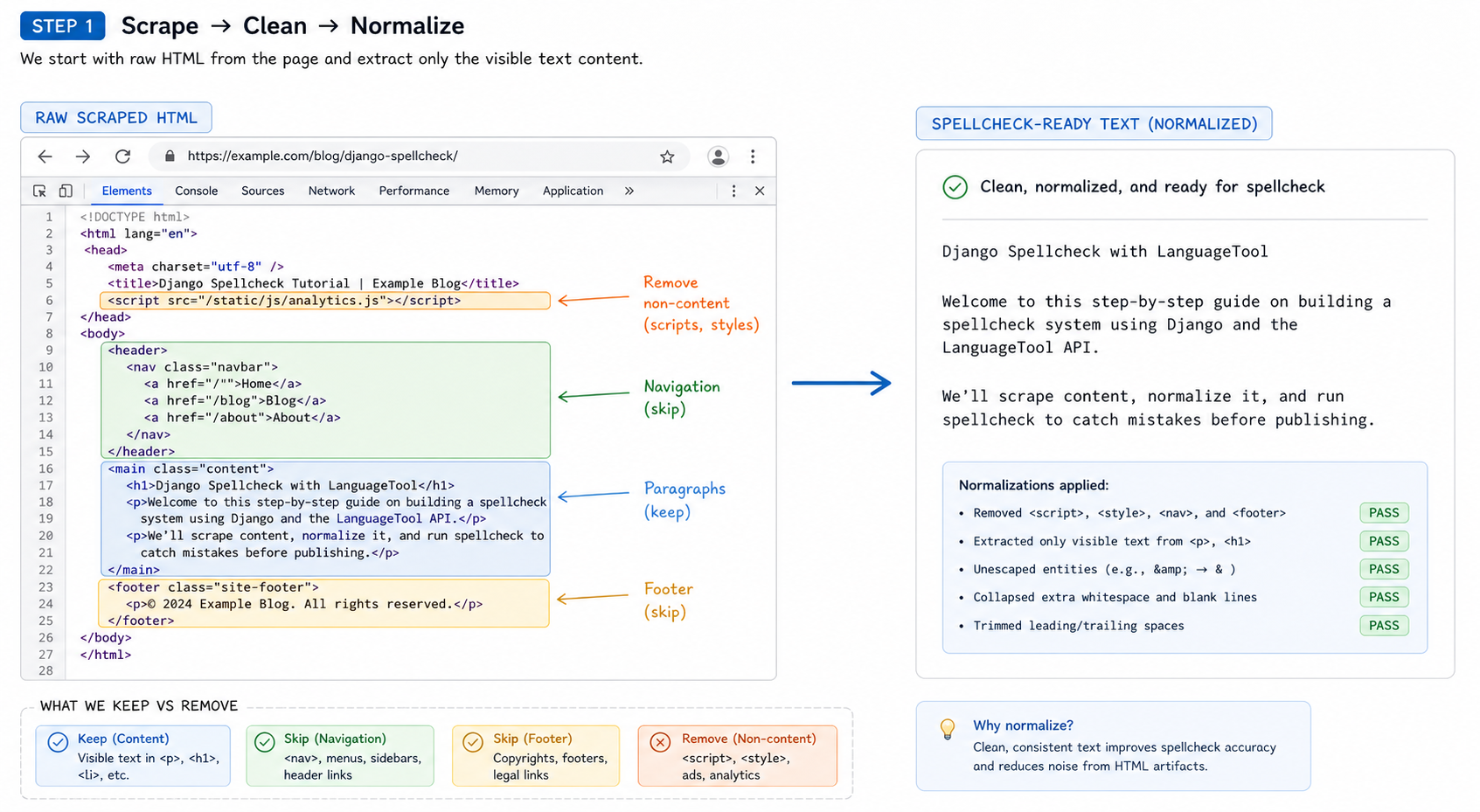
In this lesson, we'll build the normalization layer between the scraper and the spellchecker:
scraped HTML
   ↓
extract visible text
   ↓
clean spacing and entities
   ↓
preserve useful context
   ↓
spellcheck-ready text
In the next lesson, we'll turn these normalized results into a user-facing audit report UI.
CONTINUE WITH ALGODAILY PREMIUM
Keep going with the complete tutorial.
Unlock the remaining explanations and exercises, alongside the full learning library.
Explore Premium →