Special Methods and Concepts in Object Oriented Programming
Read at your own pace. Code execution, quizzes, progress tracking, and the AI tutor are available in the interactive view with JavaScript enabled.
Special Methods in Object-Oriented Programming
Special Methods in Object-Oriented Programming
Now you know the bare bones of Object-Oriented Programming. But, as I said in the previous lesson, there is still much more you have to discover. In today's lesson, we will go through a number of special functions that almost all OOP-supported programming languages have for convenience.

Keep in mind that these functions are utility functions and are not essential for OOP programming languages, meaning that you can do the same things with or without these functions. However, you'll save a tremendous amount of effort and lines of code if you know these functions. So let's begin. We will be improving our previous example based on Shapes with the new knowledge we will learn in this lesson.
Let's recap what we learned previously and see the final implementation of all the Shape classes.
// Shape.java
public class Shape {
    protected int maxWidth;
    protected int maxHeight;

    // Getters and Setters
    public int getMaxWidth() { return maxWidth; }
    public int getMaxHeight() { return maxHeight; }
    public void setMaxWidth(int maxWidth) { this.maxWidth = maxWidth; }
    public void setMaxHeight(int maxHeight) { this.maxHeight = maxHeight; }
    public int getMaxArea() { return maxWidth*maxHeight; }

    public double getArea() {
        return getMaxArea();
    }
}

// Circle.java
public class Circle extends Shape {
    protected int radius;

    // Getters and Setters
    public int getRadius() { return radius; }
    public void setRadius(int radius) { this.radius = radius; }

    @Override
    public double getArea() {
        return 3.14*radius*radius;
    }
}


// Rectangle.java
public class Rectangle extends Shape {
    protected int height;
    protected int width;

    // Getters and Setters
    public int getHeight() { return height; }
    public int getWidth() { return width; }
    public void setWidth(int width) { this.width = width; }
    public void setHeight(int height) { this.height = height; }

    @Override
    public double getArea() {
        return (double)height*width;
    }
}

// Main.java
public class Main {
    public static void main(String[] args) {
        // Your code here
    }
}
Constructors
Constructors

Programmers can't imagine OOP without constructor and destructor functions. Constructor is a special function that helps you instantiate an object of a class. Whenever you instantiate an object, a default constructor method is called.
Let's say we want to create a Rectangle object with a specific width and height (5x6). You would probably do it like below:
// Main.java
public class Main {
    public static void main(String[] args) {
        Rectangle rect = new Rectangle();
        rect.setHeight(5);
        rect.setHeight(6);
    }
}
Now, let's see what is actually happening behind the scenes.
Create all the attributes in memory with default values (0 for `height` and `width`).
Create a class reference in memory that has all the attributes.
Call 2 setter functions to reassign the attributes.
We can see that the attributes are first set to the default (0) when creating the instances. They are then overwritten with setter methods. Imagine you have a class with 10 attributes and you need to set all the attributes to create a usable object. In that case, you would need to call 10 setters which will increase the size of the code and make the code harder to read. This is where a constructor can help. Constructor is a function that is called during instantiation to initialize the attributes of the new object along with any other things you need to do.
Here is the same code to create a 5x6 rectangle but with only 1 line of constructor call.
// Main.java
public class Main {
    public static void main(String[] args) {
        Rectangle rect = new Rectangle(5,6);
    }
}
Of course, we also need to define this constructor method which takes 2 values when creating from the class:
// Rectangle.java
public class Rectangle extends Shape {
    protected int height;
    protected int width;

    // Default Constructor
    public Rectangle() {   }

    // User specified constructor
    public Rectangle(int height, int width) {
        this.height = height;
        this.width = width;
    }

    // Rest of the methods and Attributes
}
Constructors are very special because they have syntax which differs from typical methods in some languages. Constructors do not return a value (not even null). You may notice that they don't even have a return type (not even void).
Constructors are really powerful for several reasons. Suppose each object needs to dynamically create an array of variable size in it as an attribute. The best way to allocate the memory for that array in the heap would be through constructors. Or if you want to instantiate other objects inside that class, you need to do that inside the constructor.
// A random class
public class MyClass {
    protected MyAnotherClass myProperty;
    protected int[] myArray;

    public MyClass(int propValue, int arraySize) {
        myProperty = new MyAnotherClass(propValue);
        myArray = new int[arraySize];
    }
}
There are various constructors depending on their use cases. Let's look at some of them in more detail.
Default Constructor
Default Constructor
Whenever you instantiate an object, you are calling a method (notice the double parentheses after new ClassName). This method is the default constructor. Default constructors do not take any parameters and do not need to be explicitly defined by the user. However, you can override the default constructor if you want. For example, if we want a rectangle to be 1x1 initially, then we will need to override the default constructor.
// Rectangle.java
public class Rectangle extends Shape {
    protected int height;
    protected int width;

    // Overriding default constructor
    public Rectangle() {
        this.height = 1;
        this.width = 1;
    }

    // Custom Constructor
    public Rectangle(int height, int width) {
        this.height = height;
        this.width = width;
    }

    // Rest of the methods and Attributes
}
Copy Constructor
Copy Constructor
Copy constructors are called when you want to create a new object from another object that is the same type. In a constructor, you would pass another previously created object with the same type. For example, if we want to create a new rectangle from an old rectangle, we write the copy constructor.
// Rectangle.java
public class Rectangle extends Shape {
    protected int height;
    protected int width;

    // Overriding default constructor
    public Rectangle() {
        this.height = 1;
        this.width = 1;
    }

    // Copy constructor
    public Rectangle(Rectangle other) {
        this.height = other.getHeight();
        this.width = other.getWidth();
    }

    // Custom Constructor
    public Rectangle(int height, int width) {
        this.height = height;
        this.width = width;
    }


    // Rest of the methods and Attributes
}
quiz 1
Which of these constructors is NOT provided by default for the below class?
public class A {
    public int aInt;
}
Shallow Copy vs Deep Copy
Shallow Copy vs Deep Copy
If you know the basics of pointers, then you may have heard of the shallow copy and deep copy. All classes have a default copy constructor which is a shallow copy constructor.

Shallow copying is copying by reference (as opposed to copying by value). You will not notice any difference if your class has only primitive types (int, float, double, etc.). They will be copied by value in shallow copy as well. Suppose, however, you have an array as an attribute in the class. If you copy the object using the default copy constructor, then only the reference (or pointer) of the array will be copied. As a result, if you change a value at an index in the first object, then the value in the second object's array at that index will also be changed. See the code below for an example of a shallow copy.
// Shallow Copy
// MyClass.java
public class MyClass {
    protected int[] value;

    // default constructor
    public MyClass() {
        value = {1,2,3,4,5}
    }

    // No Copy constructor, so the default will be used
}

// Main.java
public class Main {
    // Instantiating
    MyClass myObj1 = new MyClass();
    // Copying, will be using default constructor
    MyClass myObj2 = new MyClass(myObj1);

    myObj1.value[2] = 10;

    // This will print: 1 2 10 4 5
    for(int i=0; i<myObj1.value.length; i++) {
        System.out.println(myObj1.value[i]);
    }

    // But this will also print: 1 2 10 4 5
    for(int i=0; i<myObj2.value.length; i++) {
        System.out.println(myObj2.value[i]);
    }
}
Now, to define a deep copy constructor, we need to create a separate array and then copy each element to the new array. See the code below:
// Deep Copy
// MyClass.java
public class MyClass {
    // For the sake of this example, we make it public to avoid excess getters
    public int[] value;

    // default constructor
    public MyClass() {
        value = {1,2,3,4,5};
    }

    // Copy constructor (Deep Copy)
    public MyClass(MyClass other) {
        this.value = new int[5];
        for(int i = 0; i<5; i++) {
            this.value[i] = other.value[i];
        }
    }
}

// Main.java
public class Main {
    // Instantiating
    MyClass myObj1 = new MyClass();
    // Copying, will be using default constructor
    MyClass myObj2 = new MyClass(myObj1);

    myObj1.value[2] = 10;

    // This will print: 1 2 10 4 5
    for(int i=0; i<myObj1.value.length; i++) {
        System.out.println(myObj1.value[i]);
    }

    // This will now print unchanged: 1 2 3 4 5
    for(int i=0; i<myObj2.value.length; i++) {
        System.out.println(myObj2.value[i]);
    }
}
quiz 2
Which of the following classes needs a copy constructor for deep-copy implementation?
class A {
    int x;
}
class B {
    int x;
    float y;
}
class C {
    String x;
}
class D {
    Integer x;
}
Destructors
Destructors
Destructors are the exact opposite of constructor methods. They are automatically called when an object goes out of scope or when you forcefully delete an object.
It is difficult for a programmer to forcefully delete an object using a language with a garbage collector. Since Java is a garbage-collected language, you cannot predict when (or even if) an object will be destroyed. Hence, there is no direct equivalent of a destructor in Java.
According to a popular question on stackoverflow.
There is an inherited method called finalize, but this is called entirely at the discretion of the garbage collector. So for classes that need to explicitly tidy up, the convention is to define a close method and use finalize only for sanity checking (i.e. if close has not been called do it now and log an error).
The reason for this is that all Java objects are heap-allocated and garbage collected. Without explicit deallocation (i.e. C++'s delete operator), there is no sensible way to implement real destructors. You will have a chance to peek at an example of an OOP language with a destructor in C++. See the code below for the previously implemented MyClass class:
class MyClass {
public:
    int* array;

    // default constructor
    MyClass() {
        this->value = new int[5];
        for(int i = 1; i <= 5; i++) {
            this->value[i] = i;
        }
    }

    // Destructor
    ~MyClass() {
        delete [] this->array;
    }
}
Closing Resources
Closing Resources
In Java, destructors are not used for normal cleanup because the garbage collector decides when memory is reclaimed. However, some objects hold resources that should be released immediately, such as files, sockets, database connections, or streams.
For these cases, Java code usually defines a close() method. A common way to formalize this is by implementing the AutoCloseable interface. Then the object can be used inside a try-with-resources block, and Java will call close() automatically when the block ends.
So the Java-style replacement for a destructor is usually not "wait for the object to die". It is:
Open resource.
Use resource.
Close resource explicitly when done.
Here is a small example.
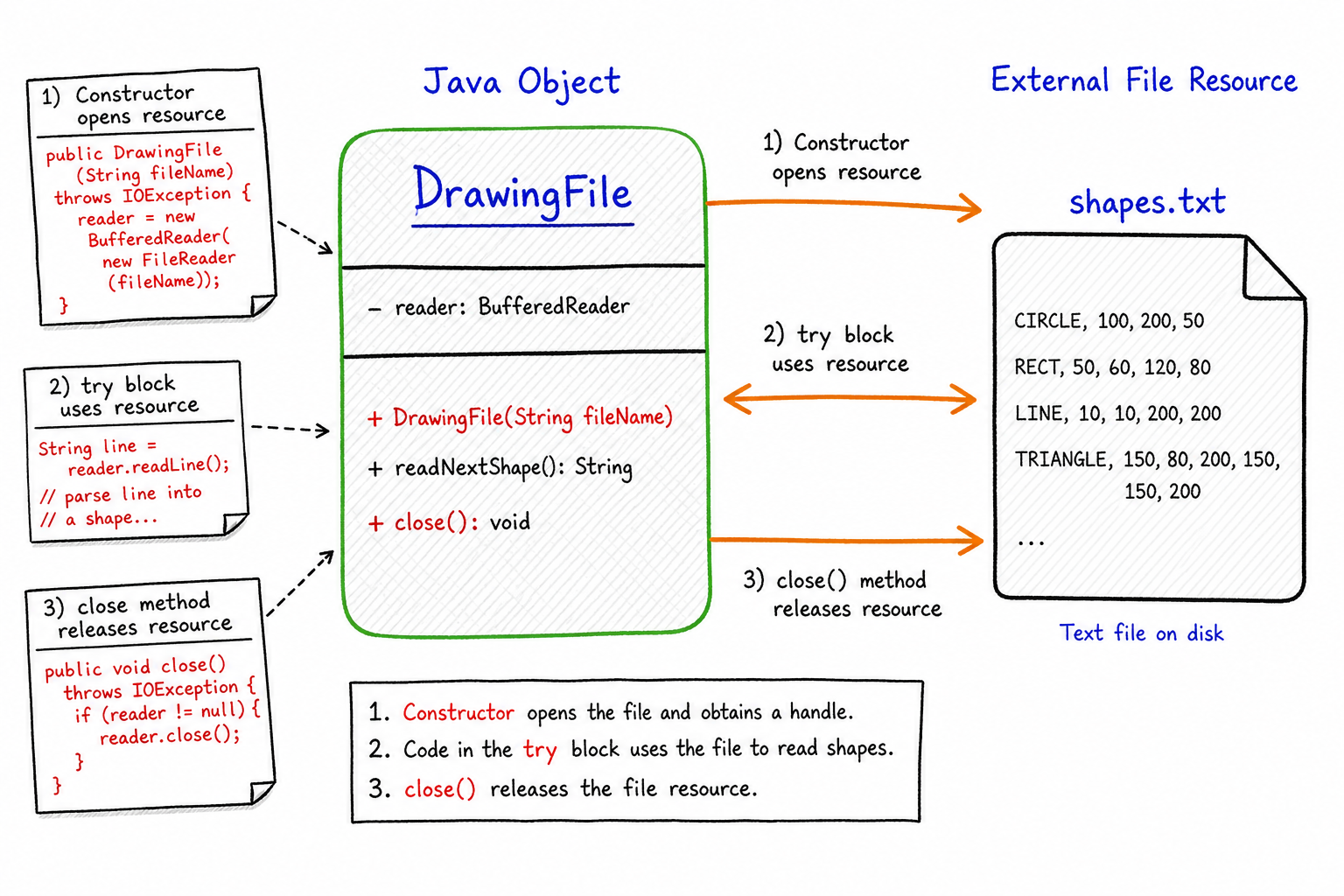
```java
// DrawingFile.java
public class DrawingFile implements AutoCloseable {
    private String fileName;

    public DrawingFile(String fileName) {
        this.fileName = fileName;
        System.out.println("Opening " + fileName);
    }

    public void draw(Rectangle rect) {
        System.out.println("Drawing rectangle to " + fileName);
    }

    @Override
    public void close() {
        System.out.println("Closing " + fileName);
    }
}

// Main.java
public class Main {
    public static void main(String[] args) {
        try (DrawingFile file = new DrawingFile("shapes.txt")) {
            Rectangle rect = new Rectangle(5, 6);
            file.draw(rect);
        }
        // close() is called automatically here
    }
}
```
quiz 2b
In Java, what is the best way to clean up a file, socket, or database connection when you are done using it?
Getter and Setter Functions
Getter and Setter Functions
We have already covered this a little in our previous lesson. In this lesson, we will be explaining the usage of getter and setter functions in more detail.

Suppose that you are using the Shape class and all its subclasses to create a very large drawing project with many other collaborators. Many developers will be importing your drawables package (suppose this contains all your classes) and instantiating many objects. Among them, one person mistakenly puts this line of code somewhere in their large file.
Rectangle rect = new Rectangle(5,6);
// Do some stuff
rect.height = -1
// Try to do something like draw the rectangle on the screen
Later in his own implementations, he finds very weird bugs that should not be there. He is not even opening the file where he put the above line. Imagine the horrific nights he and others might have just because your class does not have any way to validate its attributes.
Somehow, you should check if the assigned value to the property is valid or not. The best way is to validate a value is to raise an Exception when a user attempts to set an invalid value. However, we will be covering exceptions in our next lesson. For now, we will just print to the console that the user is attempting to set an invalid value. Unfortunately, we cannot validate the value if it is directly assigned to the attribute which is why we need setter methods. When you use a setter, you can make sure that you are getting the correct value for the correct attribute.
There are other reasons you should use setter methods. For example, you should use setter methods if you always want to convert the given value to something else before assigning it to a variable or if you want to do some database/internet operations while setting attributes.
// Rectangle.java
public class Rectangle extends Shape {
    // Make these attributes protected/private so others will not use it outside
    protected int height;
    protected int width;

    // getters and setters will always be public
    // getters
    public int getWidth() { return width; }
    public int getHeight() { return height; }

    // setters
    public void setWidth(int width) {
        if(width <= 0) {
            System.out.println("Invalid width for Rectangle");
            return;
        }
        this.width = width;
    }
    public void setHeight(int height) {
        if(height <= 0) {
            System.out.println("Invalid height for Rectangle");
            return;
        }
        this.height = height;
    }
    // Other methods and attributes
}
quiz 3
What should the proper java-beans convention-wise getter function name be for the property algodailyIsTheBest?
Static Methods
Class Methods/Static Methods
Suppose you need a value that will always be the same (but not fixed) for all objects of that class. If you had to do it with the knowledge you gathered on OOP till now, you might try to keep track of all the objects in an array and keep a property constant for all the objects when one object changes the value.
However, this approach is very tedious and not efficient at all. Most of the OOP-supported languages will give you the convenience of a static keyword. A static property or method is "static" to all the objects. Only one unit of memory will be allocated for a class so that it can be accessed from the class and all of its instances. All the objects of that class will be sharing this single value.
There are a lot of usages for static attributes and methods of a class. For example, we can keep a count of the number of instances created from that class by maintaining a static count attribute. This cannot be done with a normal attribute since it would be reset when a new object is created, plus all instances would have their own value for each attribute (which is not desired).
// ObjectCounter.java
public class ObjectCounter {
    private static int count = 0;

    // Note: we cannot access static attributes with this keyword
    public ObjectCounter() { count++; }

    // all methods using static attribute or method will need to be static
    public static int getCount() {
        return count;
    }

    public void finalize() { count--; }
}

// Main.java
public class Main {
    public static void main(String[] args) {
        // Static attributes/methods can be accessed from the class
        System.out.println(ObjectCounter.getCount()); // 0

        ObjectCounter obj = new ObjectCounter();
        ObjectCounter obj2 = new ObjectCounter();
        ObjectCounter obj3 = new ObjectCounter();

        System.out.println(ObjectCounter.getCount()); // 3

        // This is the way to cleanly delete an object before scope in java
        obj.finalize(); obj = null;
        obj2.finalize(); obj2 = null;

        System.out.println(ObjectCounter.getCount()); // 2
    }
}
quiz 4
When should you consider a method of a class static?
Equality Comparison function
Equality Comparison function
Suppose you want to compare two types of the Shape class. Since Shapes are custom classes, the compiler does not know how to compare two objects with different properties or which property to take into account. First, we need to decide what we need to compare in order to determine the equality of two Shape objects.
Let's assert that we declare two shapes equal whenever their areas are equal. We can do this by overriding the default equals method.
public class Shape {
    protected int maxWidth;
    protected int maxHeight;

    public double getArea() {
        return getMaxArea();
    }

    @Override
    public boolean equals(Object obj) {
        if (obj == null)
            return false;
        if (obj == this)
            return true;
        System.out.println("Comparing");
        return this.getArea() == ((Shape) obj).getArea();
    }
    // Other attributes and Methods
}
Class-Wide vs Object Logic
Before moving on, separate the two ideas you just saw:
-
staticlogic belongs to the class as a whole. Every instance sees the same shared value or behavior. -
equalslogic belongs to a comparison between objects. You decide which fields or derived values make two instances "the same."
In interviews, this distinction matters: use static for shared counters/utilities, and override equals when the default object identity check is not the equality rule your design needs.

Static vs Instance Logic
Before moving on, separate two ideas that often get mixed together:
-
staticbelongs to the class itself: one shared value or behavior, like a singleObjectCounter.count. -
equalsbelongs to the object comparison rule: it tells Java what “same” means for your custom type.
In the visual, notice where the data lives and who answers the question: the class answers shared-state questions, while each object participates in equality checks.

Stringify Function
Stringify Function
If you want to print your custom class to the console or make it a string to send to another object for some purpose, you'll most likely use a built-in class function named toString() in Java. Currently, the default toString() method returns the name of the class along with its package name as well as the hash code in hex format of the class calculated with another built-in method hashCode(). So if you were to print an object of type Rectangle, you would get something like this "shapes.Rectangle@abcdefgh" as output.
If you want to print something different, then - like other methods - you can override the toString() method and return whatever you want to print. For our example, we will print the name of the Rectangle with its package name and its area inside parentheses. All the built-in classes (Integer, Double, BigInteger, etc.) have overridden the toString() method to return a more informative string (the value instead of Class name and hash code).
package shapes;

// Rectangle.java
public class Rectangle extends Shape {
    protected int height;
    protected int width;

    @Override
    public double getArea() {
        return (double)height*width;
    }

    @Override
    public String toString() {
        return "shapes.Rectangle(area=" + this.getArea() + ")";
    }
}

// Main.java
public class Main {
    public static void main(String[] args) {
        Rectangle rect = new Rectangle();
        rect.setHeight(5); rect.setWidth(4);
        System.out.println(rect); // shapes.Rectangle(20)
    }
}
Conclusion
Conclusion
All of the above functions are very important to understand in order to get a good grasp of OOP. In the next lesson, instead of looking at implementations, we will go through some advanced concepts of OOP. After the next lesson, you will understand the full potential of OOP.
One Pager Cheat Sheet
One Pager Cheat Sheet
- Object-Oriented Programming (OOP) provides special functions to help save time and effort when coding, such as
gettersandsettersforclasses, as demonstrated in the example ofShapeand its subclasses. - Constructors are special-purpose methods used to set initial values and perform initialization tasks during object instantiation.
- A default constructor is a
method(instantiated withnew ClassName()) that initiates an object, which can be overridden by the user if desired. - The Copy Constructor is used to create a new object from an existing object of the same type by passing the existing object as an argument.
- A user-defined constructor takes one
intargument and assigns it to the data memberaIntin the classA. **Shallow copy** copies by reference and copies the **pointer** of an array, while **deep copy** copies the data by making a *new array* for it.- A custom copy constructor for deep copy needs to be implemented for classes A, B and D in order to copy the primitive wrapper type and non-primitive type objects by value instead of by reference.
- Java objects are heap-allocated and automatically garbage collected, so there is no direct equivalent of a destructor as found in languages such as C++, where explicit deallocation is used via the
deleteoperator. -
Usinggetter and setterfunctions ensures that values assigned to object attributes are valid and can help prevent errors from occurring when working in collaboration with other developers. - The correct getter function name for the
algodailyIsTheBestproperty according to the JavaBeans convention isgetAlgodailyIsTheBest. - Static attributes and methods provide a convenient way to share values among all instances of a class, and can be used to keep track of the number of objects created from that class.
- A
static methodcan be accessed from the class directly and can beuseful for situationswhere all the objects of the class need to sharestate, such as keeping acountof all objects created of the same class. - We can compare different
Shapeobjects by overriding the defaultequalsmethod to determine equality based on their areas. - - Static answers "what is shared by the class?";
equalsanswers "when are two objects considered the same?" - - Static members are class-level;
equalsdefines object-level comparison semantics. - Overriding the
toString()method allows you to return a more informative string than the default output of the class name and hash code. - After completing the next lesson, you will have a full understanding of the
Object-Oriented Programmingcapabilities.