Stripe Checkout for Subscriptions
Read at your own pace. Code execution, quizzes, progress tracking, and the AI tutor are available in the interactive view with JavaScript enabled.
Paid SaaS Step
Now that we've covered Custom Dictionaries and False Positives, our website checker feels more like a real product: users can run audits, review issues, and teach the app which terms are acceptable.
The next startup-engineer step is billing.
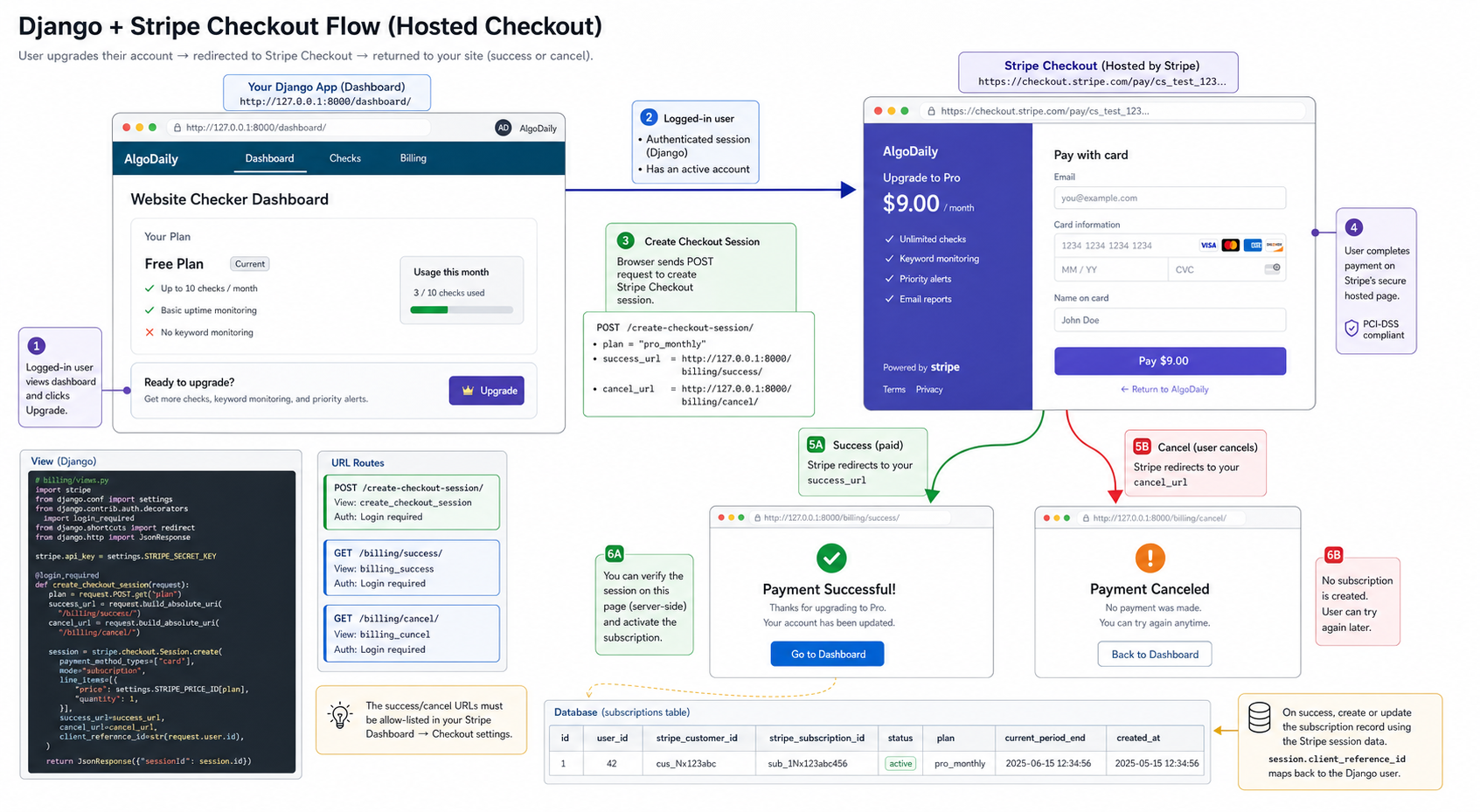
In this lesson, we'll add Stripe Checkout for subscriptions to the existing Django project. The goal is not to build a full accounting system. The goal is to create a safe path from:
logged-in user
   ↓
clicks Upgrade
   ↓
Stripe-hosted Checkout
   ↓
returns to Django success/cancel page
   ↓
app records subscription state
Stripe Checkout matters because it lets us avoid handling raw card details in our Django app. Stripe hosts the payment page, handles the sensitive payment form, and sends us billing events.
By the end, your app will have the basic paid-SaaS skeleton. In the next lesson, Plan Limits and Usage Quotas, we'll use that billing state to control product behavior.
CONTINUE WITH ALGODAILY PREMIUM
Keep going with the complete tutorial.
Unlock the remaining explanations and exercises, alongside the full learning library.
Explore Premium →