Building the Audit Report UI
Read at your own pace. Code execution, quizzes, progress tracking, and the AI tutor are available in the interactive view with JavaScript enabled.
Why Reports Matter
Now that we've covered Normalizing Page Text for Spellchecking, our app can turn messy scraped HTML into cleaner text chunks with useful context.
That is the backend half of the feature.
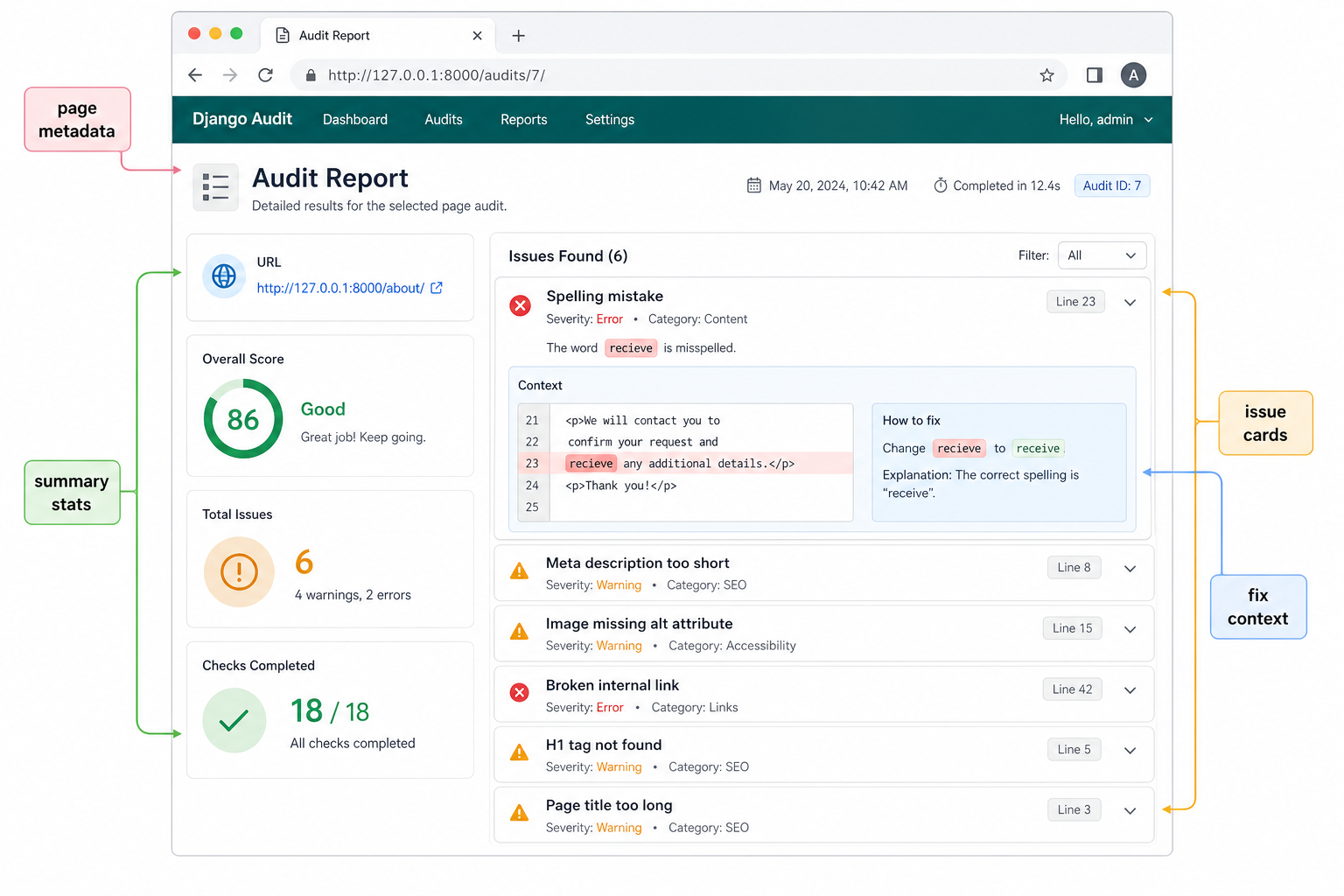
Now we need the product half: a user-facing audit report.
A useful report should answer three questions quickly:
What page was checked?
   ↓
How many issues were found?
   ↓
Where should I fix them?
This is where the spellchecker starts feeling like a SaaS feature instead of a script. The user should not need to read terminal output, raw JSON, or Django admin rows. They should see a focused page that helps them take action.
In this lesson, we'll build the shape of that report UI in Django: route, view context, template sections, issue cards, and empty states.
CONTINUE WITH ALGODAILY PREMIUM
Keep going with the complete tutorial.
Unlock the remaining explanations and exercises, alongside the full learning library.
Explore Premium →