Custom Dictionaries and False Positives
Read at your own pace. Code execution, quizzes, progress tracking, and the AI tutor are available in the interactive view with JavaScript enabled.
Why False Positives Matter
Now that we've covered Building the Audit Report UI, users can see spelling issues in a focused report.
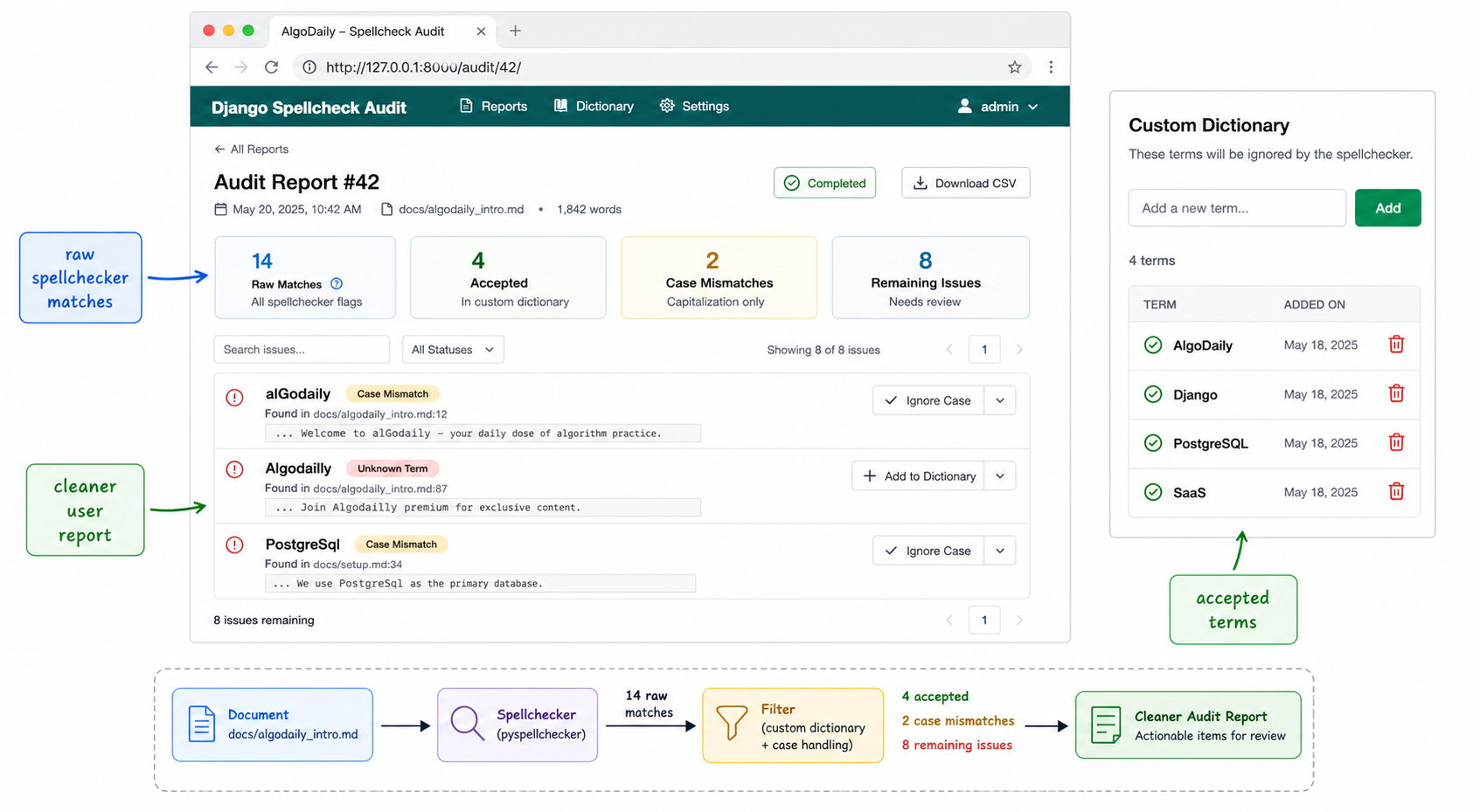
But a spellchecker report has one product problem: not every flagged word is actually wrong.
A startup landing page might contain words like:
AlgoDailyDjangoPostgreSQLwebhooksSaaS- a customer name, brand name, or product feature name
If the report keeps yelling about valid business terms, users stop trusting it.
In this lesson, we'll add the product layer that makes the spellchecker feel smarter: custom dictionaries and false-positive handling.
The flow becomes:
scrape page
   ↓
normalize visible text
   ↓
run spellchecker
   ↓
remove accepted custom terms
   ↓
show useful report issues
This is the last polish step in the Spellcheck Product Feature section before the course moves toward paid SaaS launch work.
CONTINUE WITH ALGODAILY PREMIUM
Keep going with the complete tutorial.
Unlock the remaining explanations and exercises, alongside the full learning library.
Explore Premium →