Shared Layouts and Template Partials
Read at your own pace. Code execution, quizzes, progress tracking, and the AI tutor are available in the interactive view with JavaScript enabled.
Why Layouts Matter
In Custom Views and Templates, we moved from plain text responses to real Django templates.
Now we need to make those templates maintainable.
If every page has its own full HTML document, navbar, footer, and stylesheet links, then one tiny design change becomes a copy-paste hunt. That is not how a startup engineer wants to work.
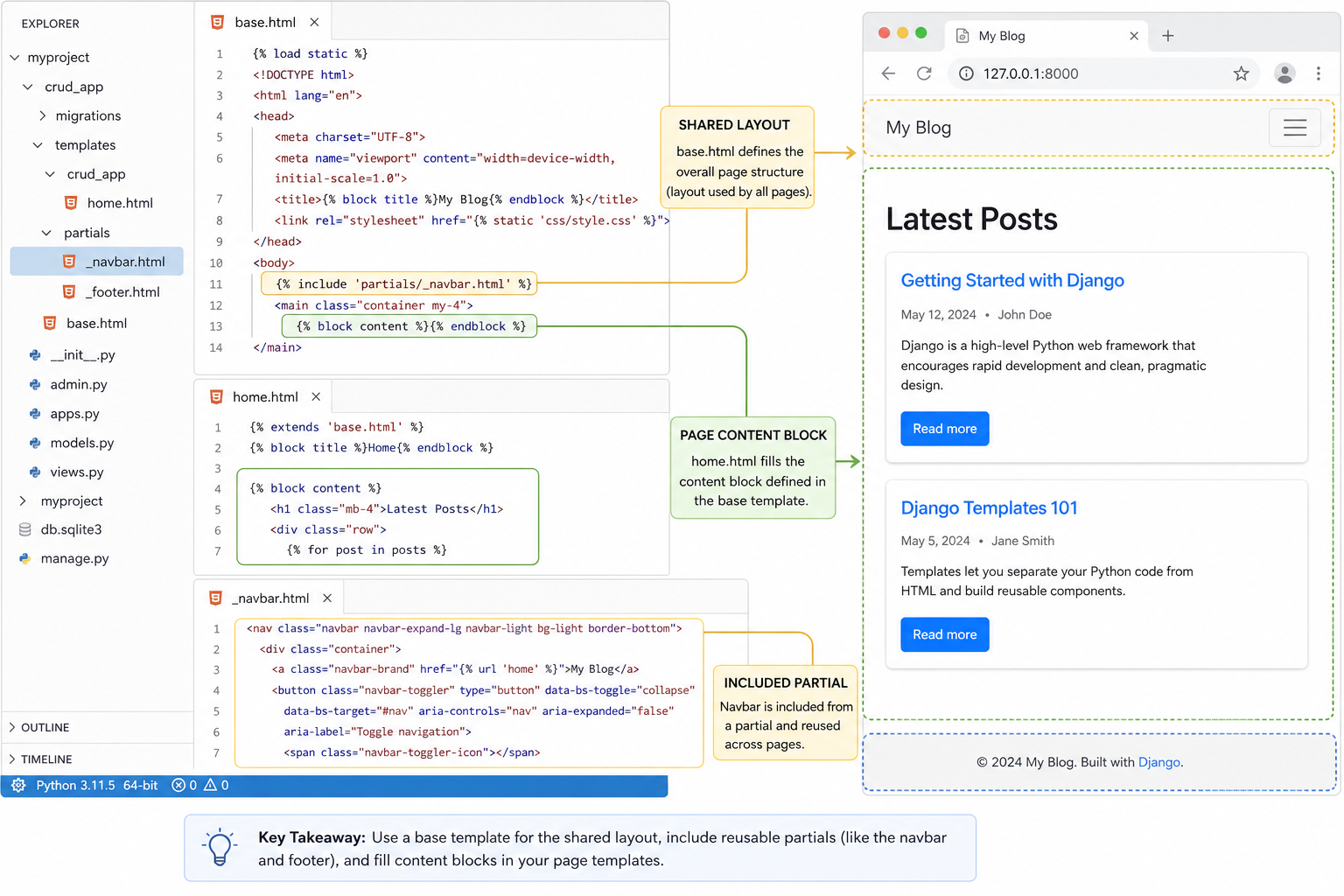
In this lesson, we'll organize the user-facing CRUD interface with:
- one shared
base.htmllayout - page-specific template blocks
- small reusable template partials
- a quick debugging checklist for template loading errors
We are not pulling database records yet. That comes next in Working With the Database. Here, we are preparing the UI structure that those records will render into.
CONTINUE WITH ALGODAILY PREMIUM
Keep going with the complete tutorial.
Unlock the remaining explanations and exercises, alongside the full learning library.
Explore Premium →