Javascript Interview Questions: Syntax and Features
Read at your own pace. Code execution, quizzes, progress tracking, and the AI tutor are available in the interactive view with JavaScript enabled.
Why Javascript?
We know that in today's age, everybody is on the internet. If you're reading this, you've made it onto the world wide web, and are running the wonderful language of Javascript.
Created in 1995, Javascript's evolution until now couldn't have been predicted. Brendan Eich had sought out to spice up static webpages, never expecting giant powerhouses like Google and Facebook to use the language in such potent ways.
Not only are billion dollar businesses being built on Javascript, but the versatile language has also produced some of the most popular frameworks out there:
- React.js
- jQuery
- d3.js
- Ember
- Angular
- Next.js
- Babel
This guide will take you through some common Javascript interview questions testing your knowledge on syntax and JS features. Press Next to start!
0True or False?
In JavaScript, the conversion between two different built-in types is deemed coercion.
Info Screen
Coercion comes in two forms in the JS language: explicit and implicit.
Here's an example of explicit coercion:
```js
var a = "42";

var b = Number(a);

console.log(a);				// "42"
console.log(b);				// 42 -- the number!

// And here's an example of implicit coercion:

var a = "42";

var b = a * 1;	// "42" implicitly coerced to 42 here

console.log(a);				// "42"
console.log(b);				// 42 -- the number!
```
Multiple Choice
What is the typeof operator?
Info Screen
JavaScript provides a typeof operator that can examine a value and tell you what type it is:
```js
var a;
typeof a;				// "undefined"

a = "hello world";
typeof a;				// "string"

a = 42;
typeof a;				// "number"

a = true;
typeof a;				// "boolean"

a = null;
typeof a;				// "object" -- weird, bug

a = undefined;
typeof a;				// "undefined"

a = { b: "c" };
typeof a;				// "object"
```
True or False?
If you needed to compare two values, and you care that they are of the same type, you would use the === operator.
Info Screen
JavaScript has both strict and type-converting comparisons:
* Strict comparison (using 3 equal signs like ===) checks for value equality without allowing for coercion
* Abstract comparison (e.g. ==) checks for value equality with coercion allowed
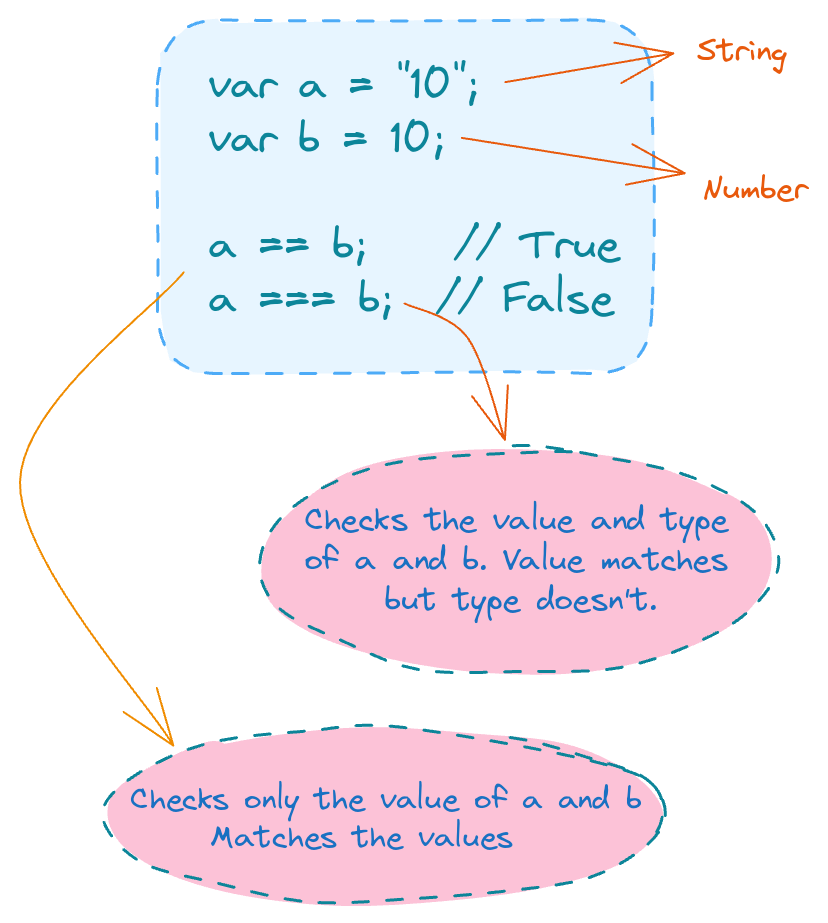
Here are some simple equality rules:
* If either value (aka side) in a comparison could be the true or false value, avoid == and use ===.
* If either value in a comparison could be of these specific values (0, `, or[]-- empty array), avoid==and use===.
* In all other cases, you're safe to use==`. Not only is it safe, but in many cases it simplifies your code in a way that improves readability.
```js
var a = "42";
var b = 42;

a == b;			// true
a === b;		// false
```
Multiple Choice
The term scope in JavaScript is defined as?
Info Screen
In JavaScript, each function gets its own scope. A function's scope is a collection of variables, as well as the accessibility of these variables inside and outside of the function. Only code lexically residing within the function's block can access that function's scoped variables.

A variable name has to be unique within the same scope. Additionally, a scope may also be nested inside another scope. If one scope is nested inside another, code inside the innermost scope can access variables from either scope.
In addition to letting you create declarations for variables at the function level, ES6 allows you declare variables that belong to individual blocks (pairs of { .. }), using the let keyword.
Source
Fill In
A ___________________ is a function that is passed to another function as an argument.
Info Screen
A callback is a function that is passed to another function as an argument. It is then executed after some operation has been completed. The following is an example of a simple callback function that logs to the console after some operations have been completed.
Source
https://coderbyte.com/algorithm/10-common-javascript-interview-questions
```js
function modifyArray(arr, callback) {
  // do something to arr here
  arr.push(100);
  // then execute the callback function that was passed
  callback();
}

var arr = [1, 2, 3, 4, 5];

modifyArray(arr, function() {
  console.log("array has been modified", arr);
});
```
True or False?
Strict Mode is a new feature in ECMAScript 5 that allows you to place a program, or a function, in a "strict" operating context. This strict context prevents certain actions from being taken and throws more exceptions.
// Non-strict code...

(function(){
  "use strict";

  // Define your library strictly...
})();

// Non-strict code...
Info Screen
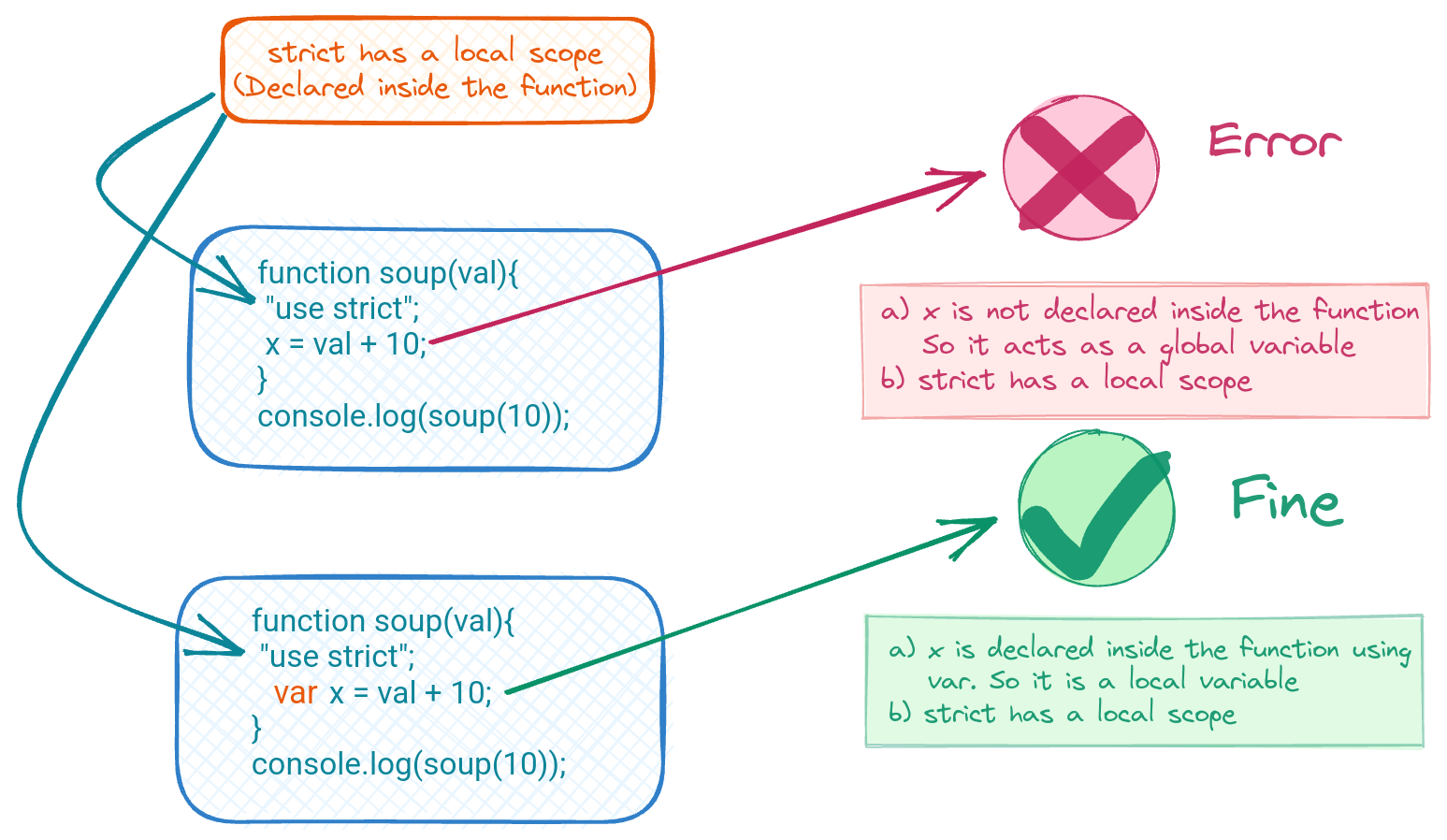
The use strict literal is entered at the top of a JavaScript program or at the top of a function. It helps you write safer JavaScript code by throwing an error if a global variable is created by mistake. For example, the following program will throw an error:
Source
```js
function doSomething(val) {
  "use strict";
  x = val + 10;
}

console.log(doSomething(10));

// It will throw an error because `x` was not defined and it is being set to
// some value in the global scope, which isn't allowed with `use strict`.
// The small change below fixes the error being thrown:

function doSomething(val) {
  "use strict";
  var x = val + 10;
  return x;
}

console.log(doSomething(10));
```
True or False?
A polyfill is a UI library in Javascript.
Info Screen
A polyfill is code (or a plugin) that would allow you to have some specific functionality only found in "modern" browsers. It allows that feature to also work in other browsers that do not have the support for that functionality built in.
* Polyfills are not part of the HTML5 standard
* Polyfilling is not limited to Javascript
Source
True or False?
null and undefined are identical aliases in JavaScript
Info Screen
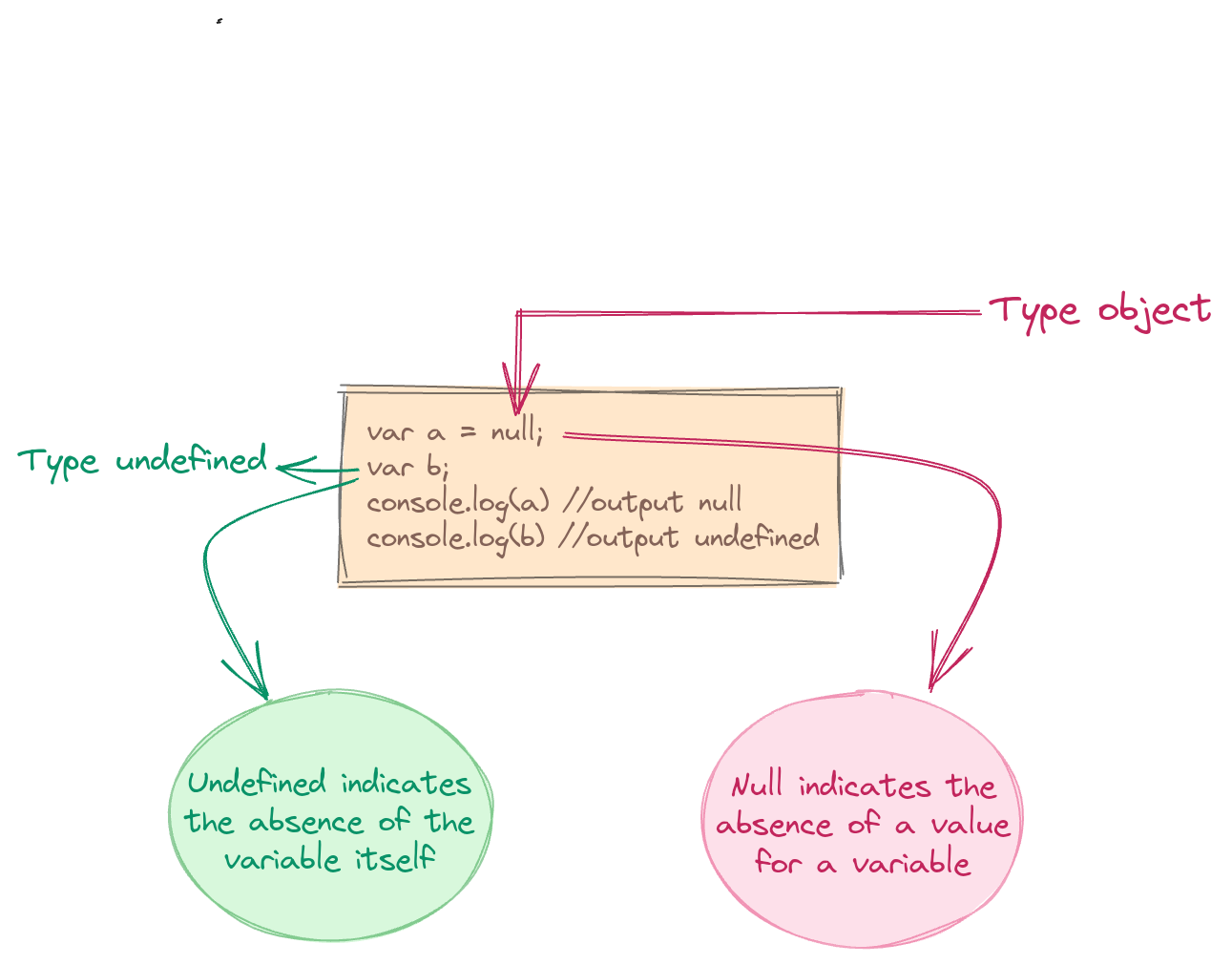
JavaScript (and by extension TypeScript) has two bottom types with no values: null and undefined. They are intended to mean different things:
- If something hasn't been initialized, it's
undefined. - If something is currently unavailable, it's
null.
Fill In
The follow code will output ___________.
(function() {
  var a = b = 5;
})();

console.log(b);
Info Screen
This code will output 5 despite seeming as if the variable was declared within a function and can't be accessed outside of it. This is because
var a = b = 5;
is interpreted the following way:
var a = b;
b = 5;
But b is not declared anywhere in the function with var so it is set equal to 5 in the global scope.
Source
```js
(function() {
  var a = b = 5;
})();

console.log(b);

```
Multiple Choice
The following code will output ___________.
var x = { foo : 1};
var output = (function() {
  delete x.foo;
  return x.foo;
})();

console.log(output);
Info Screen
This code will output undefined as output. The delete operator is used to delete a property from an object. Here, x is an object which has foo as a property. From the self-invoking function, we are deleting the foo property of object x. After deletion, we are trying to reference the deleted property foo, which results in undefined.
Source
```js
var x = { foo : 1};
var output = (function() {
  delete x.foo;
  return x.foo;
})();

console.log(output);
```
Fill In
The follow code will output ___________.
var output = (function(x) {
  delete x;
  return x;
})(1);

console.log(output);
Info Screen
The above code will output 1 as output. The delete operator is used to delete property from object. Here x is not an object it's a global variable of type number.
Source
Info Screen
The specific list of "falsy" values in JavaScript is as follows:
-
""(empty string) -
0,-0,NaN(invalid number) -
null,undefined false
Any value that's not on this "falsy" list is "truthy." Here are some examples of those:
"hello"42true-
[ ],[ 1, "2", 3 ](arrays) -
{ },{ a: 42 }(objects) -
function foo() { .. }(functions)
True or False?
Hoisting is the concept in which Javascript, by default, moves all declarations to the very bottom of the current scope for easy access.
Info Screen
Hoistingis the concept in which Javascript, by default, moves all declarations to the top of the current scope. As such, a variable can be used before it has been declared.
Note that Javascript only hoists declarations and not initializations.
Source
There are two types of hoisting: * variable hoisting - rare * function hoisting - more common

Wherever a var (or function declaration) appears inside a scope, that declaration is taken to belong to the entire scope and accessible everywhere throughout.
```js
var a = 2;
foo();	// works because `foo()`
        // declaration is "hoisted"

function foo() {
	a = 3;
	console.log( a );   // 3
	var a;              // declaration is "hoisted"
                            // to the top of `foo()`
}

console.log( a ); // 2
```
Fill In
The output of the following code is _______.
var output = (function(x) {
  delete x;
  return x;
})(0);

console.log(output);
Info Screen
This code will output 0 as output. delete operator is used to delete a property from an object. Here x is not an object it's local variable. delete operator doesn't affect local variables.
Source
```js
var output = (function(x) {
  delete x;
  return x;
})(0);

console.log(output);
```
One Pager Cheat Sheet
One Pager Cheat Sheet
- JavaScript's type coercion changes argument values to ensure that the correct types are used in expressions, both implicitly and explicitly.
- In JavaScript, explicit coercion occurs when a
value or expressionis explicitly converted to a different data type. - The
typeofoperator is used to determine the data type of a given value and return astringthat identifies itstype. - JavaScript provides a
typeofoperator that can examine a value and tell you its type. - Using
===allows you to compare two values and determine if they are equal and of the same type. - JavaScript has both strict and type-converting comparisons to check for value equality, with
strict comparisondisallowing coercion andabstract comparisonallowing it. - The scope in JavaScript determines the
visibilityandlifetimeof variables and functions, and defines how and where these variables can be accessed based on their context of declaration. - Variables in JavaScript are associated with a particular
scope, which determine their availability to code found lexically within a block and the ability to make their names unique among the same scope. - A
callbackis a flexible and modular programming pattern which increases code abstraction and maintains code maintainability. - A
callbackfunction is passed to another function as an argument and executed after some operation has been completed. - Strict Mode is a feature of ECMAScript 5 (ES5) that helps to prevent certain actions and make code more likely to throw exceptions when errors arise by using the
"use strict"statement. - The
use strictliteral helps to prevent errors by throwing an error if a global variable is created unintentionally. - No, a polyfill (also known as a
shim) is not a UI library in JavaScript; it is code thatreplicates the expected functionalityof modern browsers so that older browsers can also run a particular application or webpage. - Polyfills are pieces of code or plugins that enable modern functionality in browsers that have not implemented it natively, and it is not exclusive to
Javascript. - No
valueisintentionally absentwhennullis used, whileundefinedmeans thevariableisunassignedand hasnot been declared. - JavaScript and
TypeScripthave two bottom types,nullandundefined, which are intended to indicate different states of something either uninitialized or currently unavailable. - The code will output 5 because
bwas declared without thevarkeyword, making it globally available, whereasawas declared with thevarkeyword and was only available within the function. -
The code uses a variablebdeclared in **global scope** which allows it to output5even though it appears to be declared within a function. - The
propertyfooof theobjectxhas beendeleted, thereforex.foowill returnundefined. - The
deleteoperator is used todeletethefooproperty ofobject x, resulting inundefinedwhen attempting to reference it. - The
deleteoperator is used to delete a global variable of typenumber(in this case,x) from an object. - In JavaScript, any value that's not
null,undefined,"",0,-0,NaNorfalseis considered "truthy". - JavaScript's
hoistingbehavior allowsvariablesandfunctionsto be accessed before they are declared, though the actual values and logic within them remain in their original place. - Javascript moves all
declarationsto the top of the current scope, allowing a variable to be used before it has been declared, but only withvariable hoisting(less common) andfunction hoisting(more common). - The program outputs 0 because of the process of
function hoistingand the inability of thedeleteoperator to delete primitive values. - The
deleteoperator has no effect on local variables, so the output of this code will be0.