Databases and SQL Interview Questions Cheat Sheet
Read at your own pace. Code execution, quizzes, progress tracking, and the AI tutor are available in the interactive view with JavaScript enabled.
Introduction
On Databases
The scale of data on this planet (and beyond) is impossible to imagine. But ever wondered how this data is kept and processed? Well, the answer is obvious in our world of software-- it's databases.
A database is a system used to save and process data in an efficient manner. The way it stores information is usually in a well organized structure, and we can easily manipulate this data according to our requirements.

For example, let’s say we have some facts about a classroom. This information consists of things like student names, subject names, attendance, among other things. How are you going to organize these details?
If you're the school administrator, you'll probably use a spreadsheet, or some other tabular grid or table. You'd insert every student’s information in its own respective row and column. Databases work in the same way. We have tables in which we store our facts, and lean on several techniques to make the processing and utility of this information better.
0What is SQL
What is SQL?
On the other hand, SQL (Structured Query Language) is the actual language used to perform operations on databases. These operations include the act of inserting data, updating it, deleting it, and so on.
SQL is a global standard for relational databases. Relational databases are ones that contain co-related, associative data.
To perform any operation on a table, we write what's called a query and execute it. A query is a set of instructions written in SQL. Like any other language, SQL has its own syntax and keywords.
Using SQL is the most efficient way to process data in datastore. You don’t have to write lengthy code just to perform simple operations. It just takes a query. The basic queries like inserting, deleting, and updating take no more than a single line of code. Many consider SQL to be an intuitive language, and almost every database management system (DBMS) supports it.
With this basic understanding of databases and SQL, let's move on to interview questions based on these concepts.
```sql
-- THE BELOW IS SAMPLE SQL

create table RandomKeys (RandomKey int)
create table RandomKeysAttempt (RandomKey int)

-- generate m random keys between 1 and n
declare @cnt int = 0;
while @cnt < m
begin
  insert RandomKeysAttempt select rand()*n + 1
end;

-- eliminate duplicates
insert RandomKeys select distinct RandomKey from RandomKeysAttempt

-- as long as we don't have enough, keep generating new keys,
-- with luck (and m much less than n), this won't be necessary
declare @NextAttempt = rand()*n + 1;
while count(RandomKeys) < m
begin
  if not exists (select * from RandomKeys where RandomKey = NextAttempt)
begin
    insert RandomKeys select NextAttempt
end;
end;

-- get our random rows
select *
from RandomKeys r
join table t ON r.RandomKey = t.UniqueKey
```
Table Creation
How do you create a table in an existing database?
Which statement is used for the creation of a table?
Create Syntax
Create Example
To create a table in an existing database, the CREATE TABLE statement is used. You can create an entirely new table or a new table from an existing table using this statement. Let's have a look at its syntax first, and then we will implement it.
```sql
CREATE TABLE TableName(column1Name dataType,
                       column2Name dataType,
                       column3Name dataType,
                       columnNName dataType);
```
Create Example
Create Example
To generate a new table, we'll only need to pass the names of the columns and their data types. For example, if you wanted to store a concept like "names", then you'll likely use the data type varchar(255) (varchar stands for variable character fields, and the 255 refers to how 255 characters has historically often been the maximum length of these fields). Other options are available as well.
Let's create a new table called Class, which will store the information of students.
The attached query will generate the following table.
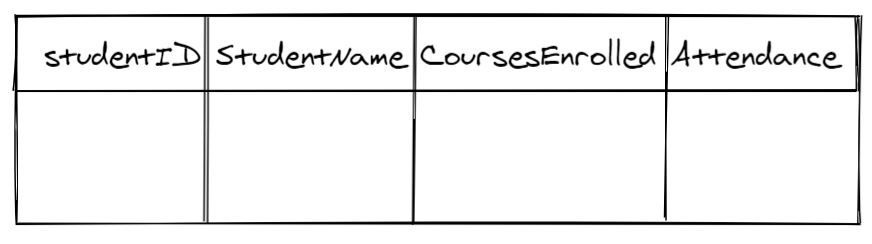
```sql
CREATE TABLE Class(StudentID int,
                   StudentName varchar(255),
                   CoursesEnrolled varchar(255),
                   Attendance int);
```
Structure Of A Table
DESC and DESCRIBE are alias statements, both used for describing a table or getting its column definitions.
DESCRIBE
DESCRIBE
You may infer from its namesake that DESCRIBE will be used to "describe" a table. But-- what does the term "describe a table" really mean?
Tables often contain data of different types. The DESCRIBE statement shows a column's name, type, and whether there are null values or not. The syntax is as follows:
DESCRIBE TableName;
Another way to accomplish this is:
DESC TableName;
Let's try to describe the table Class from before.
DESC Class;
The above line of code will generate the following output:
StudentID          int(11)              YES NULL
StudentName      varchar(255)           YES NULL
CoursesEnrolled  varchar(255)           YES NULL
Attendance       int(11)                YES NULL
0SELECT and FROM
The SELECT statement returns a result-set of the ______________ of a table.
SELECT Syntax
SELECT Syntax
The SELECT.. FROM statement part of SQL is an example of the language's intutiive nature. Similar to how we'd say in English speech that "I am selecting buttons from the buttons", the SQL version works in the same way.
Cool-- the SELECT statement is used to get columns from a given table. Let's take a look at its syntax.
```sql
SELECT column1Name, column2Name, ..., columnNName
FROM tableName
```
Extract All
Extract All
In the previous SQL code, the symbols column1Name, column2Name, and so on, are the names of the columns that you wish to extract from a given table. If you instead want to select the entire table, then instead of passing columns names, you can use an asterisk in a SELECT statement to represent all columns.
The attached statement will display all of a table's columns upon execution.
```sql
SELECT * FROM tableName;
```
Query Execution Order
Query Execution Order
One common SQL interview gotcha is that a query is not always processed in the same order that we write it.
We usually write a query starting with SELECT, but the database first needs to know which table the data is coming from. Then it filters rows, groups them if needed, and only later decides which columns to return.
A useful order to remember is:
Step Clause What it does 1FROM
Chooses the table or joined tables
2
WHERE
Filters individual rows
3
GROUP BY
Groups rows together
4
HAVING
Filters groups
5
SELECT
Chooses the output columns
6
ORDER BY
Sorts the final result
For example, if we only want students with attendance above 70, the database first reads from Class, then applies the WHERE filter, then returns the selected columns.

```sql
SELECT StudentName, Attendance
FROM Class
WHERE Attendance > 70
ORDER BY Attendance DESC;
```
Insert, Update, Delete
INSERT, UPDATE, and DELETE
The INSERT, UPDATE, and DELETE statements are used to manipulate the values stored within a table. Each statement has its own unique operation. Let's start with INSERT-- the INSERT statement is used to add values to a table. It has the following syntax:
INSERT INTO tableName (column1Name, column2Name, columnNName...)
VALUES (value1, value2, valueN...)
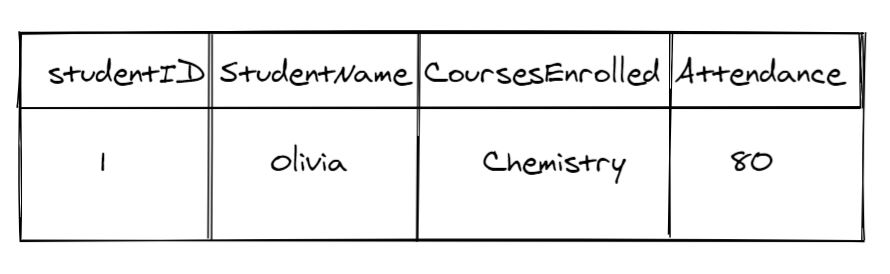
Let's insert a new record in the following table!
INSERT INTO Class (StudentID, StudentName, CoursesEnrolled, Attendance)
VALUES (1, 'Olivia', 'Chemistry', '80')
The above query will generate the following output.
0UPDATE DELETE
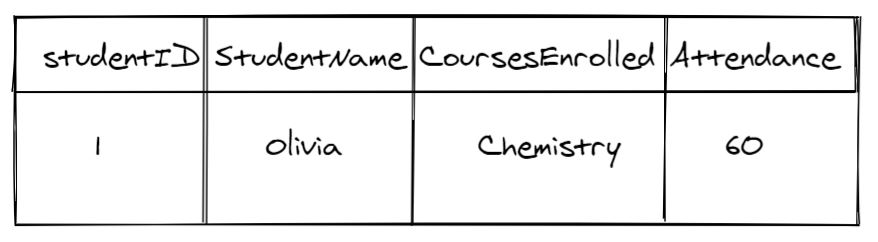
Let's say that we've made a mistake with the attendance of Olivia in the Chemistry course. We had originally thought she attended 80 courses but she actually went to 60.
What do we do now? Well, if you were the administrator working on a spreadsheet, you would remove 80 and write 60 instead. In other words, you would update the record. For this purpose, the UPDATE statement is used. We can use the following query:
UPDATE Class SET Attendance = 60 WHERE StudentName= 'Olivia';
The above query will generate the following table:
Now let's say Olivia has left the class entirely. We no longer need her attendance record. In this case, you'll have to delete her record. Let's use the DELETE statement to delete Olivia's row completely.
DELETE FROM Class WHERE StudentName= 'Olivia';
It will return the following table:
Note that you can also remove all records from a table using the query given below:
DELETE FROM Class;
0BETWEEN
The BETWEEN operator can be used without the WHERE clause.
Range with BETWEEN
Range with BETWEEN
Oftentimes, we'll want to be specific about the data we extract. For example, instead of getting an entire week's weather, you just want the weather on Wednesday.
This is possible using the WHERE clause. What if you wanted to know Wednesday's weather from 12:00 PM to 06:00 PM? In this case, you've successfully defined a range for your extracted data.
The BETWEEN operator is used to perform an operation for a specified range. The correct syntax to use this operator is attached. If you look at the query, you will notice that to apply the BETWEEN statement, we have applied the SELECT/ FROM and WHERE statements first.
Here, the statement is any condition or column name on which we want to define a range. To use the BETWEEN statement, the SELECT/ FROM and WHERE statements are mandatory.
```sql
SELECT columnName From tableName WHERE statement
BETWEEN value1 AND value2
```
Order of Operations
What's the order of execution of the following operators in the WHERE clause?
Operators
In SQL, there isn't really a predefined order of operations within the WHERE clause, but you can enforce an order using parentheses (()). The operator inside parentheses will always be applied first.
To filter data, we use the WHERE clause with the SELECT/ FROM statement. As a result, the data will be displayed only if the condition in the WHERE clause is True. For example, if you wanted to select students whose attendance count is greater than 80, you'd write the following query for this table.
```sql
SELECT StudentName FROM Class WHERE Attendance > 80
```
Logical Operators
Logical Operators
You can also use logical operators. For example, if you wanted to find students whose attendance count is greater than 80 in English, you can run this statement.
```sql
SELECT studentname
FROM   class
WHERE  attendance > 80
       AND coursesenrolled = 'English'
```
Having vs. Where
Both the HAVING and WHERE clauses perform filtering functions. The difference lies in how they perform the operation.
The WHERE clause performs its operation on single rows and cannot be used with the aggregate functions. On the other hand, the HAVING clause works on grouped data and that's why it's used with the aggregate functions.
For example, if we wanted to fetch the records having attendance > 80 using a WHERE clause, we could write this query.
```sql
SELECT studentname
FROM   class
WHERE  attendance > 80
```
With Having
But if we want to perform the same operation using the HAVING clause, we'd switch it up like this.
To use the HAVING clause, we first have to form a grouping, and then apply the condition.
```sql
SELECT studentname,
       Sum(attendance) AS TotalAttendance
FROM   class
GROUP  BY studentname
HAVING totalattendance > 80
```
Aggregate Functions
Aggregate functions return multiple values.
What Are Aggregate Functions?
What Are Aggregate Functions?
An aggregate function is a function that's applied on multiple values, and returns a single value after the calculation. In SQL, there are multiple aggregate functions. The most commonly used ones are:
- MIN()
- MAX()
- SUM()
- AVG()
- COUNT()
Each of these functions are applied on columns. Let's investigate the operation of each, one by one. All queries are written referring to the following table:
0MIN()
MIN()
The MIN() function is used to find the row with the minimum value of a column. For example, if you want to check the minimum attendance then you'd use the following query.
```sql
SELECT MIN(Attendance) FROM Class;
```
MAX()
MAX()
The MAX() function is used to find the maximum value of a column. For example, if you wanted to check the maximum attendance, then you'd use the following query.
```sql
SELECT MAX(Attendance) FROM Class;
```
SUM()
SUM()
The SUM() function is used to find the sum (the total amount resulting from the addition of two or more numbers) of values of a column. For example, if you want to find the sum of the attendance, you can do the following.
```sql
SELECT SUM(Attendance) FROM Class;
```
AVG()
AVG()
The AVG() function is used to find the mean, or average, value of a column. For example, if you want to find the average of the attendance, we can run this query.
```sql
SELECT MAX(Attendance) FROM Class;
```
COUNT()
COUNT()
The COUNT() function is used to find the number of rows of a column. In other words, it counts the total number of records. Note that by default, it does not ignore null values.
For example, if you want to check the number of student names, you can use the following query.
```sql
SELECT COUNT(StudentName) FROM Class;
```
On Joins
The JOIN clause combines multiple tables based on their mutual _________.
Joins Reference
A Reference On Joins
When writing SQL, a situation might occur where you have to combine the rows of multiple columns to execute your query. The JOIN clause is used in this case to join two or more tables based on a mutual column.
In order to join two tables, there must be a column in table1 which is also present in table2. Often this will be a primary key column on table1 that is found as a foreign key column on table2, or vice versa.
There are four types of joins:
- INNER JOIN
- RIGHT OUTER JOIN
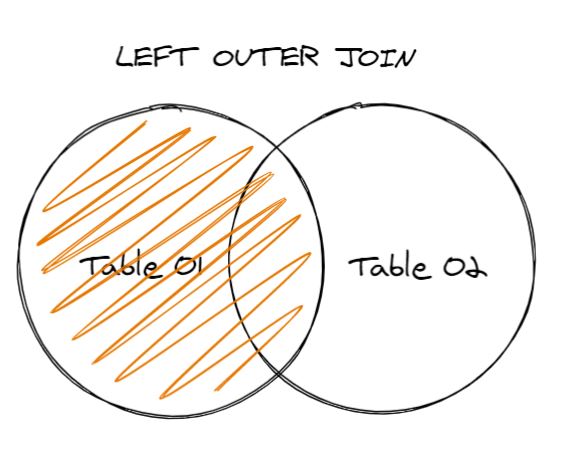
- LEFT OUTER JOIN
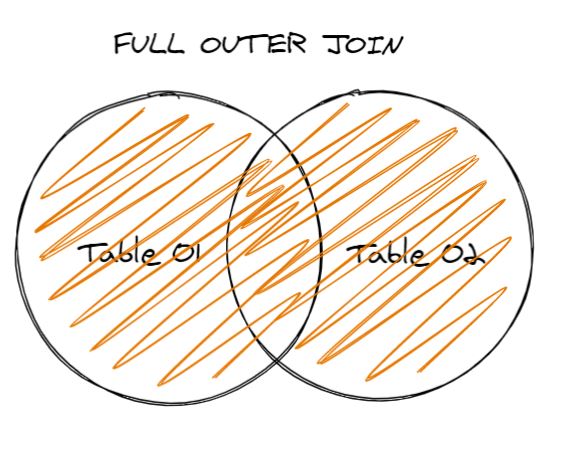
- FULL OUTER JOIN
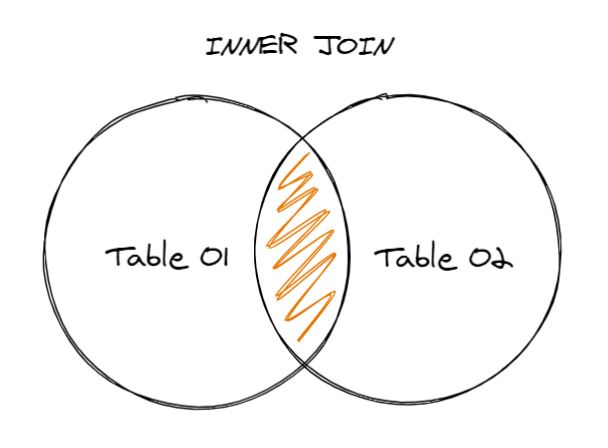
INNER JOIN
The INNER JOIN clause is used when we need the records which have the same value of the mutual column in both the tables.
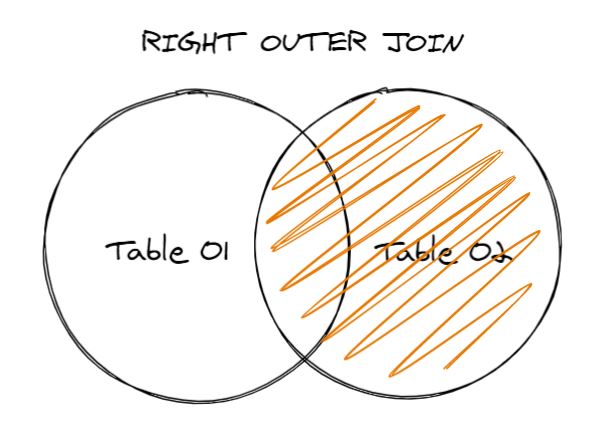
RIGHT OUTER JOIN
RIGHT OUTER JOIN is used when we wish to have all records from the "right" table, and just the records which have the same value of the mutual column from the left table.
LEFT OUTER JOIN
LEFT OUTER JOIN is used when we wish to have all records from the left table, and just the records which have the same value of the mutual column from the right table.
FULL OUTER JOIN
FULL OUTER JOIN is used when we wish to have all records from both the tables, whether the records have the same value of the mutual column or not.
0One Pager Cheat Sheet
One Pager Cheat Sheet
-
A database is
a systemused tosave and process datain an efficient manner, usuallystored in a tabularformat toinsertand manipulate information. -
SQLis a global standardstructured query language, which is used to perform operations onrelational databaseslike inserting, deleting, and updating, and is considered intuitive and easy-to-use. - The
SQLstatementCREATE TABLEis used to create a new table in a database, specifying a mandatory table_name and the optional columns with their datatypes. - Using the
CREATE TABLEstatement, we can create a new table or derive one from an existing table in an existing database. - We can
createa new table calledClasscontaining "studies" information by passingcolumn namesand their correspondingdata typesto a query. - SQL
DESCandDESCRIBEare alias statements used to list information about a table, such as key attributes and data types. -
DESCRIBEis a helpfulSQLstatement for seeing information about a table, such as column names, data types and null value presence. - The SELECT statement is used to query a table for specific data, returning a
result-setof its associated columns and properties. - The
SELECTstatement in SQL is an intuitive way toretrieve columnsfrom agiven table. - The statement
SELECT *will extractall columnsfrom a table. - SQL is written starting with
SELECT, but logically processed starting withFROM. -
INSERT,UPDATE, andDELETEare SQL statements used to manipulate values stored in atable. - To update or delete records from a table in a database, you can use
UPDATEorDELETESQL statements respectively. - The BETWEEN operator is used with the
WHEREclause to select values within a specified range and is not valid without it. - We can use the
BETWEENoperator to perform an operation on a specified range, by combining it with theSELECT/ FROMandWHEREstatements. - The order of operations in the WHERE clause is determined by the order of precedence which consists of relational operators (
>=,>,<=,<) followed by the OR operator, and finally the equality checks (=and!=). - The order of operations within the
WHEREclause can be enforced with parentheses (()) to selectively filter data using theSELECT/ FROMstatement. - You can
find studentswhose attendance count is greater than 80 in English by using logical operators. - The
WHEREclause works on individual records, while theHAVINGclause works ongrouped dataand allows us to useaggregate functions. - We
groupthe data and then use theHAVINGclause to apply the condition. - Aggregate functions, such as
AVG(), return a single value calculated from a set of input values. -
Aggregate functionsare used to compute and return a single value from multiple values in aSQLdatabase, such asMIN(),MAX(),SUM(),AVG(), andCOUNT(). - The
MIN()function is used tofind the row with the minimum valueof acolumnin a query. - The
MAX()functionis usedto find the maximum value of a column. - The
SUM()function can be used to find the total amount of values from a column. - The
AVG()function is used to calculate the mean value of a column. - The
COUNT()function is used to find the number of rows for a given column, not ignoringnullvalues by default. - The
JOINclause is used tojoindata from multiple tables based on their common columns, forming relationships and returning a single result set. - The JOIN clause is used in
SQLto combine two or more tables based on a mutual column, and can be executed with four types of joins:INNER,RIGHT OUTER,LEFT OUTER, andFULL OUTER.