Implement a Graph
Read at your own pace. Code execution, quizzes, progress tracking, and the AI tutor are available in the interactive view with JavaScript enabled.
Description
Since a graph is one of the more difficult data structures to conceptualize in a programmatic 2D manner, let's go ahead and implement it! We'll go with an adjacency list version. Note that there's also the adjacency matrix method which we will cover later.
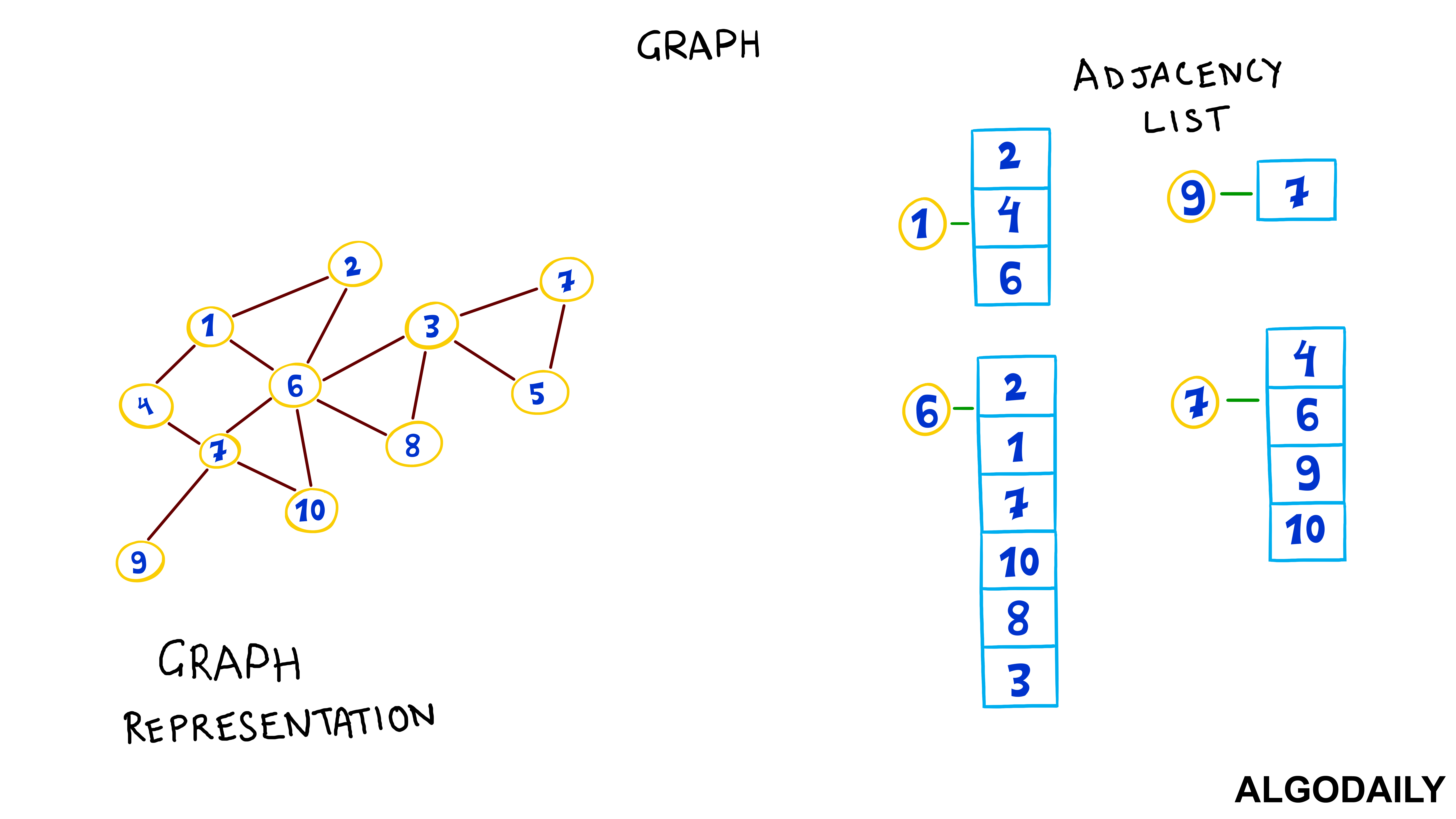
Recall that an adjacency list is a concept in graph theory, used to describe a representation of a graph via its nodes' adjacent (neighboring) nodes. You can think of it as each vertex maintaining a list of other vertices it's connected to. Using an unordered list data structure, each list is comprised of the node's neighbors.
Here's a skeleton of the implementation. Can you fill the rest in? What could be a good data structure to model this?
class Graph {
  constructor(verticesCount) {
    this.adjacencyList = {};
  }

  addVertex(nodeVal) {}

  addEdge(src, dest) {}

  removeVertex(nodeVal) {}

  removeEdge(src, dest) {}
}
Constraints
- Number of nodes in the graph <=
100000 - It's advised to use a
HashMapfor the adjacency list - Expected time complexity for all the utility functions is
O(1) - Expected space complexity is
O(n)
```js
class Graph {
	constructor() {}

	addVertex(nodeVal) {}

	addEdge(src, dest) {}

	removeVertex(val) {}

	removeEdge(src, dest) {}

	printNeighbors() {
		const result = [];

		for (let vertex of this.adjacencyList.keys()) {
			const neighbors = [];

			neighbors.push(`${vertex}:`);

			this.adjacencyList.get(vertex).forEach((neighbor) => {
				neighbors.push(neighbor);
			});

			result.push(neighbors.join(' '));
		}

		return result;
	}
}
```
Multiple Choice
Let's begin by choose the correct data structure for this problem. Which of the below would make the most sense to represent a list of neighbors for each node? Note that we'll want to prioritize quick lookups.
Step Three
Using a hash table, we're able to set each particular vertex as a hash key, and its value pairing to an array of adjacent vertices. We can use the default hash table data structure that comes with the language:
```js
class Graph {
  constructor() {
    this.adjacencyList = new Map();
    // we can iterate through keys with Map
    // and use objects and functions as keys
  }
```
Step Four
The next step is to have methods that add and remove nodes to the graph by editing the adjacency lists.
True or False?
The advantages to using a hash table to represent an adjacency list include 1) O(1) insert and delete complexity on average, 2) a vertex can be modeled by any hashable object, and 3) more space-efficiency for sparse graphs.
Step Six
To add a vertex, we can simply add a key to the hash table. The same with removal -- we'll just remove the key. However, with removal, there is the caveat that we also need to ensure that the node to be removed is also disregarded as a neighbor of other nodes.
In other words, if node A is a neighbor of B, and node A is to be removed, we should update B's adjacency list.
```js
addVertex(nodeVal) {
  this.adjacencyList.set(nodeVal, []);
  // set a key with the node value,
  // and an array to contain neighbors
}

removeVertex(val) {
  if (this.adjacencyList.get(val)) {
    this.adjacencyList.delete(val);
  }

  this.adjacencyList.forEach((vertex) => {
    const neighborIdx = vertex.indexOf(val);
    if (neighborIdx >= 0) {
      vertex.splice(neighborIdx, 1);
    }
  })
}
```
Fill In
Each adjacency list can be represented by an __________ for O(1) random access of adjacent nodes.
Step Eight
Finally, we need to be able to add and remove edges (or connections) between the various nodes. Assuming this is a undirected graph, we can simply add the two nodes to each others' adjacency lists to create an edge:
```js
addEdge(src, dest) {
  this.adjacencyList.get(src).push(dest);
  this.adjacencyList.get(dest).push(src);
  // push to both adjacency lists
}
```
Step Nine
Then, to remove an edge, let's do the inverse and splice them out of each others' lists.
```js
removeEdge(src, dest) {
  const srcDestIdx = this.adjacencyList.get(src).indexOf(dest);
  this.adjacencyList.get(src).splice(srcDestIdx, 1);

  const destSrcIdx = this.adjacencyList.get(dest).indexOf(src);
  this.adjacencyList.get(dest).splice(destSrcIdx, 1);
}
```
Step Ten
With those methods, we've built a simple graph class.
One Pager Cheat Sheet
One Pager Cheat Sheet
- We can effectively implement a graph data structure by using an
adjacency listin aHashMapto store connected nodes, with an expected time and space complexity ofO(1)andO(n), respectively. - A Hash Table is an efficient data structure used to quickly lookup key-value pairs in a
Graphclass. - We
can storea graph representations in ahash table, which maps each vertex to its adjacent vertices. - We can edit the adjacency lists to
addandremovenodes from thegraph. - Hash Tables provide an
O(1)time complexity for adding, deleting and referencing any data type in a graph, making them ideal for representing sparse graphs. - We can simply add or remove a key from a hash table to add or remove a vertex, but
removalrequires us to update the adjacency list of neighboring nodes. - An adjacency list allows for
O(1) random accessto a node's neighbors, allowing us to efficiently access and modify the graph with an array representation. - We can
create edgesbetween two nodes by simply adding them to each others' adjacency lists. - To
remove an edge, wesplicethem out of each others' lists. - We have successfully created a
graphclass usingvarious methods.