Calling Functions: Calling, Parameters, Returning
Read at your own pace. Code execution, quizzes, progress tracking, and the AI tutor are available in the interactive view with JavaScript enabled.
Introduction
For the Javascript version of this lesson, please click here.
In this lesson, we will learn about a fundamental concept in programming called functions. Functions provide a modular structure to the code. They perform a single action and provide a method to reuse a code block in different parts of the program. Functions are known by various terminologies in computer science. Methods, procedures, and subroutines are some of the common ones.
Functions
Functions
A function is a block of code in a programming language that encloses a set of statements. Once implemented, this block of code is reusable throughout the program. Functions make it easier to organize and reuse code.
A function generally follows the following structure in a program.

Let's discuss each of these components of functions in the next sections.
Types of Functions
Types of Functions
In programming languages, there are usually two types of functions; built-in functions and user-defined functions. Built-in functions are pre-defined by the programming language itself. We've already seen built-in functions in previous lessons such as print(). User-defined functions are functions that are defined by the user to dedicate a block of code to perform a specific task.
In this lesson, we will discuss how you can create and use your functions within your program.
Creating Functions
Creating Functions
Function declaration or creating functions is different in different programming languages. Usually, a function keyword is specified, followed by the function name, parenthesis (with function parameters, if any), and then comes the body of the function.
Now let's see how we can create functions in Python.
In Python, the def keyword is used as the function keyword. This is followed by the function name, parenthesis, and a colon. The body of the function is denoted by an indentation.
```java
public class HelloWorld {
    public static void main(String[] args) {
        javaFunc();
    }

    public static void javaFunc() {
        System.out.println("Hello World!");
    }
}
```
```javascript
function javascriptFunc() {
    console.log("Hello World!");
}
javascriptFunc();
```
```python
def python_func():
    print("Hello World!")
python_func()
```
```cpp
#include <iostream>

void cppFunc() {
    std::cout << "Hello World!" << std::endl;
}

int main() {
    cppFunc();
    return 0;
}
```
```csharp
class HelloWorld {
    static void Main(string[] args) {
        CsharpFunc();
    }

    static void CsharpFunc() {
        System.Console.WriteLine("Hello World!");
    }
}
```
```go
package main

import "fmt"

func main() {
    goFunc()
}

func goFunc() {
    fmt.Println("Hello World!")
}
```
Calling Functions
Calling Functions
In our last code example we created a function, but as you may have checked, it did not produce any output. Why? Because functions need to be invoked by a call to use them in a program. Calling a function means to specify the function name of the function that we want to use in the program. This executes all the statements present inside the function.
Consider the same example as before. Now we specify a statement which denotes the function name along with the parenthesis, after the function implementation. This statement invokes the call to the function. The code block below demonstrates this behavior.
```java
public class Main {
    public static void main(String[] args) {
        javaFunc();
    }

    public static void javaFunc() {
        System.out.println("Hello World!");
    }
}
```
```javascript
function javascriptFunc() {
    console.log("Hello World!");
}

javascriptFunc();
```
```python
def python_func():
    print("Hello World!")

python_func()
```
```cpp
#include <iostream>

void cppFunc() {
    std::cout << "Hello World!" << std::endl;
}

int main() {
    cppFunc();
    return 0;
}
```
```csharp
class Program {
    static void Main(string[] args) {
        CsharpFunc();
    }

    static void CsharpFunc() {
        System.Console.WriteLine("Hello World!");
    }
}
```
```go
package main

import "fmt"

func goFunc() {
    fmt.Println("Hello World!")
}

func main() {
    goFunc()
}
```
Function Call Timeline
A function definition is like saving a reusable instruction block. Nothing inside runs until the program reaches a call to that function.
In the visual, notice the difference between defining the function and calling it. The call is the moment execution jumps into the function body.

Define Then Call
A function has two separate moments:
- Definition: Python learns what the function should do.
- Call: Python actually runs the function body.
In the visual, notice that the function body stays inactive until the call line uses the function name plus parentheses: python_func().

True or False
We can call a function before implementing it.
Function Parameters
Function Parameters
Functions can take in external information in the form of variables or directly through function parameters. They are specified inside the parenthesis after the function name. Multiple parameters can be separated by commas.
Function parameters are given a variable name inside the parenthesis during function declaration. The desired values are passed when the function call is invoked. Below code block demonstrate some examples of specifying function parameters and calling functions with parameters.
def func1(name):
    print("Hello I am " + name)

def add(a, b, c):
    d = a + b + c
    print("Sum of a, b, and c is: " + str(d))

func1("Beth")
add(2, 3, 4)
void func1(String name) {
    System.out.println("Hello I am " + name);
}

void add(int a, int b, int c) {
    int d = a + b + c;
    System.out.println("Sum of a, b, and c is: " + d);
}

func1("Beth");
add(2, 3, 4);
function func1(name) {
    console.log("Hello I am " + name);
}

function add(a, b, c) {
    let d = a + b + c;
    console.log("Sum of a, b, and c is: " + d);
}

func1("Beth");
add(2, 3, 4);
void Func1(string name) {
    Console.WriteLine("Hello I am " + name);
}

void Add(int a, int b, int c) {
    int d = a + b + c;
    Console.WriteLine("Sum of a, b, and c is: " + d);
}

Func1("Beth");
Add(2, 3, 4);
func func1(name string) {
    fmt.Println("Hello I am " + name)
}

func add(a int, b int, c int) {
    d :=  a + b + c
    fmt.Println("Sum of a, b, and c is: ", d)
}

func1("Beth")
add(2, 3, 4)
void func1(std::string name) {
    std::cout << "Hello I am " << name << '\n';
}

void add(int a, int b, int c) {
    int d = a + b + c;
    std::cout << "Sum of a, b, and c is: " << d << '\n';
}

func1("Beth");
add(2, 3, 4);
Note: Here the variable
dis of typeint. We usestr(d)to convert the type of variabledfrominttostring, as string concatenation only works with two variables of typestring. Concatenation ofstringandint` would generate an error.
True or False
There is no limit to the number of parameters that we can specify for a function.
Returning Functions
Returning Functions
Functions stop executing at two points; when it finishes executing all statements in the function body or when it encounters a return statement. This return statement mostly also has a return value associated with it, which is returned to the caller.
The function add(a, b, c) in the following code block implements the sum of three numbers and returns the sum. This sum is then returned to the variable that calls the function, which is named as result here. Printing the value of result tells us the value of the sum computed by the function.
```py
def add(a, b, c):
    d = a + b + c
    return d

result = add(33, 12, 47)
print(result) # prints 92

```
```java
public static int add(int a, int b, int c) {
    int d = a + b + c;
    return d;
}

public static void main(String[] args) {
    int result = add(33, 12, 47);
    System.out.println(result); // prints 92
}
```
```javascript
function add(a, b, c) {
    var d = a + b + c;
    return d;
}

var result = add(33, 12, 47);
console.log(result); // prints 92
```
```cpp
#include<iostream>
using namespace std;

int add(int a, int b, int c) {
    int d = a + b + c;
    return d;
}

int main() {
    int result = add(33, 12, 47);
    cout << result; // prints 92
    return 0;
}
```
```csharp
class Program
{
    static int Add(int a, int b, int c)
    {
        int d = a + b + c;
        return d;
    }

    static void Main(string[] args)
    {
        int result = Add(33, 12, 47);
        Console.WriteLine(result); // prints 92
    }
}
```
```go
package main

import "fmt"

func add(a, b, c int) int {
    d := a + b + c
    return d
}

func main() {
    result := add(33, 12, 47)
    fmt.Println(result) // prints 92
}
```
Parameters In, Value Out
Parameters let a function receive values from the call. A return sends one computed value back to the caller.
Trace the arrows: the arguments fill the parameter names, the function does its work, and the returned value gets assigned to result.

Arguments Flow Back
Parameters and returns make a function feel like a small machine:
- The call sends in arguments.
- The function stores them as parameters.
- The
returnsends one value back to the caller.
Track where the value 92 is created, then where it lands.

Fill In
What will be printed by the variable result, in the following code block in Python?
```py
def div(a, b):
c = b/a
result = div(15, 5)
print(result)
java
public static double div(double a, double b) {
double c = b / a;
return c;
}
public static void main(String[] args) {
double result = div(15, 5);
System.out.println(result);
}
javascript
function div(a, b) {
let c = b / a;
return c;
}
let result = div(15, 5);
console.log(result);
cpp
include
double div(double a, double b) { double c = b / a; return c; }
int main() {
double result = div(15, 5);
std::cout << result << std::endl;
return 0;
}
csharp
public class Program
{
public static double Div(double a, double b)
{
double c = b / a;
return c;
}
static void Main()
{
    double result = Div(15.0, 5.0);
    System.Console.WriteLine(result);
}
}
go
package main
import "fmt"
func div(a float64, b float64) float64 { c := b / a return c }
func main() { result := div(15, 5) fmt.Println(result) } ```
Multiple Choice
What is the output for the following code? ```py def compare_num(a, b): if a > b: print("a is greater than b") return a elif a == b: print("a is equal to b") return a else: print("a is less than b") return b
result = compare_num(4, 2)
print(result)
java
public int compareNum(int a, int b) {
if (a > b) {
System.out.println("a is greater than b");
return a;
} else if (a == b) {
System.out.println("a is equal to b");
return a;
} else {
System.out.println("a is less than b");
return b;
}
}
int result = compareNum(4, 2);
System.out.println(result);
javascript
function compareNum(a, b) {
if (a > b) {
console.log("a is greater than b");
return a;
} else if (a === b) {
console.log("a is equal to b");
return a;
} else {
console.log("a is less than b");
return b;
}
}
let result = compareNum(4, 2);
console.log(result);
cpp
include
include
int compareNum(int a, int b) {
if (a > b) {
std::cout << "a is greater than b" << std::endl;
return a;
} else if (a == b) {
std::cout << "a is equal to b" << std::endl;
return a;
} else {
std::cout << "a is less than b" << std::endl;
return b;
}
}
int result = compareNum(4, 2);
std::cout << result;
csharp
public int CompareNum(int a, int b) {
if (a > b) {
Console.WriteLine("a is greater than b");
return a;
} else if (a == b) {
Console.WriteLine("a is equal to b");
return a;
} else {
Console.WriteLine("a is less than b");
return b;
}
}
int result = CompareNum(4, 2);
Console.WriteLine(result);
go
package main
import "fmt"
func compareNum(a int, b int) int {
if a > b {
fmt.Println("a is greater than b")
return a
} else if a == b {
fmt.Println("a is equal to b")
return a
} else {
fmt.Println("a is less than b")
return b
}
}
func main() {
result := compareNum(4, 2)
fmt.Println(result)
}
```
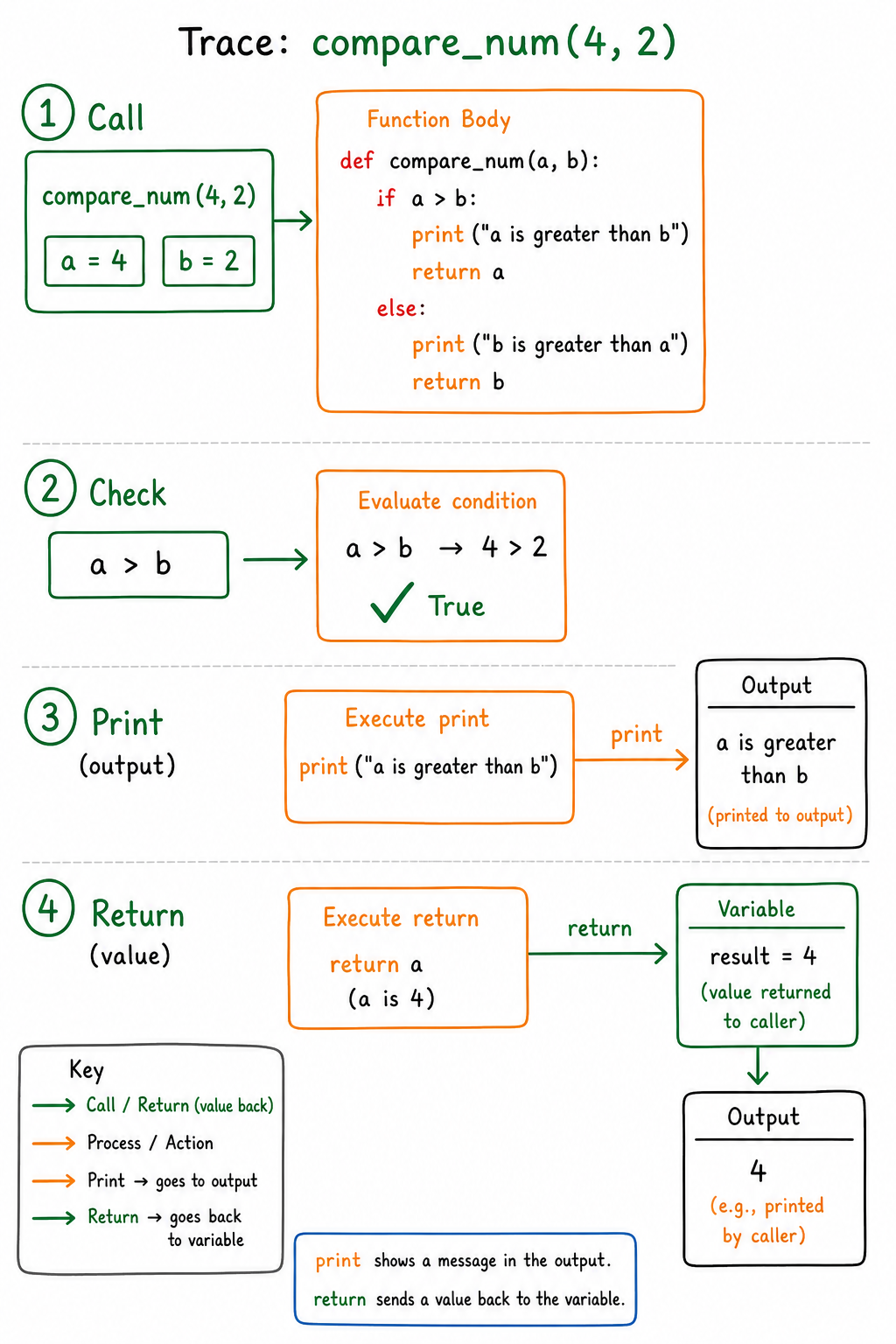
Trace Print And Return
When a function both prints and returns, two different things may happen: one message appears in the output, and one value travels back to the caller.
Use this trace to separate what the function displays from what the caller receives.
Print Versus Return
The last two questions hinge on one important distinction:
-
print()shows a value to the screen. -
returngives a value back to the caller.
If a Python function reaches the end without return, the caller receives None.

Summary
Summary
Functions are an extremely helpful technique to reuse and organize code. With specifying parameters and return statements, we can do more with functions that are just combining a set of statements, and even specify different values from the entirety of the program that we want to work upon. A common beginner's mistake is to forget to call the implemented functions when using them in code. Don't fall for it!
One Pager Cheat Sheet
One Pager Cheat Sheet
- We will learn about functions, their
parametersand working statements to create modular and reusable code blocks. - Functions
enclose a set of statementstomake it easier to organize and reuse code, following a specific structure. - We will learn to create and use our own user-defined functions in our program, as well as review existing built-in functions.
- Creating functions in Python requires a
defkeyword followed by the function name,parenthesis(withfunction parameters, if any), a colon, and an indentedbody. - We can make a function work in our program by
callingit with itsname, followed by parentheses( ). - - Defining a function stores its steps; calling it runs those steps.
- - Defining a function stores the instructions; calling it with
()executes them. - It is not possible to call a function before it has been defined and implemented with all its
statementsandparametersestablished. - Functions can take in external information through function parameters specified inside the parenthesis after the function name, which is then passed to the function call when invoked.
- There is no upper limit to the number of
function parametersthat can be specified, provided they are separated correctly and referenced correctly within the function. - A
returnstatement in a function can allow the function to pass back areturn valueto the variable that called it. - - Arguments flow into parameters;
returnflows a value back to the caller. - - Arguments go into parameters; a
returnvalue comes back and can be saved in a variable. - The variable
resultis set toNoneimplicitly returned by thediv()function, resulting inNonebeing printed when printing the value ofresult. - The variable
resultcontains4, the larger value returned by the functioncompare_num(), which comparesa(4) andb(2) and prints out "a is greater than b" whenais the greater value. - -
printdisplays a value;returngives a value back to the caller. - -
print()displays;returnpasses a value back. Noreturnin Python meansNone. - With
functions, we canreuse and organizecode more efficiently, avoiding the mistake of forgetting to call them.