Advanced OOP: Class Access, Modifiers, Overloading
Read at your own pace. Code execution, quizzes, progress tracking, and the AI tutor are available in the interactive view with JavaScript enabled.
Advance Practices in Object-Orientated Programming
In this lesson, we'll be covering Advance Practices in Object-Orientated Programming. After getting through all the fundamentals of OOP, this tutorial is going to be a bit more relaxing. We will discuss some advanced practices with this technique.
Keep in mind that these practices are essential when attempting to understand and use OOP. You can say that today's lesson will be "easy on your brain". Let's start!
Controlling Access to Members of a Class
Controlling Access to Members of a Class
The first rule of OOP is Abstraction. To make an abstract class, we need a methodology to maintain access to the members of a class. Many OOP-supported languages have special keywords for these methodologies called access level modifiers. Oracle has a very self-explanatory definition for these modifiers:
Access level modifiers determine whether other classes can use a particular field or invoke a particular method. There are two levels of access control:
- At the top-level—public or package-private (no explicit modifier).
- At the member level—public, private, protected, or package-private (no explicit modifier).

A class is defined by a starting optional modifier. Additionally, each attribute and method within that class will also need its own access modifier.
<access modifier> class [Name] {
    <access modifier> <static modifier> [Type] [property name];

    <access modifier> <static modifier> [Return Type] [method name] {
        // Implementation
        return [Return type R-value];
    }
}
class [Name] {
    [property name];  // No type in JS

    [method name]() {
        // Implementation
        return [Return type R-value];
    }
}
class [Name]:
    [property name]  # No type in Python

    def [method name](self):
        # Implementation
        return [Return type R-value]
class [Name] {
    [Type] [property name];

public:  // Access modifier example. C++ has public, private, protected
    [Return Type] [method name]() {
        // Implementation
        return [Return type R-value];
    }
};
type [Name] struct {
    [PropertyName] [Type]
}

func (receiver [Name]) [MethodName]() [ReturnType] {
    // Implementation
    return [Return type R-value]
}
What are these keywords? Let us go through them one by one.
Access Modifier Map
Access Modifier Map
Access modifiers are easier to remember if you ask two questions:
- Where is the code trying to access this member from?
- Is that code inside a subclass?
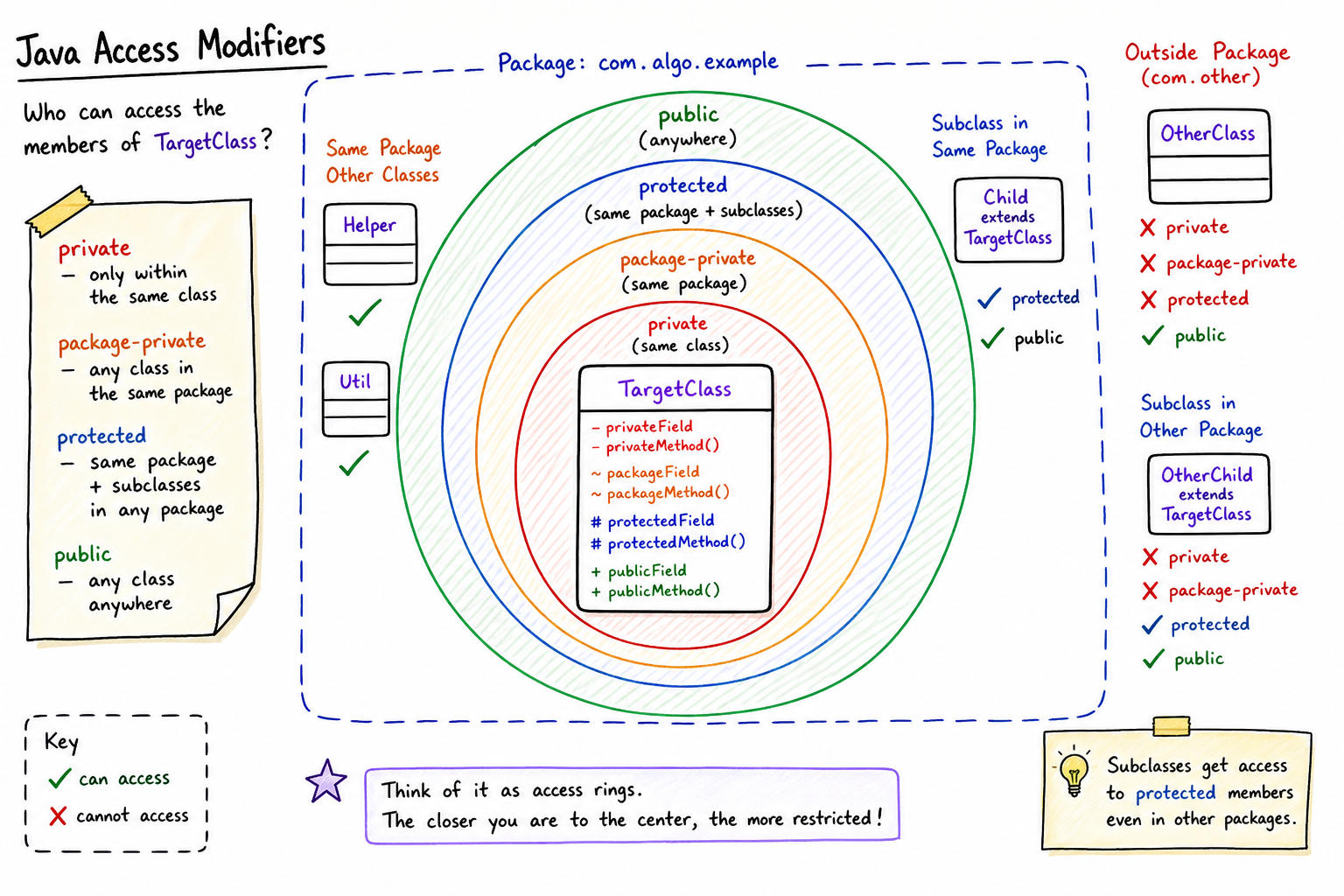
Here is the Java access map you should keep in your head:
Modifier Same class Same package Subclass in another package Anywherepublic
Yes
Yes
Yes
Yes
protected
Yes
Yes
Yes
No
package-private
Yes
Yes
No
No
private
Yes
No
No
No
Notice that package-private is not written with a keyword. If you leave off public, protected, and private, Java treats the member as package-private.
This is why Java projects usually place related classes in the same package: package-private access can expose useful implementation details to nearby classes without opening them to the entire program.
Public
Public
Public is the most open access modifier. If a variable/attribute has a public modifier, then any other object can easily access it via the . (dot) operator.
Below are major things you need to keep in mind when using the public keyword.
- There can only be one
publicclass in a single file in Java. - The file name should be the same as the class name.
- It is considered bad practice to make more public attributes and class methods than necessary.
Package Private
Package-Private
This is the most obscure access modifier and is only applicable to the Java programming language. Java likes to maintain all of its classes inside packages. There is no keyword reserved for this access modifier. Instead, if you do not use any keyword at all, then that class, method, or attribute will be package-private.
Any other class inside a package can access a package-private method or attribute inside the same package, but a class outside that package cannot see the variable without an access modifier.
Protected
Protected
This is the most common access modifier of the four. A class can only access a protected class method or attribute if it is a descendant of that class in the inheritance hierarchy. It is similar to private, which we will discuss in the next paragraph. No matter where the descendant class is (perhaps in another package), we can access a class's methods/attributes if we inherit from that class.
If you look at the Shape class hierarchy in the previous lesson, you'll now understand that Square can access all of the properties of the Rectangle and Shape class because it is a descendant of both the Rectangle and Shape class. It cannot, however, access any protected method/attribute of the Circle class because it is not inherited from that class.
Encapsulation Check
Suppose we are designing a BankAccount class.
Which field declaration is usually the safest starting point for the account balance?
Private
Private
Any method, property, or constructor with the private keyword is accessible only from the same class. This is the most restrictive access modifier and is essential to the concept of encapsulation. All data is hidden from the outside world.
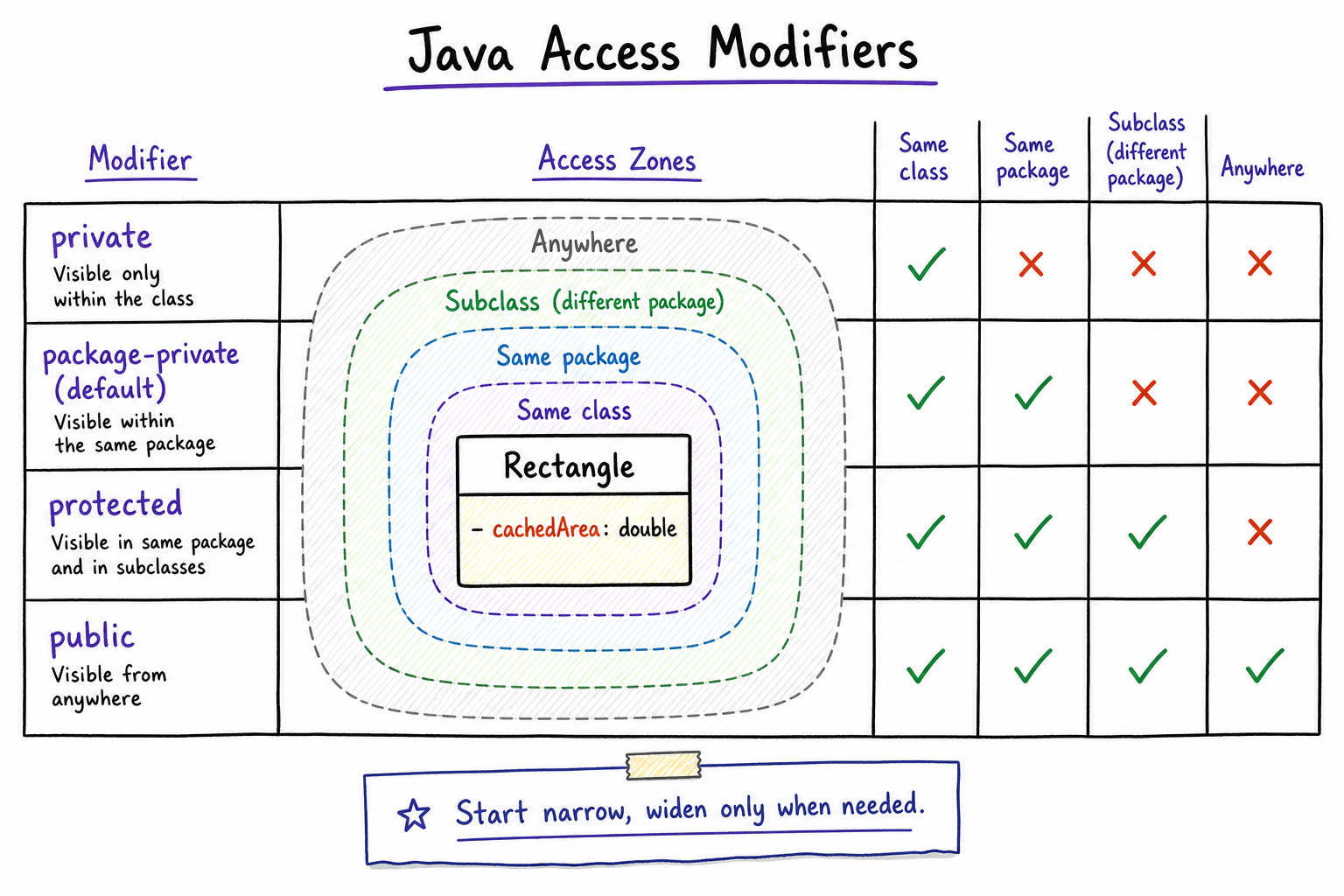
You use this access modifier when you don't even want the inherited classes to access this class's property. This modifier can be used to define variables for internal calculations, tracking, and caching that are not needed for any other class to use. For example, we can cache the area of a Rectangle and return it with a getter. No other class needs to know this attribute since they can just use the getter methods.
A general rule of thumb is to keep an attribute as "private" as possible. You'll have fewer weird bugs to deal with later.
Visibility as Boundaries
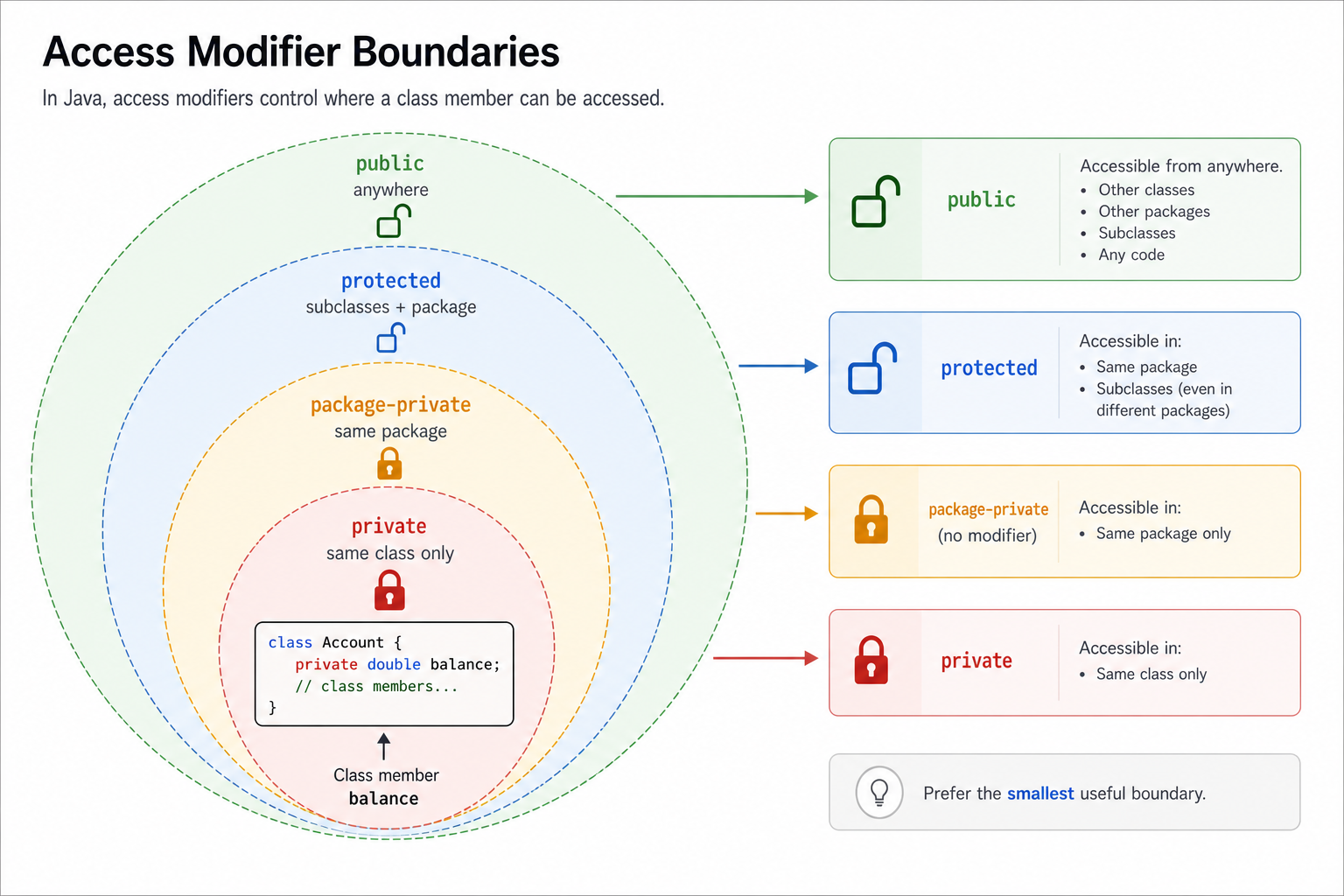
Before moving on, anchor the four access modifiers as boundaries around a class member.
The more restrictive the modifier, the fewer places can touch that field or method directly. In interviews and real code, this is the encapsulation instinct: start narrow, then open access only when another class truly needs it.
Access Modifier Snapshot
Before moving on, compress the four Java access levels into one mental model: each modifier answers, “Who is allowed to touch this member directly?”
Use the visual from left to right. As access gets wider, convenience increases—but so does the chance that outside code can depend on details you may want to change later.
Accessing the Object Itself
Accessing the Object Itself
All OOP-supported programming languages have a special keyword or way to access the "self" object from within a class. For Java and C++, it is this. For Python, it can be named anything but is by convention self.
Suppose you are creating a constructor for the Rectangle class which will take the parameters height and width. You can define the constructor like below:
public class Rectangle extends Shape {
    protected int height, width;
    public Rectangle(int h, int w) {
        height = h;
        width = w;
    }
}
class Rectangle extends Shape {
    constructor(h, w) {
        super();
        this.height = h;
        this.width = w;
    }
}
class Rectangle(Shape):
    def __init__(self, h, w):
        super().__init__()
        self.height = h
        self.width = w
class Rectangle : public Shape {
protected:
    int height, width;
public:
    Rectangle(int h, int w) : height(h), width(w) {}
};
type Rectangle struct {
    Shape
    height int
    width  int
}

func NewRectangle(h int, w int) *Rectangle {
    return &Rectangle{
        height: h,
        width: w,
    }
}
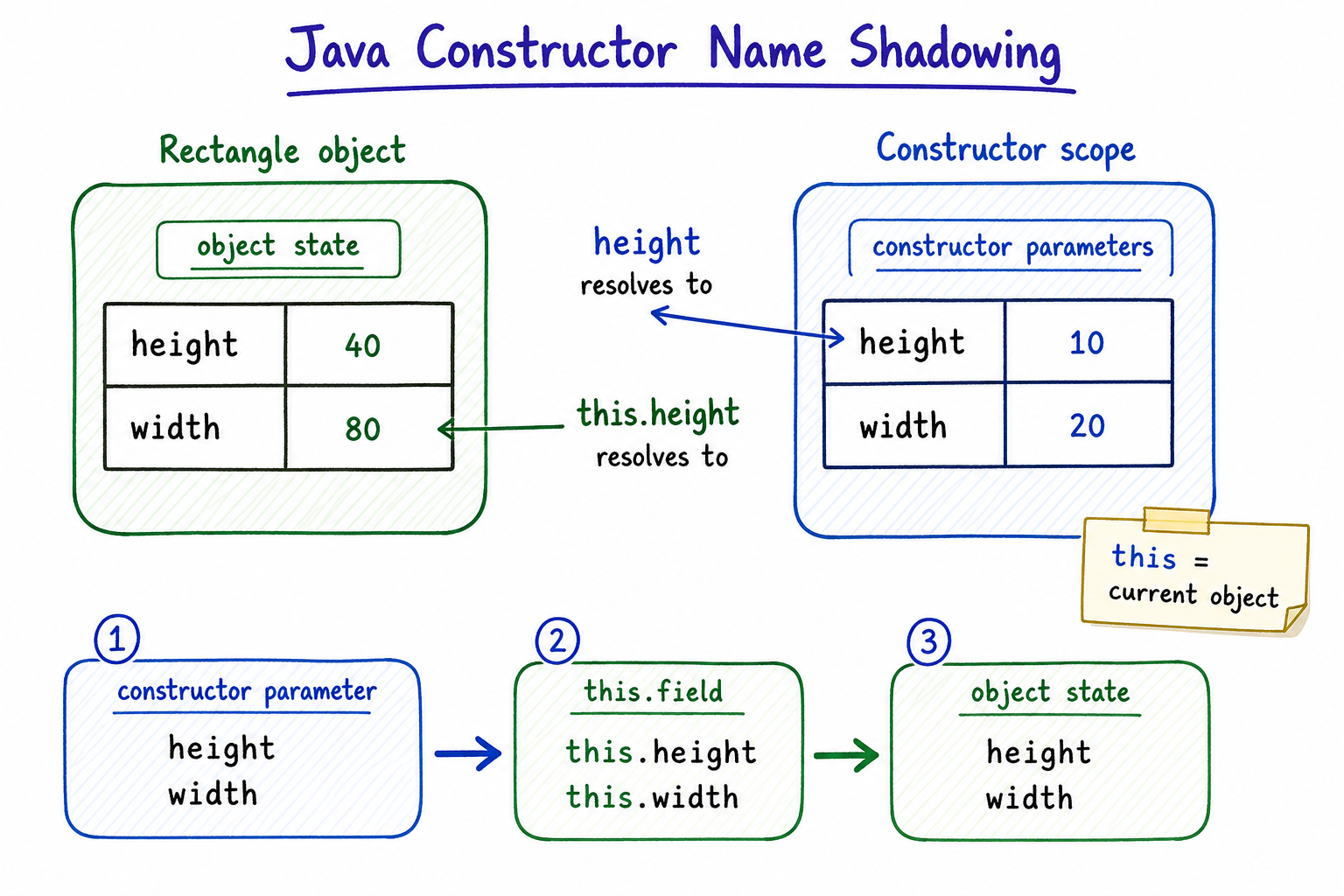
But what if you wanted to name the parameters the same thing as the attributes of the class? It would be easier for the user of the class to understand the method signature Rectangle(int height, int width) instead of Rectangle(int h, int w). However, after renaming the parameters, if we use the identifier height or width inside the function, then it will always refer to the parameter (closest scope) and not the attributes. So how do we refer to attributes with the same name?
Here we can use the this keyword to refer to anything of "this" class and not anything outside of the class. See the code below:
public class Rectangle extends Shape {
    protected int height, width;
    public Rectangle(int height, int width) {
        // this.height => height attribute of Rectangle.
        // height => height parameter of the constructor method.
        this.height = height;
        this.width = width;
    }
}
class Rectangle extends Shape {
    constructor(height, width) {
        super();
        // this.height => height attribute of Rectangle.
        // height => height parameter of the constructor method.
        this.height = height;
        this.width = width;
    }
}
class Rectangle(Shape):
    def __init__(self, height, width):
        super().__init__()
        # self.height => height attribute of Rectangle.
        # height => height parameter of the constructor method.
        self.height = height
        self.width = width
class Rectangle : public Shape {
protected:
    int height, width;
public:
    Rectangle(int height, int width) : height(height), width(width) {
        // this->height => height attribute of Rectangle.
        // height => height parameter of the constructor method.
    }
};
type Rectangle struct {
    Shape
    height int
    width  int
}

func NewRectangle(height int, width int) *Rectangle {
    // height attribute of Rectangle is r.height
    // height parameter of the constructor method is the same name.
    return &Rectangle{
        height: height,
        width: width,
    }
}
In addition to referencing attributes with the same name as parameters, you also have to access the object itself in order to pass an object to an outside function from within the class. For example, suppose you have a class named GetOne whose job is to return one Rectangle object from two Rectangle objects. Additionally, suppose you have a method in Rectangle that takes a GetOne class and a Rectangle object then updates itself to become a copy of the returned object. Let us first define the GetOne class hierarchy.
package getone;

// GetOne.java
public class GetOne {
    public Rectangle get(Rectangle rect1, Rectangle rect2) {
        // Just return the first one for now. We will overload this with subclasses
        // Actually this should be an abstract class which we will cover in later lesson
        return rect1;
    }
}

// GetSmallerArea.java
public class GetSmallerArea extends GetOne {
    @Overriding
    public Rectangle get(Rectangle rect1, Rectangle rect2) {
        return rect1.getArea() <= rect2.getArea() ? rect1 : rect2;
    }
}

// GetLargerArea.java
public class GetLargerArea extends GetOne {
    @Overriding
    public Rectangle get(Rectangle rect1, Rectangle rect2) {
        return rect1.getArea() < rect2.getArea() ? rect2 : rect1;
    }
}
package getone;

public class GetOne {
    public Rectangle get(Rectangle rect1, Rectangle rect2) {
        // Just return the first one for now. We will overload this with subclasses
        // Actually this should be an abstract class which we will cover in later lesson
        return rect1;
    }
}
class GetOne {
    get(rect1, rect2) {
        // Just return the first one for now.
        return rect1;
    }
}

class GetSmallerArea extends GetOne {
    get(rect1, rect2) {
        return rect1.getArea() <= rect2.getArea() ? rect1 : rect2;
    }
}

class GetLargerArea extends GetOne {
    get(rect1, rect2) {
        return rect1.getArea() < rect2.getArea() ? rect2 : rect1;
    }
}
class GetOne:
    def get(self, rect1, rect2):
        # Just return the first one for now.
        return rect1

class GetSmallerArea(GetOne):
    def get(self, rect1, rect2):
        return rect1 if rect1.get_area() <= rect2.get_area() else rect2

class GetLargerArea(GetOne):
    def get(self, rect1, rect2):
        return rect1 if rect1.get_area() < rect2.get_area() else rect2
class GetOne {
public:
    virtual Rectangle get(Rectangle rect1, Rectangle rect2) {
        // Just return the first one for now.
        return rect1;
    }
};

class GetSmallerArea : public GetOne {
public:
    Rectangle get(Rectangle rect1, Rectangle rect2) override {
        return rect1.getArea() <= rect2.getArea() ? rect1 : rect2;
    }
};

class GetLargerArea : public GetOne {
public:
    Rectangle get(Rectangle rect1, Rectangle rect2) override {
        return rect1.getArea() < rect2.getArea() ? rect2 : rect1;
    }
};
type GetOne struct{}

func (g *GetOne) get(rect1, rect2 Rectangle) Rectangle {
    return rect1
}

type GetSmallerArea struct {
    GetOne
}

func (g *GetSmallerArea) get(rect1, rect2 Rectangle) Rectangle {
    if rect1.getArea() <= rect2.getArea() {
        return rect1
    }
    return rect2
}

type GetLargerArea struct {
    GetOne
}

func (g *GetLargerArea) get(rect1, rect2 Rectangle) Rectangle {
    if rect1.getArea() < rect2.getArea() {
        return rect2
    }
    return rect1
}
Note: In Go, there's no concept of class inheritance like in Java. Instead, Go uses composition and embedding. The given Go code assumes a struct named Rectangle exists with a method getArea.
Now we define the method inside the Rectangle class. The method will take GetOne and another Rectangle object then update itself using get methods. For this, we need to pass two objects to the get method. One object will be the Rectangle and the other will be itself. See below how we can do that:
public class Rectangle extends Shape {
    protected int height, width;

    public void compareAndUpdate(GetOne comparator, Rectangle other) {
        // Passing myself to comparator with "this" keyword
        Rectangle one = comparator.get(this, other);
        this.height = one.height;
        this.width = one.width;
    }

    @Overriding
    public String toString() {
        return "Rectangle(" + height + "," + width + ")";
    }
}
public class Rectangle extends Shape {
    protected int height, width;

    public void compareAndUpdate(GetOne comparator, Rectangle other) {
        // Passing myself to comparator with "this" keyword
        Rectangle one = comparator.get(this, other);
        this.height = one.height;
        this.width = one.width;
    }

    @Override
    public String toString() {
        return "Rectangle(" + height + "," + width + ")";
    }
}
class Rectangle extends Shape {
    constructor(height, width) {
        super();
        this.height = height;
        this.width = width;
    }

    compareAndUpdate(comparator, other) {
        // Passing myself to comparator with "this" keyword
        let one = comparator.get(this, other);
        this.height = one.height;
        this.width = one.width;
    }

    toString() {
        return `Rectangle(${this.height},${this.width})`;
    }
}
class Rectangle(Shape):
    def __init__(self, height, width):
        super().__init__()
        self.height = height
        self.width = width

    def compare_and_update(self, comparator, other):
        # Passing myself to comparator with "self" keyword
        one = comparator.get(self, other)
        self.height = one.height
        self.width = one.width

    def __str__(self):
        return f"Rectangle({self.height},{self.width})"
class Rectangle : public Shape {
protected:
    int height, width;
public:
    void compareAndUpdate(GetOne& comparator, Rectangle& other) {
        // Passing myself to comparator with "this" pointer
        Rectangle one = comparator.get(*this, other);
        this->height = one.height;
        this->width = one.width;
    }

    std::string toString() {
        return "Rectangle(" + std::to_string(height) + "," + std::to_string(width) + ")";
    }
};
type Rectangle struct {
    Shape
    height int
    width  int
}

func (r *Rectangle) compareAndUpdate(comparator GetOne, other Rectangle) {
    // Passing myself to comparator with "r" pointer
    one := comparator.get(*r, other)
    r.height = one.height
    r.width = one.width
}

func (r Rectangle) String() string {
    return fmt.Sprintf("Rectangle(%d,%d)", r.height, r.width)
}
In the main method, we can use this like below:
public class Main {
    public static void main(String[] args) {
        // Using concept of polymorphism
        GetOne smaller = new GetSmallerArea();
        GetOne larger = new GetLargerArea();

        Rectangle rect1 = new Rectangle(3, 4);
        Rectangle rect2 = new Rectangle(5, 6);

        rect1.compareAndUpdate(smaller, rect2);
        System.out.println(rect1); // Rectangle(3,4)

        rect1.compareAndUpdate(larger, rect2);
        System.out.println(rect1); // Rectangle(5,6)
    }
}
// Assuming necessary class definitions from previous conversions
const main = () => {
    // Using concept of polymorphism
    let smaller = new GetSmallerArea();
    let larger = new GetLargerArea();

    let rect1 = new Rectangle(3, 4);
    let rect2 = new Rectangle(5, 6);

    rect1.compareAndUpdate(smaller, rect2);
    console.log(rect1.toString()); // Rectangle(3,4)

    rect1.compareAndUpdate(larger, rect2);
    console.log(rect1.toString()); // Rectangle(5,6)
}

main();
# Assuming necessary class definitions from previous conversions
def main():
    # Using concept of polymorphism
    smaller = GetSmallerArea()
    larger = GetLargerArea()

    rect1 = Rectangle(3, 4)
    rect2 = Rectangle(5, 6)

    rect1.compare_and_update(smaller, rect2)
    print(rect1)  # Rectangle(3,4)

    rect1.compare_and_update(larger, rect2)
    print(rect1)  # Rectangle(5,6)

main()
// Assuming necessary class and header definitions from previous conversions
int main() {
    // Using concept of polymorphism
    GetOne* smaller = new GetSmallerArea();
    GetOne* larger = new GetLargerArea();

    Rectangle rect1(3, 4);
    Rectangle rect2(5, 6);

    rect1.compareAndUpdate(*smaller, rect2);
    std::cout << rect1.toString() << std::endl; // Rectangle(3,4)

    rect1.compareAndUpdate(*larger, rect2);
    std::cout << rect1.toString() << std::endl; // Rectangle(5,6)

    delete smaller;
    delete larger;
    return 0;
}
// Assuming necessary struct and interface definitions from previous conversions
func main() {
    // Using concept of polymorphism
    var smaller GetOne = &GetSmallerArea{}
    var larger GetOne = &GetLargerArea{}

    rect1 := Rectangle{height: 3, width: 4}
    rect2 := Rectangle{height: 5, width: 6}

    rect1.compareAndUpdate(smaller, rect2)
    fmt.Println(rect1) // Rectangle(3,4)

    rect1.compareAndUpdate(larger, rect2)
    fmt.Println(rect1) // Rectangle(5,6)
}
What `this` Points To
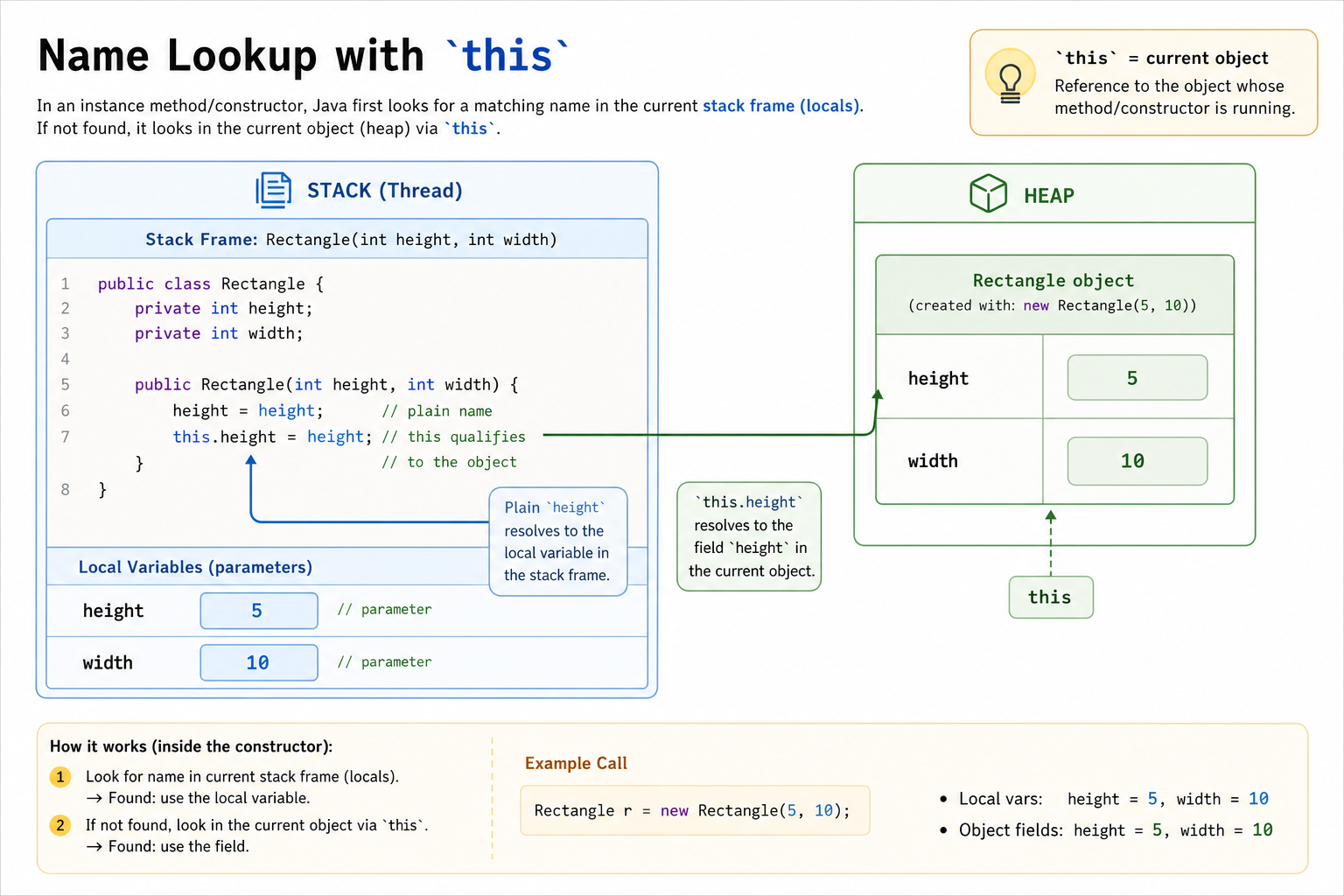
The key idea: this is not a new object. It is a reference to the current object whose method or constructor is running.
When a parameter has the same name as a field, the unqualified name usually points to the nearest local variable. this.field explicitly reaches into the object.
Why this Matters
The this keyword is easiest to remember as a tie-breaker and pointer: it tells the program, “use the field on this object, not the local parameter.”
In constructors and setters, this avoids shadowing bugs. In method calls, it also lets the current object pass itself along as a complete value.
quiz 1
Suppose you have a code snippet like below:
private class A {
    private String text;
}
How do you access the text property from within the class?
Accessing Super Class
Accessing Super Class
To recap what you've seen before, classes can be derived from other classes. With this inheritance-derivation relationship, the whole system can be viewed as a class hierarchy. Inside the hierarchy, there are some definitions to keep in mind which are similar to the tree data structure.

- Subclass: A class that is derived from another class is called a subclass.
- Superclass: The class from which a subclass is derived is called the superclass.
- Siblingclass: If two classes are derived from the same parent, then they are siblingclasses. Keep in mind that this is different from sibling nodes in a tree where all the nodes at the same level are sibling nodes. In the context of OOP, sibling classes must have the same parent.
Inheriting from a class means that you are extending the class's capabilities (or changing them). What if you don't want to totally replace the functionality of a method you are overriding? In that case, you need to somehow call the previous method first, then add other instructions. The initial method before inheritance can be accessed using the super keyword.
For example, when you create a constructor for the Square class, you only need 1 value (the side). Since it is derived from the Rectangle class, you should just reuse the Rectangle constructor. You can do it like so:

public class Square extends Shape {
    public Square(int side) {
        // This calls the super constructor
        super(side, side);
        // If you want, you can also do other things here
    }

    // This method is unnecessary
    // But for demo we are showing it to you.
    @Overriding
    public double getArea() {
        return super.getArea();
    }
}
Grandfather class
You have code like below:
public class A {
    public String a() {
        // impl
    }
}
public class B extends A {
    public String a() {
        // impl
    }
}
public class C extends B {
    public String a() {
        // impl
    }
}
How can you call the method a of class A from class C?
Let the instance of C be called c.
Overload Resolution
Java chooses an overloaded method by looking at the method name and parameter types.
What will the following program print?
public class Printer {
    public void print(int value) {
        System.out.println("int");
    }

    public void print(String value) {
        System.out.println("String");
    }

    public static void main(String[] args) {
        Printer printer = new Printer();
        printer.print("10");
    }
}
Fill in the exact output.
Fill in the blank: _____________
Method Chaining
Method Chaining
In many libraries, you see a large number of . (dot) notations (like in chains) calling several functions sequentially. This is a programming style named method chaining. In method chaining, most of the methods in a class return the object itself so another function can use the object later on.

For example, suppose you want to create a group of shapes with a new class ShapeGroup that will contain several shapes inside its internal data structure. We will implement several methods to add different types of shapes to our class. Each of these methods in our ShapeGroup class will return itself in order to use method chaining.
public class ShapeGroup {
    private List<Shape> arrayList;
    private List<Integer> labels; // 1 = Rectangle, 2 = Circle, 3 = Square

    public ShapeGroup() {
        arrayList = new ArrayList<>();
        labels = new ArrayList<>();
    }

    // These methods will return itself, ShapeGroup
    public ShapeGroup addRect(Rectangle rect) {
        arrayList.add(rect);
        labels.add(1);
        return this;
    }

    public ShapeGroup addRect(int height, int width) {
        return this.addRect(new Rectangle(height, width));
    }

    public ShapeGroup addCircle(Circle circle) {
        arrayList.add(circle);
        labels.add(2);
        return this;
    }

    public ShapeGroup addCircle(double radius) {
        return this.addCircle(new Circle(radius));
    }

    public ShapeGroup addSquare(Square sq) {
        arrayList.add(sq);
        labels.add(3);
        return this;
    }

    public ShapeGroup addSquare(int side) {
        return this.addSquare(new Square(side));
    }
}
Inside the main method, we can add a bunch of shapes with only 1 line of code.
public class Main {
    public static void main(String[] args) {
        ShapeGroup sg = new ShapeGroup();
        // Adding 5 shapes
        sg.addSquare(5).addRect(5,4).addCircle(new Circle(3.4)).addCircle(3.4).addRect(new Rectangle(8,2));
    }
}
Overriding vs Overloading
Overriding vs Overloading
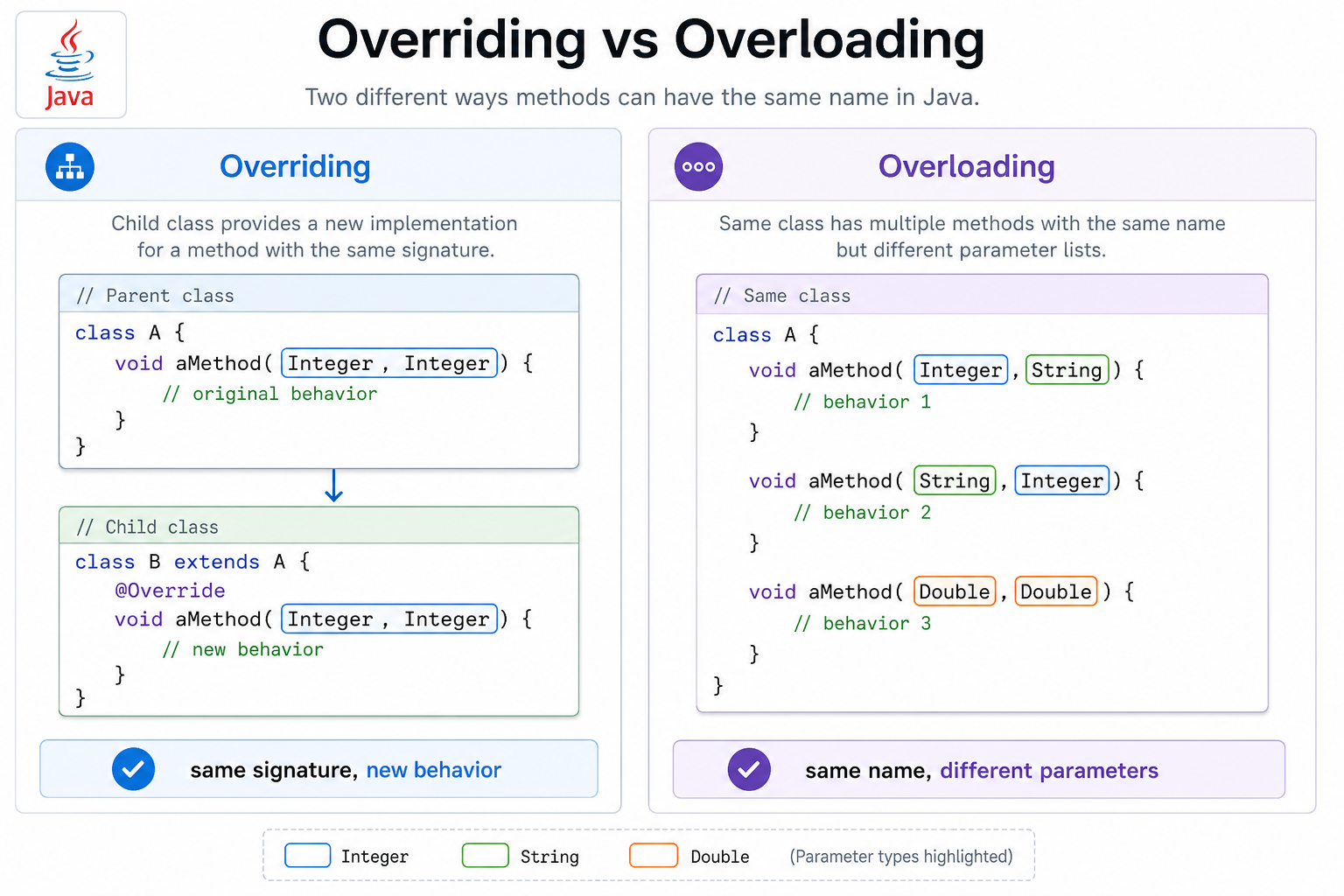
When it comes to inheritance, there are two ways to add methods to your subclasses. Overriding a class means altering a method from its superclass. Overloading a method means creating a separate method with the same name but different parameter types.
Overriding must occur between the superclass and subclass. On the other hand, function overloading can occur in the same class.
When comparing overloading and overriding, the function signature is the primary difference. A function signature contains both the name of the function and the parameters of the function. If the function signature is identical for two classes in an inheritance hierarchy, then you are overriding a method. If they are different (even in the same class), then you are overloading the method.
public class A {
    public String aMethod(Integer a, Integer b) {
        return a.toString() + b.toString();
    }

    // An overloading of aMethod
    public String aMethod(Integer a, String b) {
        return a.toString() + b;
    }

    // Another overloading of aMethod
    public String aMethod(String a, Integer b) {
        return a + b.toString();
    }
}

public class B extends A {
    // Notice that name, parameter and return types will always be same for overriding
    @Override
    public String aMethod(Integer a, Integer b) {
        return (a+b).toString();
    }

    // An overloading from superclass. Because different parameter.
    public String aMethod(Double a, Double b) {
        return (a+b).toString();
    }
}
class A {
    aMethod(a, b) {
        if (typeof a === 'number' && typeof b === 'number') {
            return a.toString() + b.toString();
        } else if (typeof a === 'number' && typeof b === 'string') {
            return a.toString() + b;
        } else if (typeof a === 'string' && typeof b === 'number') {
            return a + b.toString();
        }
    }
}

class B extends A {
    aMethod(a, b) {
        if (typeof a === 'number' && typeof b === 'number') {
            return (a + b).toString();
        } else if (typeof a === 'string' && typeof b === 'number') {
            return super.aMethod(a, b);
        } else if (typeof a === 'number' && typeof b === 'string') {
            return super.aMethod(a, b);
        } else if (typeof a === 'number' && typeof b === 'number') {
            return (a + b).toString();
        }
    }
}
class A:
    def a_method(self, a, b):
        if isinstance(a, int) and isinstance(b, int):
            return str(a) + str(b)
        elif isinstance(a, int) and isinstance(b, str):
            return str(a) + b
        elif isinstance(a, str) and isinstance(b, int):
            return a + str(b)

class B(A):
    def a_method(self, a, b):
        if isinstance(a, int) and isinstance(b, int):
            return str(a + b)
        elif isinstance(a, float) and isinstance(b, float):
            return str(a + b)
        else:
            return super().a_method(a, b)
#include <string>

class A {
public:
    std::string aMethod(int a, int b) {
        return std::to_string(a) + std::to_string(b);
    }

    std::string aMethod(int a, std::string b) {
        return std::to_string(a) + b;
    }

    std::string aMethod(std::string a, int b) {
        return a + std::to_string(b);
    }
};

class B : public A {
public:
    std::string aMethod(int a, int b) {
        return std::to_string(a + b);
    }

    std::string aMethod(double a, double b) {
        return std::to_string(a + b);
    }
};
package main

import (
    "fmt"
    "strconv"
)

type A struct{}

func (a A) aMethod(aInt int, bInt int) string {
    return strconv.Itoa(aInt) + strconv.Itoa(bInt)
}

func (a A) aMethodIntStr(aInt int, bStr string) string {
    return strconv.Itoa(aInt) + bStr
}

func (a A) aMethodStrInt(aStr string, bInt int) string {
    return aStr + strconv.Itoa(bInt)
}

type B struct {
    A
}

func (b B) aMethod(aInt int, bInt int) string {
    return strconv.Itoa(aInt + bInt)
}

func (b B) aMethodFloat(aFloat float64, bFloat float64) string {
    return fmt.Sprintf("%f", aFloat+bFloat)
}
Note: Go doesn't support method overloading. To demonstrate a similar concept, we use different method names based on the parameter types.
Signature Matchup
Use the method signature as your quick sorting tool.
If a subclass keeps the same method name and parameters, it is overriding. If the parameter list changes, it is overloading — even when the method name stays the same.
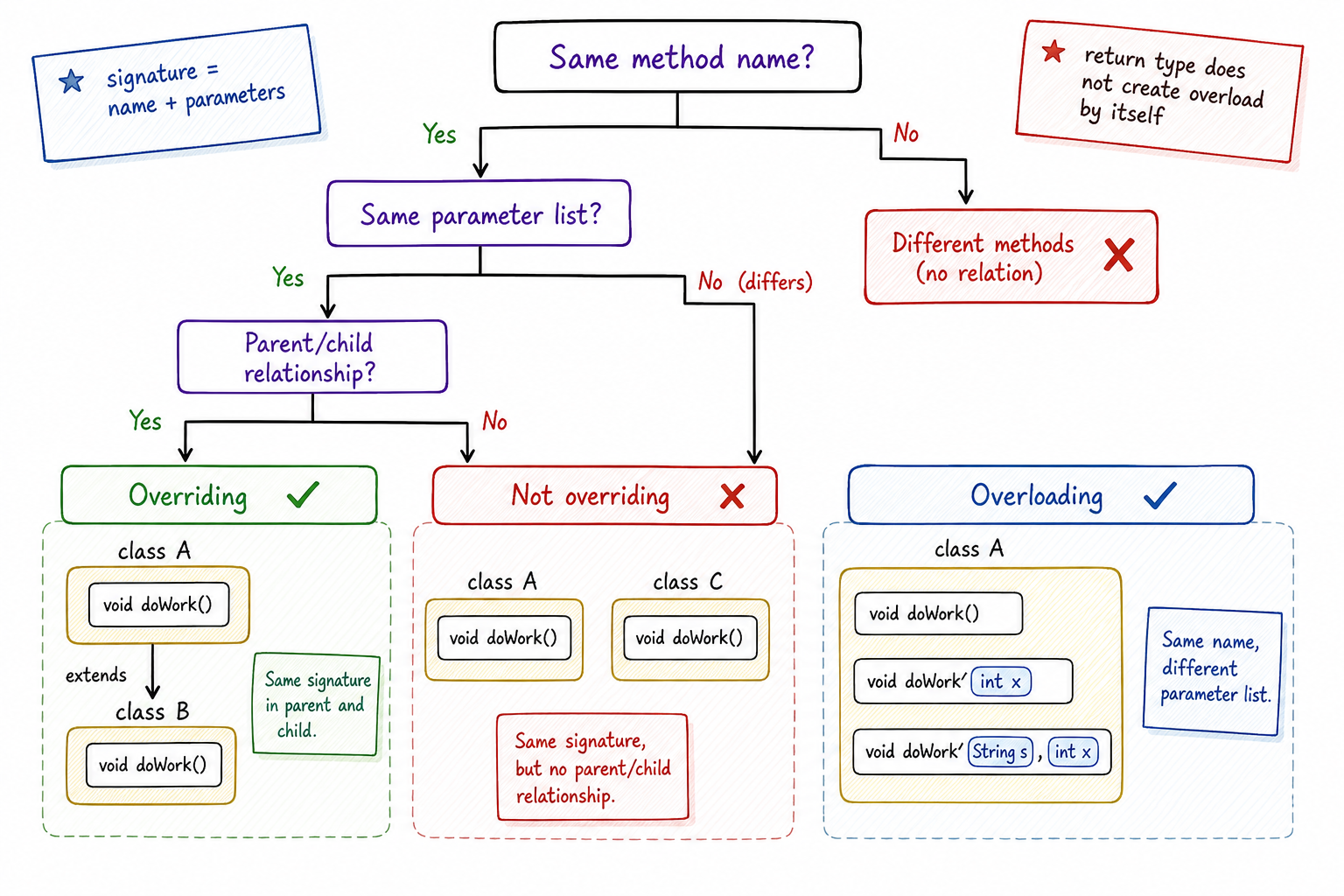
Signature Decision Tree
When you see two methods with the same name, don’t guess from the class names alone. Ask two questions: are they in an inheritance relationship, and do their signatures match?
That decision tells you whether you are looking at overriding, overloading, or just unrelated methods with the same name.
Class Typecasting Rules
Class Typecasting Rules
In an inheritance hierarchy, you can cast an object to any of its parent or child classes in the hierarchy tree. This can be done with the same syntax used for primitives ((newType) oldObject). Keep in mind, however, that you will get an Exception at runtime if you try to do illegal casting (for example, cast a Square to a Circle).
If you try to typecast an object to a subtype, it is called downcasting, or narrowcasting. Generally, it is considered bad practice to downcast unless it is absolutely necessary in your code. If you try to typecast an object to a superclass type, then it is called upcasting, or wide casting. Most polymorphism concepts are applied with the help of upcasting in a program.
public class Main {
    Rectangle rect = new Rectangle(5,6);

    // Upcasting
    Shape shape = (Shape) rect;

    // Downcasting
    Rectangle rect2 = (Rectangle) shape;

    // This is also valid
    Shape shape2 = new Rectangle();

    // But this is invalid
    Rectangle rect3 = new Shape();
}
// JavaScript does not have explicit type casting in the same way as Java.
// However, for demonstration purposes, the idea can be shown with class inheritance:
class Main {
    constructor() {
        let rect = new Rectangle(5,6);

        // Upcasting (implicitly)
        let shape = rect;

        // Downcasting (not directly possible in JS, but for demonstration)
        let rect2 = shape;

        // This is also valid
        let shape2 = new Rectangle();

        // But this would be invalid (and will throw an error if tried)
        // let rect3 = new Shape();
    }
}
# Python is dynamically typed, so casting isn't strictly necessary, but to illustrate the concept:
class Main:
    rect = Rectangle(5, 6)

    # Upcasting
    shape = rect

    # Downcasting (Python doesn't require explicit casting)
    rect2 = shape

    # This is also valid
    shape2 = Rectangle()

    # But this is invalid (and will throw an error if tried)
    # rect3 = Shape()
class Main {
    Rectangle rect = Rectangle(5, 6);

    // Upcasting
    Shape* shape = ▭

    // Downcasting
    Rectangle* rect2 = dynamic_cast<Rectangle*>(shape);

    // This is also valid
    Shape* shape2 = new Rectangle();

    // But this would be invalid
    // Rectangle* rect3 = new Shape();  // This will cause a compilation error
};
// Go uses interfaces to achieve polymorphism, which is slightly different than class-based inheritance:
type Main struct {
    rect    Rectangle
    shape   Shape
    rect2   Rectangle
    shape2  Shape
}

func NewMain() Main {
    m := Main{}
    m.rect = Rectangle{height: 5, width: 6}

    // Upcasting
    m.shape = m.rect

    // Downcasting (achieved through type assertion in Go)
    m.rect2, _ = m.shape.(Rectangle)

    // This is also valid
    m.shape2 = Rectangle{}

    // But this would be invalid (and will throw an error if tried)
    // m.rect3 = Shape{}
    return m
}
It is not allowed in Java to typecast to other classes outside of the superclass and subclasses set. In those cases, you will need a ModelMapper which will give you class A given B or class B given A regardless of any inheritance relationship between A and B.
It's too complicated to go through ModelMapper now, so we are leaving it out of this series. However, feel free to go and check the documentation yourself if you are curious.
Conclusion
Conclusion
That's all for today! In the next lesson, we will learn about abstract classes, multiple inheritance, and interfaces. We will also learn how to make OOP design decisions and create UML diagrams, so be prepared to become a master of object-oriented programming.
One Pager Cheat Sheet
One Pager Cheat Sheet
- We will be learning about Advanced Practices in Object-Orientated Programming today, which are essential for understanding and using OOP.
- Access level modifiers are used to determine which classes can use defined fields or invoke specific methods in order to maintain access control for members of a class.
- All
publicattributes and class methods should be used as sparingly as possible, and there should only be onepublicclass per file in Java, where the file name must be the same as its class name. - Classes, methods, or attributes without any access keyword defined are
package-private, allowing any class inside the same package to access them, but no other class outside the package can. -
Square can access
protectedmethods and attributes of its ancestor classes in the inheritance hierarchy. - The most restrictive access modifier
privateshould be used to hide data from the outside world, leading to fewer bugs later on. - - Access modifiers are visibility boundaries:
private< package-private <protected<public. - - Prefer the narrowest access that still lets the class do its job.
- In all OOP-supported programming languages,
thisor another special keyword must be used to access the "self" object from within a class in order to access attributes or pass an object to an outside function. - - Use
thiswhen you need to refer to the current object, especially when parameters shadow fields. - -
this.fieldmeans “the field belonging to the current object.” - The current object is referenced using the
thiskeyword, which in this context refers to an instance of theAclass, and should be used to access thetextproperty of the instance viathis.text. - Classes can access methods of their superclass using the
superkeyword. - The use of
superenables access to methods of a class' superclass and allows to access any superclass' method with the use ofsuper.super.method(). - Using Method Chaining, multiple functions can be called on an object in a single statement, returning the object to allow function calls to be
chainedtogether. - Overriding occurs between the superclass and subclass, while overloading is done within the same class and differs in the function signature.
- - Same name + same parameters across parent/child means overriding; same name + different parameters means overloading.
- - Same name + same signature across parent/child = overriding; same name + different parameters = overloading.
- You can
upcastand/ordowncastan object within its inheritance hierarchy, but it is bad practice to downcast unless necessary, and casting to classes outside of the hierarchy requires aModelMapper. - Becoming a master of Object-Oriented Programming (OOP) involves learning about
abstractclasses, multiple inheritance, and interfaces, as well as making OOP design decisions and creating UML diagrams.