An Interactive Introduction to Regular Expressions
Read at your own pace. Code execution, quizzes, progress tracking, and the AI tutor are available in the interactive view with JavaScript enabled.
Introduction
Have you ever wondered how search engines look up data in such a short amount of time? Or how text editors instantly find words when their search option is used? Or ever thought about how they deal with such a large amount of data and find only the relevant information?
Search engines or text editors ease this process by using regular expressions.
What are Regular Expressions?
What are Regular Expressions?
Regular expressions, also known by the shorthand regex, are a special sequence of characters that define a certain pattern. This sequence is then used to match text according to the defined pattern.
You might be wondering-- why do we need another method to perform text matching, when we can already do it using:
- the
equaloperator (==) - by indexing, or
- via string methods in any programming language?
It's because regular expressions are a more powerful (and much shorter!) method of performing the string matching operation, one where you can match strings even with custom-defined patterns, a functionality that you might not be able to perform using other methods.
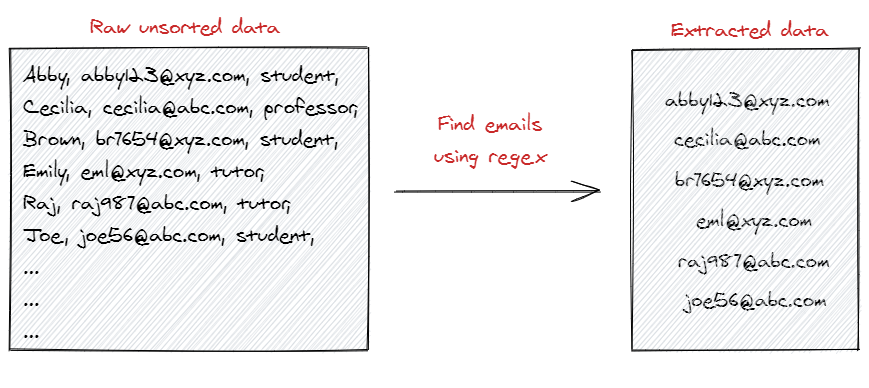
Regular expressions can ease our day to day programming as well. Suppose you receive the data of personal information of people in your university, and you want to extract all the emails from it. If this is done manually, it would surely take quite some time. But don't worry! Regular expressions can make it easy, by solving this problem in a single line.
True or False
Python provides support for regular expressions in the re module. To use regex in a program, we need to import this module at the start of our program. This module provides helpful functions that make the matching process easier.
Let's review basic Python with a short question! Would import re be a correct method to import the re module in Python?
Regular Expressions in Python
We start our introduction to regular expressions in Python by using a basic search method to match strings provided by the re module.
.search(regex, string) takes a regular expression and a string as an input, and scans through the entire input string, and looks for a location where the given regex pattern finds a match.
Since this is an introduction to regular expressions, we will only use this method from
remodule. There are other methods from the module which provide more functionality. However, hold that thought for now.
Let's look at a simple example of this search method.
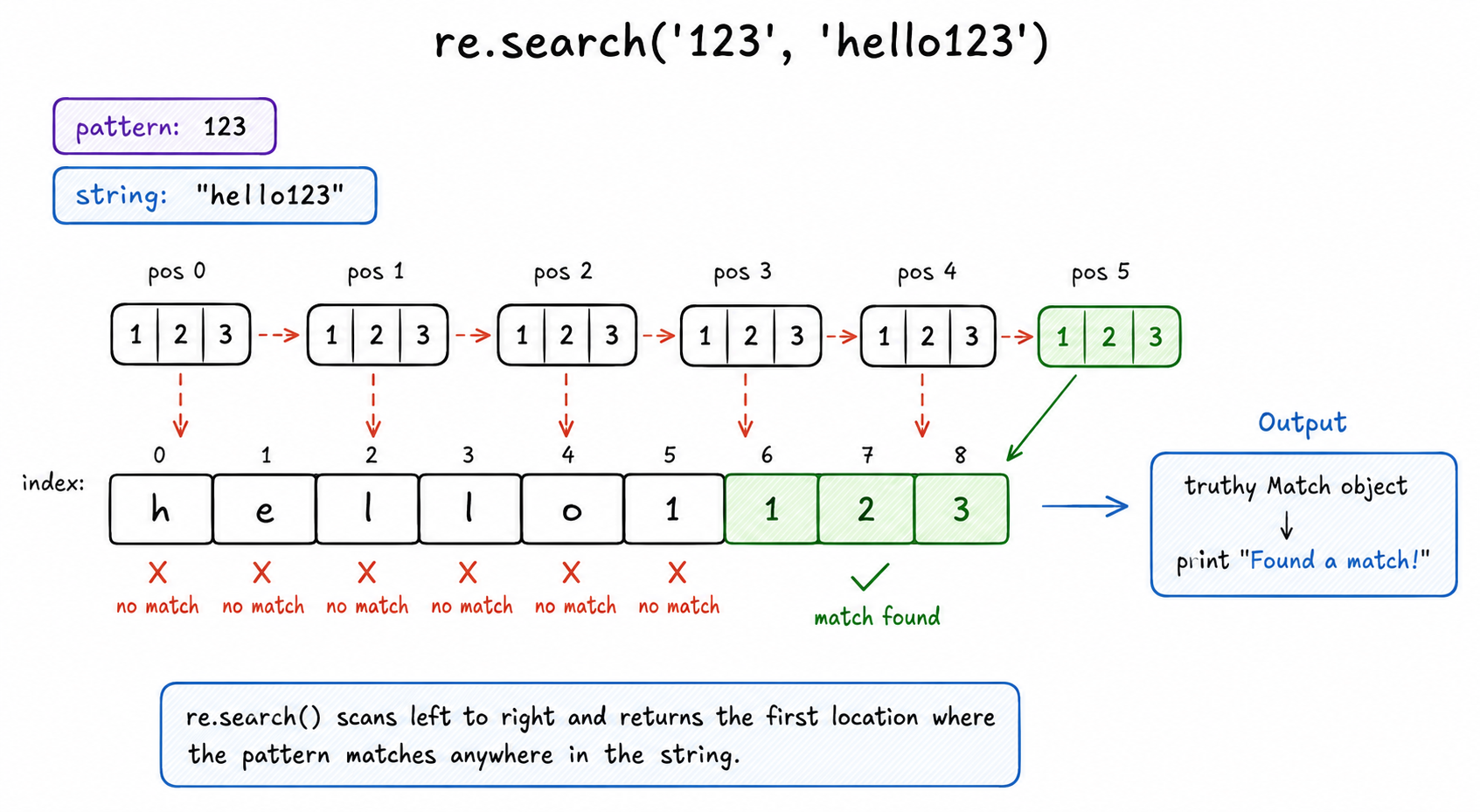
Since the string contained '123', the pattern '123' is instantly matched with the string s in this example.
```java
public class Main {
    public static void main(String[] args) {
        String s = "hello123";
        java.util.regex.Pattern pattern = java.util.regex.Pattern.compile("123");
        java.util.regex.Matcher matcher = pattern.matcher(s);
        if (matcher.find()) {
            System.out.println("Found a match!");
        } else {
            System.out.println("Did not find a match.");
        }
    }
}
```
```javascript
// Adding a function to wrap the existing code
function findMatch() {
    let s = 'hello123';
    if (s.search('123') != -1) {
        console.log("Found a match!");
    } else {
        console.log("Did not find a match.");
    }
}

// Driver code to execute the function
findMatch();
```
```python
# Adding a function to wrap the existing code
def find_match():
    import re
    s = 'hello123'
    if re.search('123', s):
        print("Found a match!")
    else:
        print("Did not find a match.")

# Driver code to execute the function
find_match()
```
```cpp
// Wrapping existing code inside a function
void findMatch() {
    std::string s = "hello123";
    std::regex e ("123");
    if (std::regex_search(s,e))
        std::cout << "Found a match!" << std::endl;
    else
        std::cout << "Did not find a match." << std::endl;
}

// Driver code to execute the function
int main() {
    findMatch();
    return 0;
}
```
```csharp
class Program {
    static void Main(string[] args) {
        string s = "hello123";
        if (System.Text.RegularExpressions.Regex.IsMatch(s, "123")) {
            Console.WriteLine("Found a match!");
        } else {
            Console.WriteLine("Did not find a match.");
        }
    }
}
```
```go
package main

import (
	"fmt"
	"regexp"
)

// Wrapping existing code inside a function
func findMatch() {
	s := "hello123"
	match, _ := regexp.MatchString("123", s)
	if match {
		fmt.Println("Found a match!")
	} else {
		fmt.Println("Did not find a match.")
	}
}

func main() {
	// Driver code to execute the function
	findMatch()
}
```
Search as a Scanner
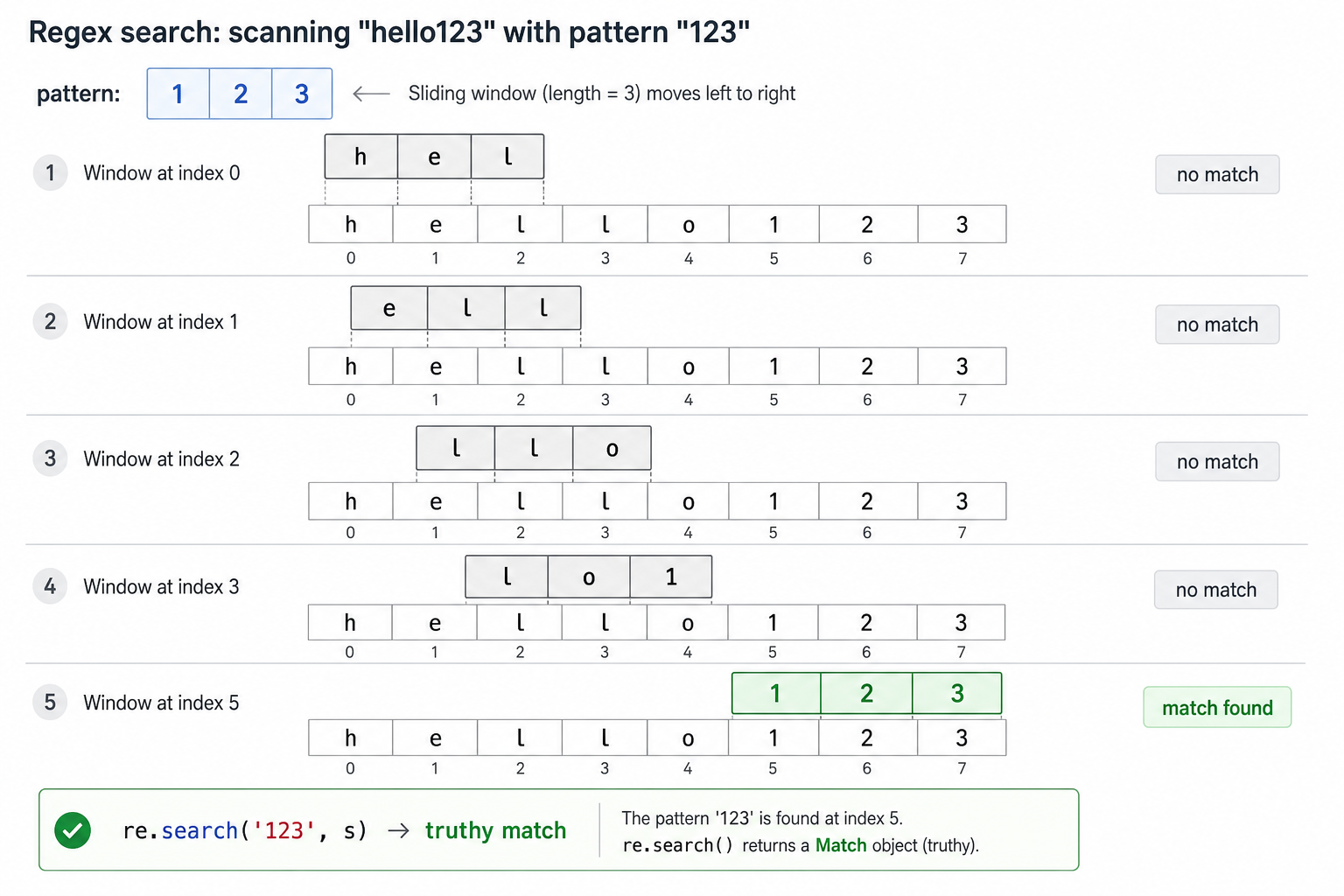
re.search() is easiest to understand as a scanner moving across the input string.
It does not require the pattern to start at index 0. It keeps checking positions until it finds a window that matches the regex, then returns a truthy match object.
Search Finds a Window
Think of re.search() as sliding a small matching window across the string from left to right.
For re.search('123', 'hello123'), the first few positions fail, then the window lands on 123 and returns a match.
How Search Scans
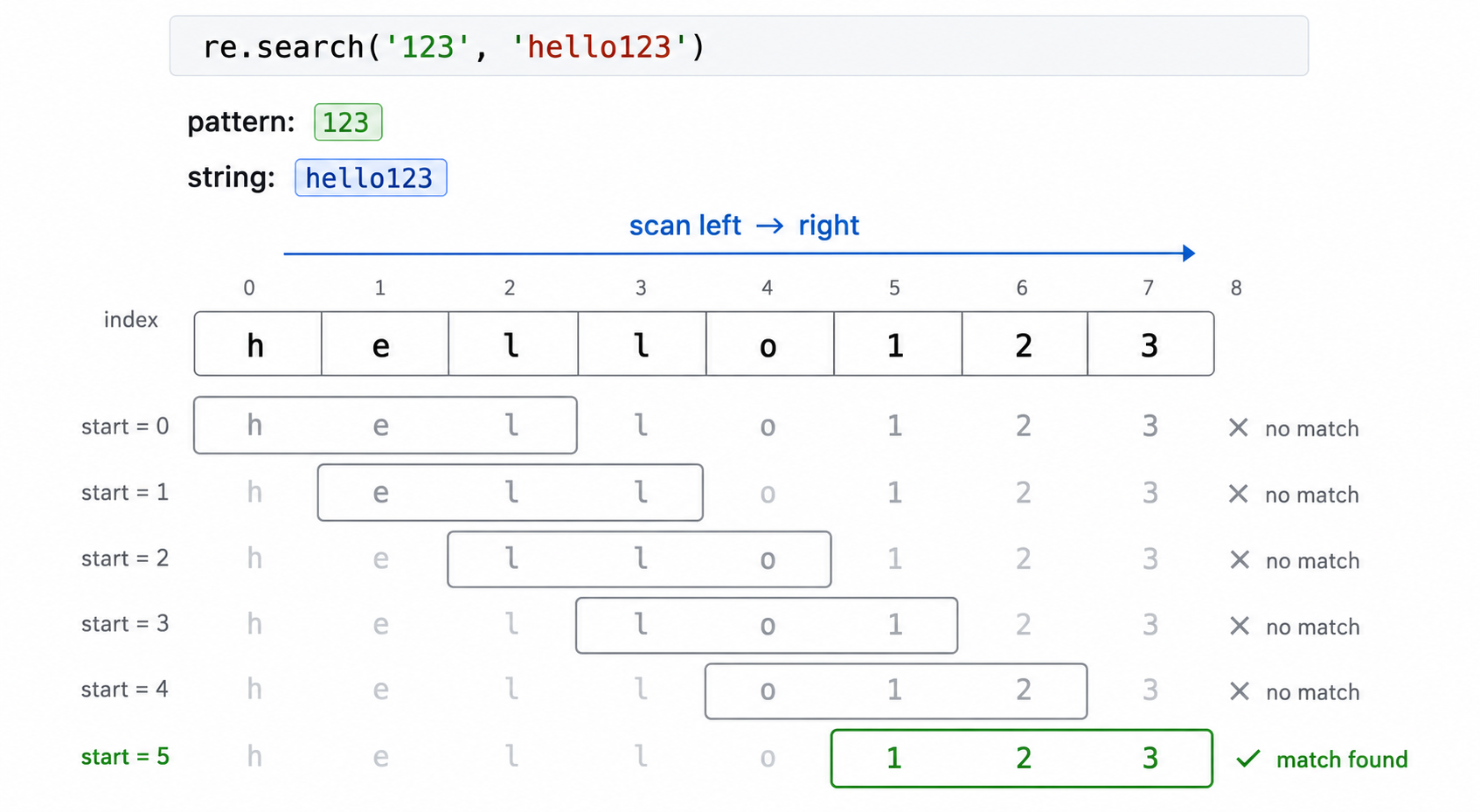
Think of re.search(pattern, string) as a scanner moving left to right through the input.
For pattern = '123' and s = 'hello123', nothing matches until the scanner reaches the final three characters. Once it finds a match anywhere in the string, the search succeeds.
Special Characters in Regular Expressions
Sure, the previous example could've also easily been replicated using a string method. The difference between normal search functions and regular expressions becomes much more evident when special characters (or metacharacters) are used in regular expressions. They provide a unique meaning to the expression when used. In this lesson, we will discuss some of the commonly used metacharacters.
The most basic among these is the use of square brackets ([ ]) to define a character class. Any character inside the class is matched with the given string.
```py
import re

s = 'john479'
if re.search('[0-9]', s):
    print("Found a match!")
else:
    print("Did not find a match.")
```
```java
import java.util.regex.Pattern;

String s = "john479";
if (Pattern.matches(".*[0-9].*", s))
    System.out.println("Found a match!");
else
    System.out.println("Did not find a match.");
```
```javascript
let s = 'john479';
if (/[0-9]/.test(s))
    console.log("Found a match!");
else
    console.log("Did not find a match.");
```
```cpp
#include <regex>
#include <string>
#include <iostream>

std::string s = "john479";
if (std::regex_search(s, std::regex("[0-9]")))
    std::cout << "Found a match!" << std::endl;
else
    std::cout << "Did not find a match." << std::endl;
```
```csharp
using System;
using System.Text.RegularExpressions;

string s = "john479";
if (Regex.IsMatch(s, "[0-9]"))
    Console.WriteLine("Found a match!");
else
    Console.WriteLine("Did not find a match.");
```
```go
package main

import (
    "fmt"
    "regexp"
)

func main() {
    s := "john479"
    if regexp.MustCompile("[0-9]").MatchString(s) {
        fmt.Println("Found a match!")
    } else {
        fmt.Println("Did not find a match.")
    }
}
```
Special Characters Part 2
This code snippet prints "Found a match!" as a single-digit value (in the range of 0 to 9) is present in the string. We can combine these square brackets to obtain more interesting results (such as matching consecutive characters) as illustrated below.
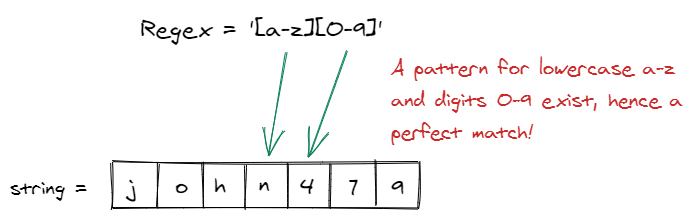
[a-z] matches any character between 'a' and 'z', [0-9] matches any character between '0' and '9'. Since they are placed right next to each other, the match is found consecutively.
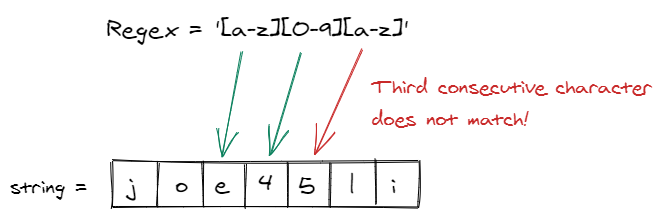
Here the third part of the expression, [a-z] did not match the third consecutive character of the pattern. As a result, a matching string was not found.
Characters and digits can also be combined for matching, such as in the following example.
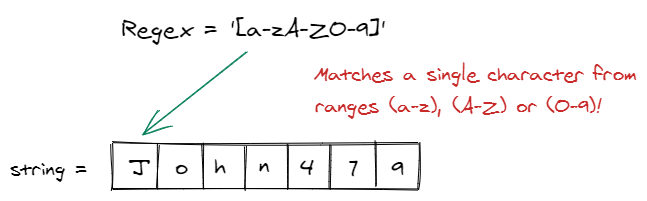
Let's see another metacharacter, a period (.). A period matches any single character occurring at that specific place in a string (except newline character).
The regex 'chips.dip' matches any string which has any single character in-between 'chips' and 'dip', such as the one given in input 'chipsndip' or 'chipsmdip'.
```java
public class Main {
    public static void main(String[] args) {
        String s = "chipsndip";
        java.util.regex.Pattern pattern = java.util.regex.Pattern.compile("chips.dip");
        java.util.regex.Matcher matcher = pattern.matcher(s);
        if (matcher.find()) {
            System.out.println("Found a match!");
        } else {
            System.out.println("Did not find a match.");
        }
    }
}
```
```javascript
// Adding a function to wrap the existing code
function findMatch() {
    let s = 'chipsndip';
    if (/chips.dip/.test(s)) {
        console.log("Found a match!");
    } else {
        console.log("Did not find a match.");
    }
}

// Driver code to execute the function
findMatch();
```
```python
# Adding a function to wrap the existing code
def find_match():
    import re
    s = 'chipsndip'
    if re.search('chips.dip', s):
        print("Found a match!")
    else:
        print("Did not find a match.")

# Driver code to execute the function
find_match()
```
```cpp
// Wrapping existing code inside a function
void findMatch() {
    std::string s = "chipsndip";
    std::regex e ("chips.dip");
    if (std::regex_search(s,e))
        std::cout << "Found a match!" << std::endl;
    else
        std::cout << "Did not find a match." << std::endl;
}

// Driver code to execute the function
int main() {
    findMatch();
    return 0;
}
```
```csharp
class Program {
    static void Main(string[] args) {
        string s = "chipsndip";
        System.Text.RegularExpressions.Regex r = new System.Text.RegularExpressions.Regex("chips.dip");
        if (r.IsMatch(s)) {
            Console.WriteLine("Found a match!");
        } else {
            Console.WriteLine("Did not find a match.");
        }
    }
}
```
```go
package main

import (
	"fmt"
	"regexp"
)

// Wrapping existing code inside a function
func findMatch() {
	var s = "chipsndip"
	match, _ := regexp.MatchString("chips.dip", s)
	if match {
		fmt.Println("Found a match!")
	} else {
		fmt.Println("Did not find a match.")
	}
}

func main() {
	// Driver code to execute the function
	findMatch()
}
```
Special Characters Part 3
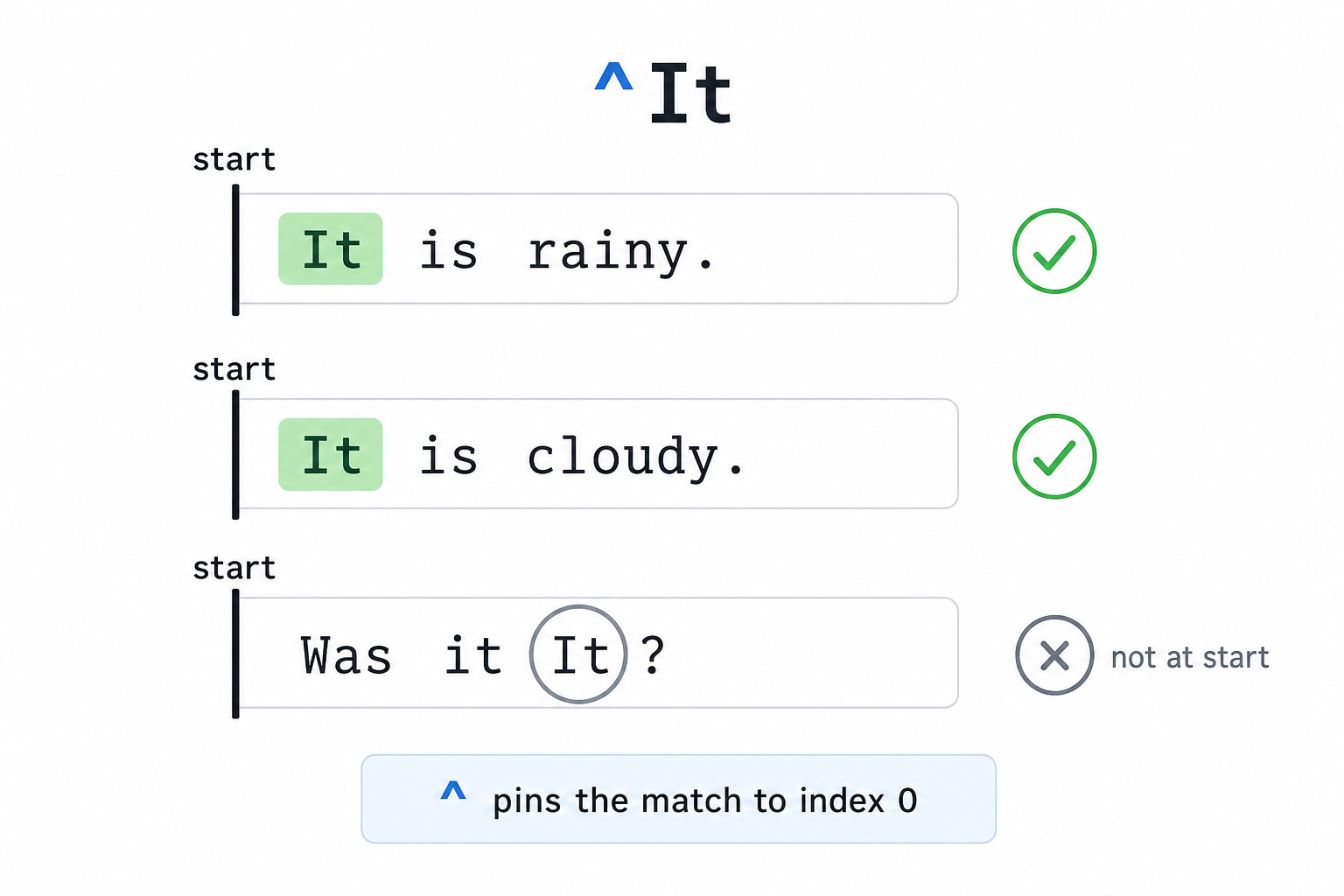
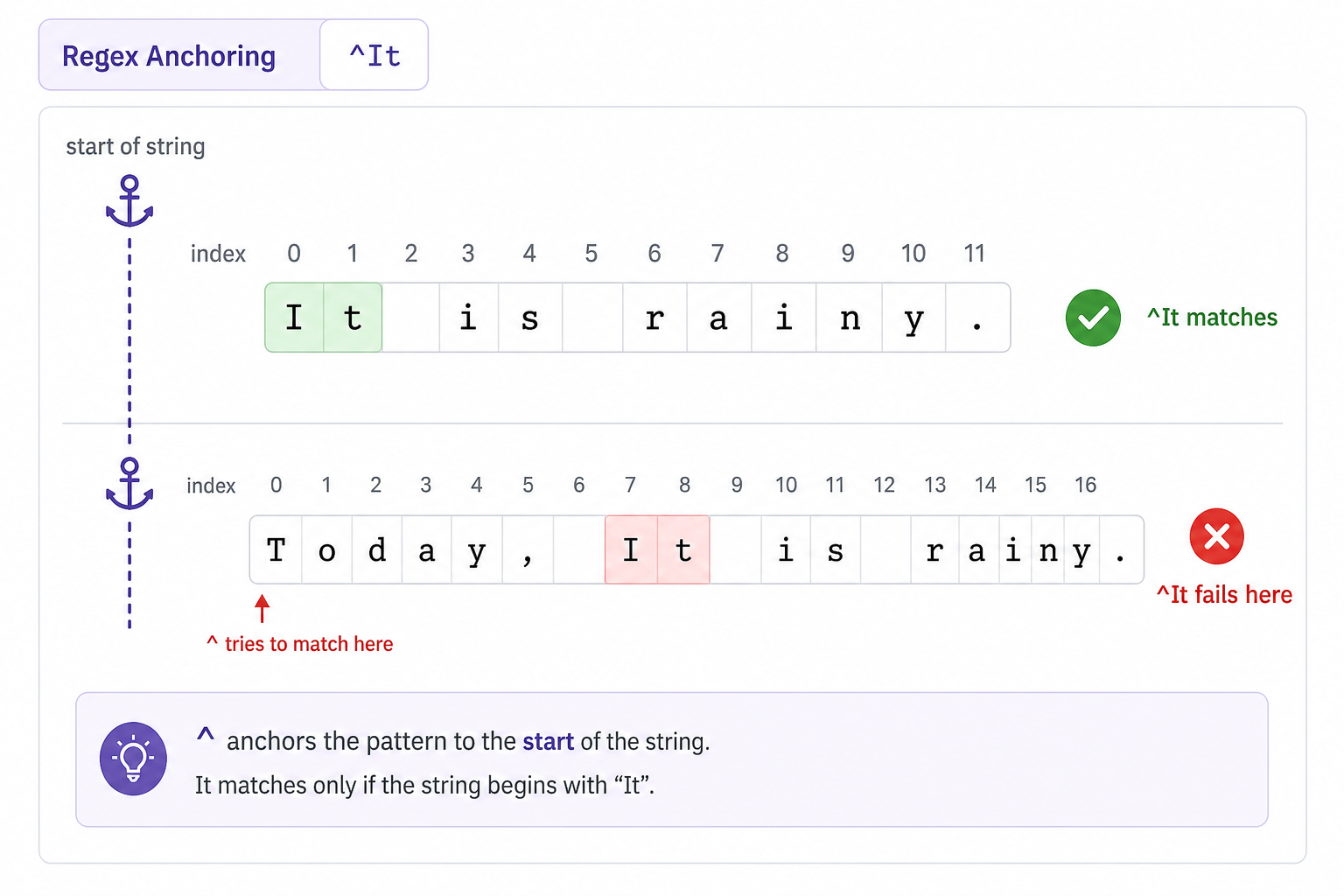
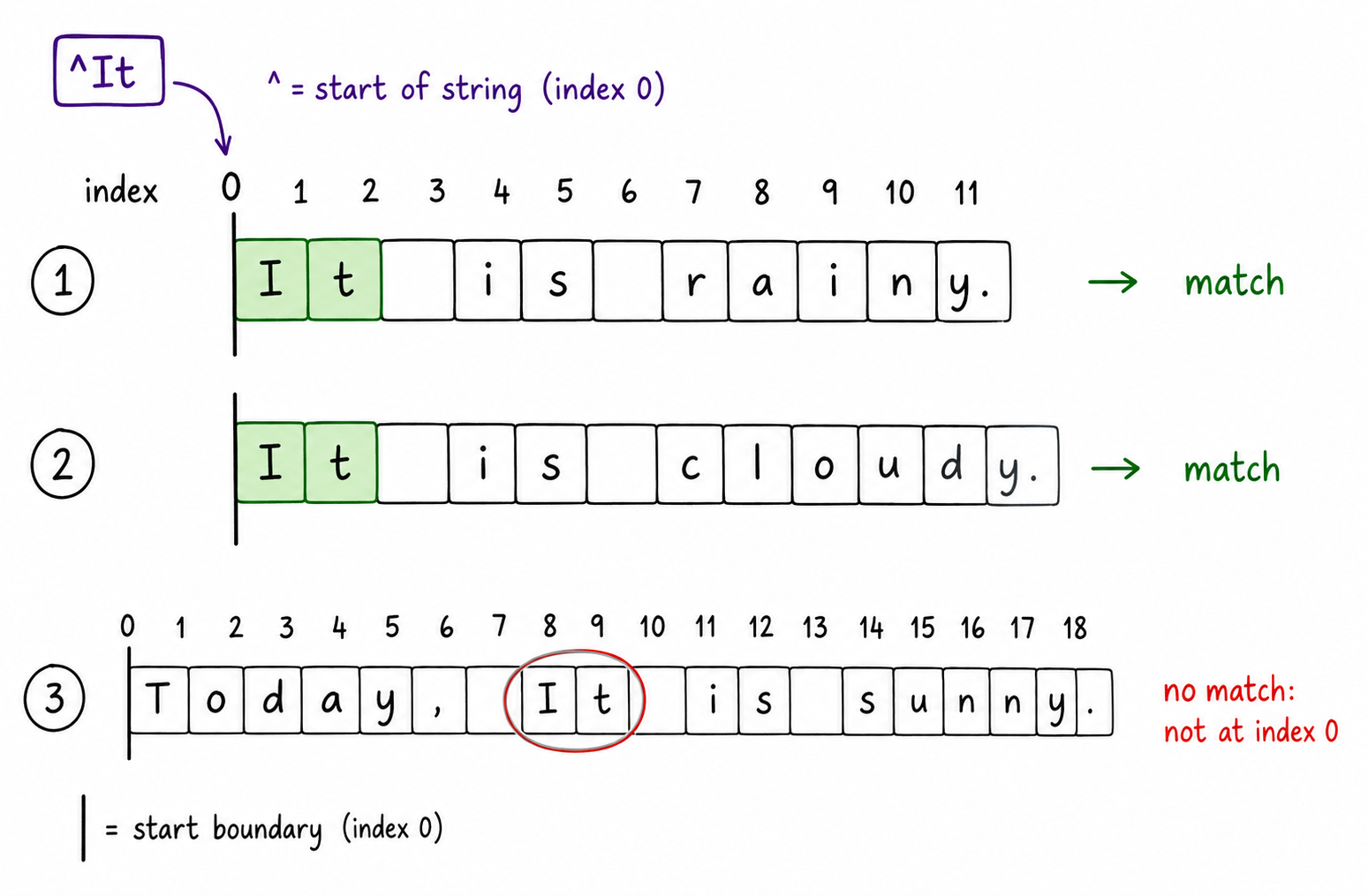
A caret (^) is another metacharacter. It matches characters at the start of the string. This is helpful when we need to match multiple strings that start with similar characters.
All the given strings begin from 'It', and hence are successfully matched with the given regular expression '^It'.
```java
public class Main {
    public static void main(String[] args) {
        String s1 = "It is rainy.";
        String s2 = "It is cloudy.";
        String s3 = "It is sunny.";
        if (java.util.regex.Pattern.matches("^It", s1) && java.util.regex.Pattern.matches("^It", s2) && java.util.regex.Pattern.matches("^It", s3)) {
            System.out.println("Found a match!");
        } else {
            System.out.println("Did not find a match.");
        }
    }
}
```
```javascript
// Adding a function to wrap the existing code
function findMatch() {
    var s1 = 'It is rainy.';
    var s2 = 'It is cloudy.';
    var s3 = 'It is sunny.';
    if (/^It/.test(s1) && /^It/.test(s2) && /^It/.test(s3)) {
        console.log("Found a match!");
    } else {
        console.log("Did not find a match.");
    }
}

// Driver code to execute the function
findMatch();
```
```python
# Adding a function to wrap the existing code
def find_match():
    import re
    s1 = 'It is rainy.'
    s2 = 'It is cloudy.'
    s3 = 'It is sunny.'
    if re.search('^It', s1) and re.search('^It', s2) and re.search('^It', s3):
        print("Found a match!")
    else:
        print("Did not find a match.")

# Driver code to execute the function
find_match()
```
```cpp
// Wrapping existing code inside a function
void findMatch() {
    std::string s1 = "It is rainy.";
    std::string s2 = "It is cloudy.";
    std::string s3 = "It is sunny.";

    std::regex pattern("^It");
    if (std::regex_search(s1, pattern) && std::regex_search(s2, pattern) && std::regex_search(s3, pattern)) {
        std::cout << "Found a match!" << std::endl;
    } else {
        std::cout << "Did not find a match." << std::endl;
    }
}

// Driver code to execute the function
int main() {
    findMatch();
    return 0;
}
```
```csharp
class Program {
    static void Main(string[] args) {
        string s1 = "It is rainy.";
        string s2 = "It is cloudy.";
        string s3 = "It is sunny.";
        if (System.Text.RegularExpressions.Regex.IsMatch(s1, "^It") && System.Text.RegularExpressions.Regex.IsMatch(s2, "^It") && System.Text.RegularExpressions.Regex.IsMatch(s3, "^It")) {
            Console.WriteLine("Found a match!");
        } else {
            Console.WriteLine("Did not find a match.");
        }
    }
}
```
```go
package main

import (
	"fmt"
	"regexp"
)

// Wrapping existing code inside a function
func findMatch() {
	s1 := "It is rainy."
	s2 := "It is cloudy."
	s3 := "It is sunny."
	match, _ := regexp.MatchString("^It", s1)
	match2, _ := regexp.MatchString("^It", s2)
	match3, _ := regexp.MatchString("^It", s3)
	if match && match2 && match3 {
		fmt.Println("Found a match!")
	} else {
		fmt.Println("Did not find a match.")
	}
}

func main() {
	// Driver code to execute the function
	findMatch()
}
```
Anchor the Beginning
The caret ^ is an anchor, not a character to consume.
Read ^It as: “the string must begin with It.” If It appears later in the sentence, the pattern does not satisfy the anchor.
Caret Means Start
The caret ^ does not mean “contains this somewhere.” It means “the match must begin at index 0.”
So ^It matches It is rainy., but it would not match Today, It is rainy. because It appears later.
Anchoring the Start
^ is an anchor, not a character to consume.
It pins the pattern to index 0, so ^It only matches when It is the very beginning of the string. If It appears later, the same letters are present, but the anchor fails.
Special Characters 4
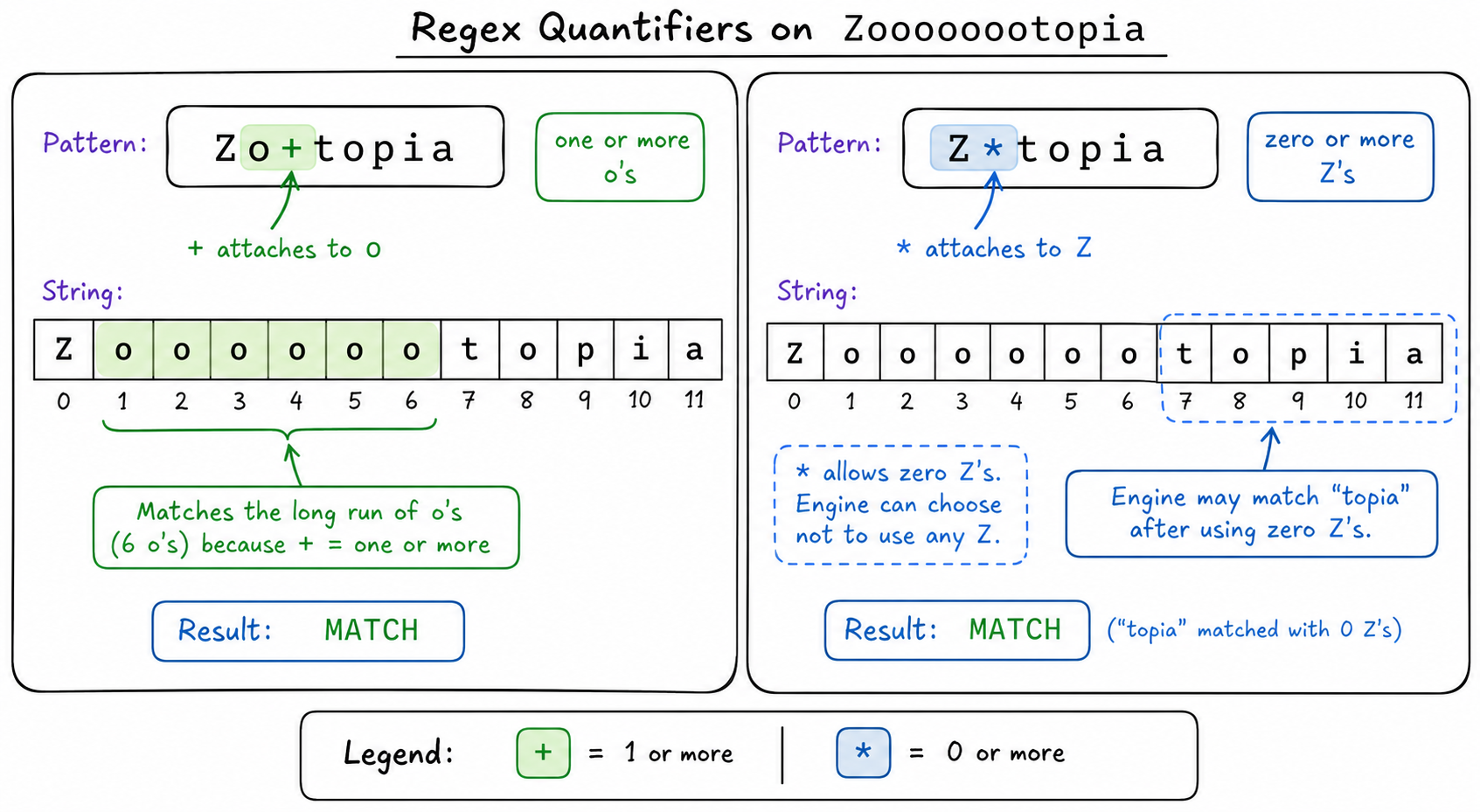
Let's look at a repetition based metacharacter, plus (+). It checks if the previous character (from the position of +) in the string appears one or more times from that position.
```java
public class Main {
    public static void main(String[] args) {
        String s = "Zoooooootopia";
        java.util.regex.Pattern pattern = java.util.regex.Pattern.compile("Zo+topia");
        java.util.regex.Matcher matcher = pattern.matcher(s);
        if (matcher.find()) {
            System.out.println("Found a match!");
        } else {
            System.out.println("Did not find a match.");
        }
    }
}
```
```javascript
// Adding a function to wrap the existing code
function findMatch() {
    let s = "Zoooooootopia";
    let pattern = /Zo+topia/;
    if (pattern.test(s)) {
       console.log("Found a match!");
    } else {
       console.log("Did not find a match.");
    }
}

// Driver code to execute the function
findMatch();
```
```python
# Adding a function to wrap the existing code
def find_match():
    import re
    s = 'Zoooooootopia'
    if re.search('Zo+topia', s):
        print("Found a match!")
    else:
        print("Did not find a match.")

# Driver code to execute the function
find_match()
```
```cpp
// Wrapping existing code inside a function
void findMatch() {
    std::string s = "Zoooooootopia";
    std::regex r("Zo+topia");
    if(std::regex_search(s, r)) {
        std::cout << "Found a match!\n";
    } else {
        std::cout << "Did not find a match.\n";
    }
}

// Driver code to execute the function
int main() {
    findMatch();
    return 0;
}
```
```csharp
class Program {
    static void Main(string[] args) {
        string s = "Zoooooootopia";
        System.Text.RegularExpressions.Regex regex = new System.Text.RegularExpressions.Regex(@"Zo+topia");
        if (regex.IsMatch(s)) {
            Console.WriteLine("Found a match!");
        } else {
            Console.WriteLine("Did not find a match.");
        }
    }
}
```
```go
package main

import (
	"fmt"
	"regexp"
)

// Wrapping existing code inside a function
func findMatch() {
	s := "Zoooooootopia"
	match, _ := regexp.MatchString("Zo+topia", s)
	if match {
		fmt.Println("Found a match!")
	} else {
		fmt.Println("Did not find a match.")
	}
}

func main() {
	// Driver code to execute the function
	findMatch()
}
```
Special Characters 5
In this example, it is important to write 'o' before '+', because this metacharacter checks if there is a preceding character present (there must be one of the repeating characters to check!). However, you could avoid this by using the asterisk ('*') metacharacter.
This matches the string perfectly without having to know about the preceding character beforehand.
```java
public class Main {
    public static void main(String[] args) {
        String s = "Zoooooootopia";
        java.util.regex.Pattern pattern = java.util.regex.Pattern.compile("Z*topia");
        java.util.regex.Matcher matcher = pattern.matcher(s);
        if (matcher.find()) {
            System.out.println("Found a match!");
        } else {
            System.out.println("Did not find a match.");
        }
    }
}
```
```javascript
// Adding a function to wrap the existing code
function findMatch() {
    let s = 'Zoooooootopia';
    if (/Z*topia/.test(s)) {
        console.log("Found a match!");
    } else {
        console.log("Did not find a match.");
    }
}

// Driver code to execute the function
findMatch();
```
```python
# Adding a function to wrap the existing code
def find_match():
    import re
    s = 'Zoooooootopia'
    if re.search('Z*topia', s):
        print("Found a match!")
    else:
        print("Did not find a match.")

# Driver code to execute the function
find_match()
```
```cpp
// Wrapping existing code inside a function
void findMatch() {
    std::string s = "Zoooooootopia";
    std::regex pattern("Z*topia");
    if (std::regex_search(s, pattern)) {
        std::cout << "Found a match!" << std::endl;
    } else {
        std::cout << "Did not find a match." << std::endl;
    }
}

// Driver code to execute the function
int main() {
    findMatch();
    return 0;
}
```
```csharp
class Program {
    static void Main(string[] args) {
        string s = "Zoooooootopia";
        System.Text.RegularExpressions.Regex regex = new System.Text.RegularExpressions.Regex("Z*topia");
        if (regex.IsMatch(s)) {
            Console.WriteLine("Found a match!");
        } else {
            Console.WriteLine("Did not find a match.");
        }
    }
}
```
```go
package main

import (
	"fmt"
	"regexp"
)

// Wrapping existing code inside a function
func findMatch() {
	s := "Zoooooootopia"
	pattern := regexp.MustCompile("Z*topia")
	if pattern.FindString(s) == "" {
		fmt.Println("Did not find a match.")
	} else {
		fmt.Println("Found a match!")
	}
}

func main() {
	// Driver code to execute the function
	findMatch()
}
```
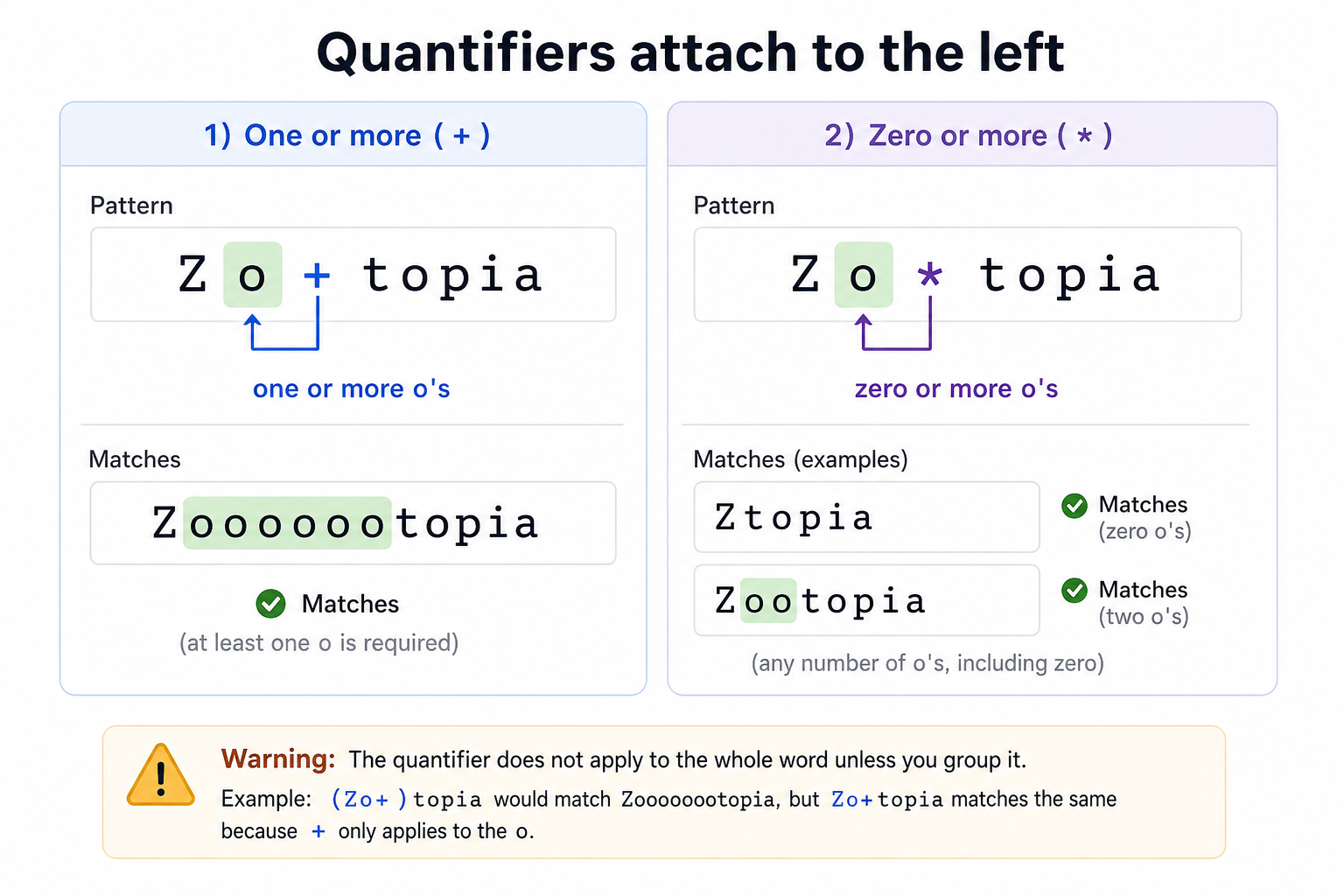
Quantifiers Look Left
+ and * are quantifiers. They modify the token immediately to their left.
So in Zo+topia, the + belongs to o: match one or more o characters. With *, the idea is similar, but zero repetitions are allowed.
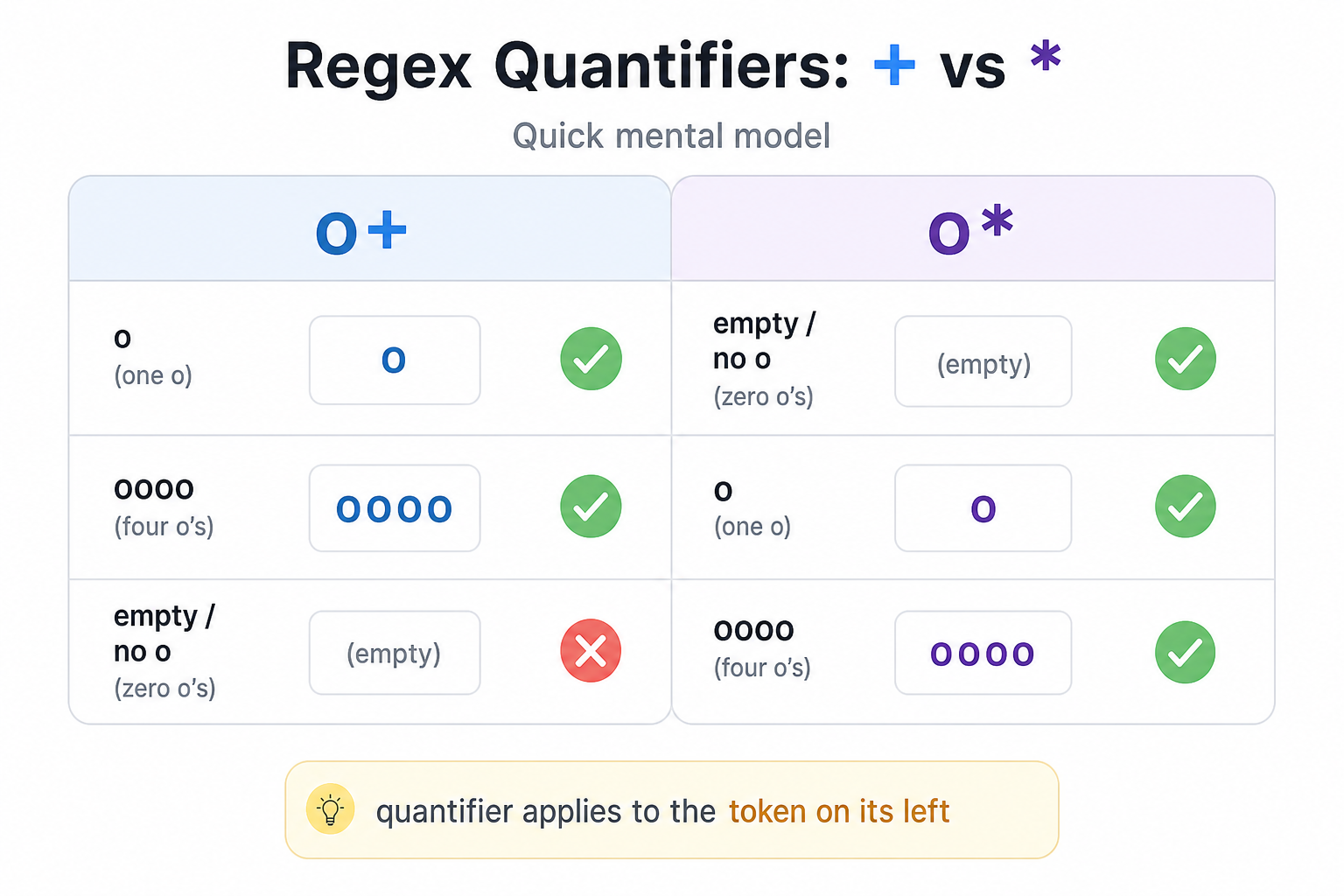
Plus vs Star
Both + and * are repetition operators, but they answer slightly different questions about the token immediately to their left.
Use this visual to compare: o+ means “one or more os,” while o* means “zero or more os.”
Quantifiers Attach Left
+ and * both modify the token immediately to their left.
So o+ means “one or more o characters,” while Z* means “zero or more Z characters.” The key interview habit: always ask, what exact character or group is this quantifier repeating?
Learn More
This lesson only lists down the basics of regular expressions. There are many other metacharacters available, and their combinations allow us to match complex patterns in texts.
If you are interested in learning more, below is a list of some more metacharacters (and the ones we studied in this lesson) used in regular expressions, along with their usage. Try experimenting with these metacharacters to create unique regular expressions.
Metacharacter Character Name Usage [ ] Square brackets Matches set of characters specified within them . Period Matches any single character except newline ^ Caret Matches the start of string $ Dollar Matches the end of string * Asterik Matches if there are zero or more repetitions + Plus Matches if there are one or more repetitions \w Lowercase w Matches a single letter, digit, or underscore \W Uppercase W Matches any character which is not a part of \w \s Lowercase s Matches single whitespace character \S Uppercase S Matches any character which is not a part of \s \d Lowercase d Matches decimal digit in the range 0-9 \D Uppercase D Matches any character which is not a part of \d \t Lowercase t Matches tab \n Lowercase n Matches newline characterOne Pager Cheat Sheet
One Pager Cheat Sheet
Search engines and text editors use **regular expressions** to quickly locate data and filter out the relevant information.- Regular expressions, or regex, are a special sequence of characters that define a pattern to
matchtext, which can be more powerful and shorter than the ‘equal’ operator (==),indexing, or otherstring methods. - The
importkeyword is used toloadtheremodulein Python, and thereforeimport reis a valid statement. - The
remodule provides a basic search method,.search(regex, string), which scans through a string and looks for a match to the provided regular expression, as demonstrated in a simple example. - -
re.search(pattern, string)scans left to right until some substring matches the pattern. - -
re.search(pattern, string)scans until it finds any substring that matches the pattern. - -
re.search()checks the whole string from left to right and succeeds when the pattern appears anywhere. - Using special characters (or
metacharacters) in regular expressions adds unique meaning to the expression, typically demonstrated by defining a character class with square brackets ([ ]). - Using
Square Brackets,[a-z],[0-9], and.we can createRegexpatterns to match character ranges, digits, and consecutive characters to achieve desired results. - The
^metacharacter allows us to match multiple strings that start with the same characters. - -
^patternmatches only when the pattern appears at the start of the string. - -
^patternanchors the pattern to the beginning of the string. - -
^patternmeans: match this pattern only at the start of the string. - The metacharacter
+checks if the previous character appears one or more times. - By using the
*metacharacter, one can avoid having to specify the preceding character when searching for a repeating character in a string. - -
x+means one or morex;x*means zero or morex; both attach to the token on the left. - -
+requires at least one repeat;*allows zero repeats, and both apply to the item directly on their left. - - Quantifiers like
+and*apply to the character or group directly before them. - The basics of regular expressions were just covered, but with
metacharacterssuch asSquare Brackets,Period,Caret,Dollar,Asterisk,Plus,\w,\W,\s,\S,\d,\D,\tand\n, one canmatch complex patternsin text.