Data Types and Variables
Read at your own pace. Code execution, quizzes, progress tracking, and the AI tutor are available in the interactive view with JavaScript enabled.
Why Types Matter
From program shape to program data
In Introduction to C++, you learned how a C++ program is compiled and why C++ programmers think carefully about performance.
Now we zoom into the smallest building blocks your programs manipulate: data types and variables.
A variable answers two questions:
-
What kind of value is this?
int,double,char,bool, etc. - Where can I store and reuse it? a named place in memory
This matters whether you're counting users on a website, storing a stock price, tracking an AI model's accuracy, or representing a single character in a file.

Primitive Building Blocks
Common primitive types
C++ gives you several built-in, primitive types. These are the backbone of larger structures you'll meet later.
Type Meaning Example valueint
whole number
42
double
decimal number
3.14159
float
smaller decimal number
0.75f
char
single character
'A'
bool
true/false value
true
A variable declaration combines a type, a name, and often an initial value:
int users = 1200;
Read it as: “Create a variable named users that stores an integer.”
```cpp
#include <iostream>

int main() {
    int users = 1200;
    double modelAccuracy = 0.9275;
    char grade = 'A';
    bool marketOpen = true;

    std::cout << "Users: " << users << "\n";
    std::cout << "Model accuracy: " << modelAccuracy << "\n";
    std::cout << "Grade: " << grade << "\n";
    std::cout << "Market open? " << marketOpen << "\n";

    return 0;
}
```
Typed At Compile Time
True or false?
In C++, every variable has a type that the compiler knows before the program runs.
Variables Name Memory
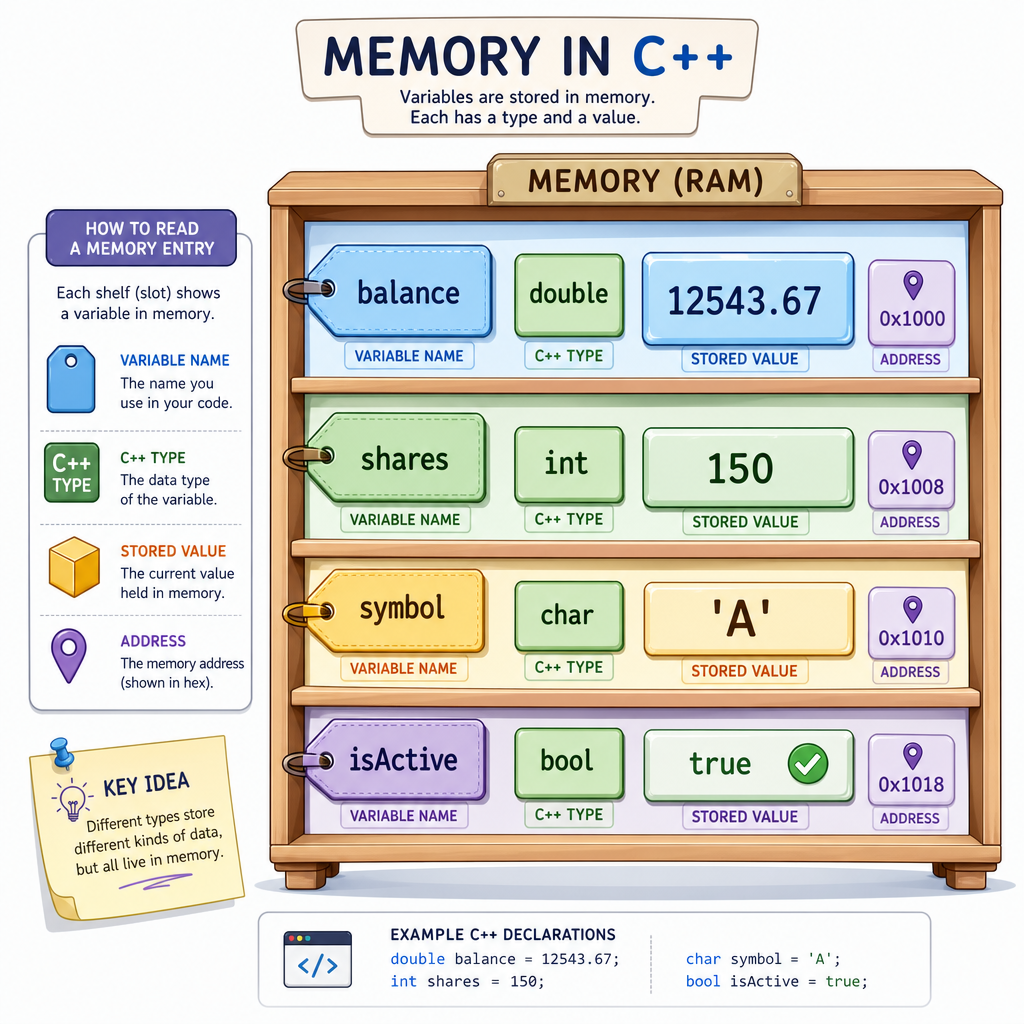
A variable is a typed label
A useful mental model:
name        type       value
---------   -------    --------
balance     double     1050.75
shares      int        20
symbol      char       'A'
isActive    bool       true
The name lets you refer to the value later.
The type tells C++:
- how much memory may be needed
- what kind of operations make sense
- how to interpret the raw bits stored there
This is one reason C++ can be fast: it does not need to guess what kind of data a variable holds while the program is running.
Choosing Types
You need to store the number of completed coding challenges a learner has solved. Which type is the best everyday choice?
Initialization Styles
Give variables a starting value
In C++, a variable can be declared first, then assigned later—but when possible, prefer initializing it right away.
Common styles:
-
int a = 10;assignment-style initialization -
int b(10);parentheses initialization -
int c{10};brace initialization
Brace initialization is popular in modern C++ because it helps prevent accidental narrowing, such as trying to squeeze a decimal value into an integer.
Also notice const: it marks a variable as read-only after initialization. Use it when a value should not change, like a tax rate, physics constant, or configuration limit.
```cpp
#include <iostream>

int main() {
    int challengeCount{42};
    double price{99.95};
    const double taxRate{0.0825};

    std::cout << "Challenges solved: " << challengeCount << "\n";
    std::cout << "Price: $" << price << "\n";
    std::cout << "Tax rate: " << taxRate << "\n";

    return 0;
}
```
Decimal Choice
Fill in the blank with the best type name.
To store a value like 99.95, use a variable of type _____.
Size And Precision
Types have sizes
C++ types occupy memory. The exact size can depend on your system and compiler, but some relationships are common:
-
charis usually 1 byte -
intis commonly 4 bytes -
doubleis commonly 8 bytes -
boolis often 1 byte, though it represents onlytrueorfalse
You can ask your compiler using sizeof.
For finance and AI work, precision matters. A double can represent many decimal values, but floating-point math is still approximate. Later, when programs become more complex, this becomes important for money, statistics, and model scores.
```cpp
#include <iostream>

int main() {
    std::cout << "sizeof(char): " << sizeof(char) << " byte(s)\n";
    std::cout << "sizeof(int): " << sizeof(int) << " byte(s)\n";
    std::cout << "sizeof(float): " << sizeof(float) << " byte(s)\n";
    std::cout << "sizeof(double): " << sizeof(double) << " byte(s)\n";
    std::cout << "sizeof(bool): " << sizeof(bool) << " byte(s)\n";

    return 0;
}
```
Text Basics
char vs std::string
A char stores one character:
'A''7''$'
Notice the single quotes.
For multiple characters, C++ commonly uses std::string. A string is not a primitive type, but it is so useful that you will use it constantly.
Use:
-
charfor one symbol -
std::stringfor names, messages, IDs, and labels
This distinction is similar to frontend work: a single character and a full text field are related, but not the same thing.
```cpp
#include <iostream>
#include <string>

int main() {
    char rating = 'A';
    std::string company = "AlgoDaily";
    std::string ticker = "AAPL";

    std::cout << "Rating: " << rating << "\n";
    std::cout << "Company: " << company << "\n";
    std::cout << "Ticker: " << ticker << "\n";

    return 0;
}
```
Brace Initialization
Which initialization style is especially helpful for catching accidental narrowing conversions?
Conversion Caution
Types can convert, but be careful
C++ can convert between some types automatically. Sometimes that is useful. Sometimes it hides a bug.
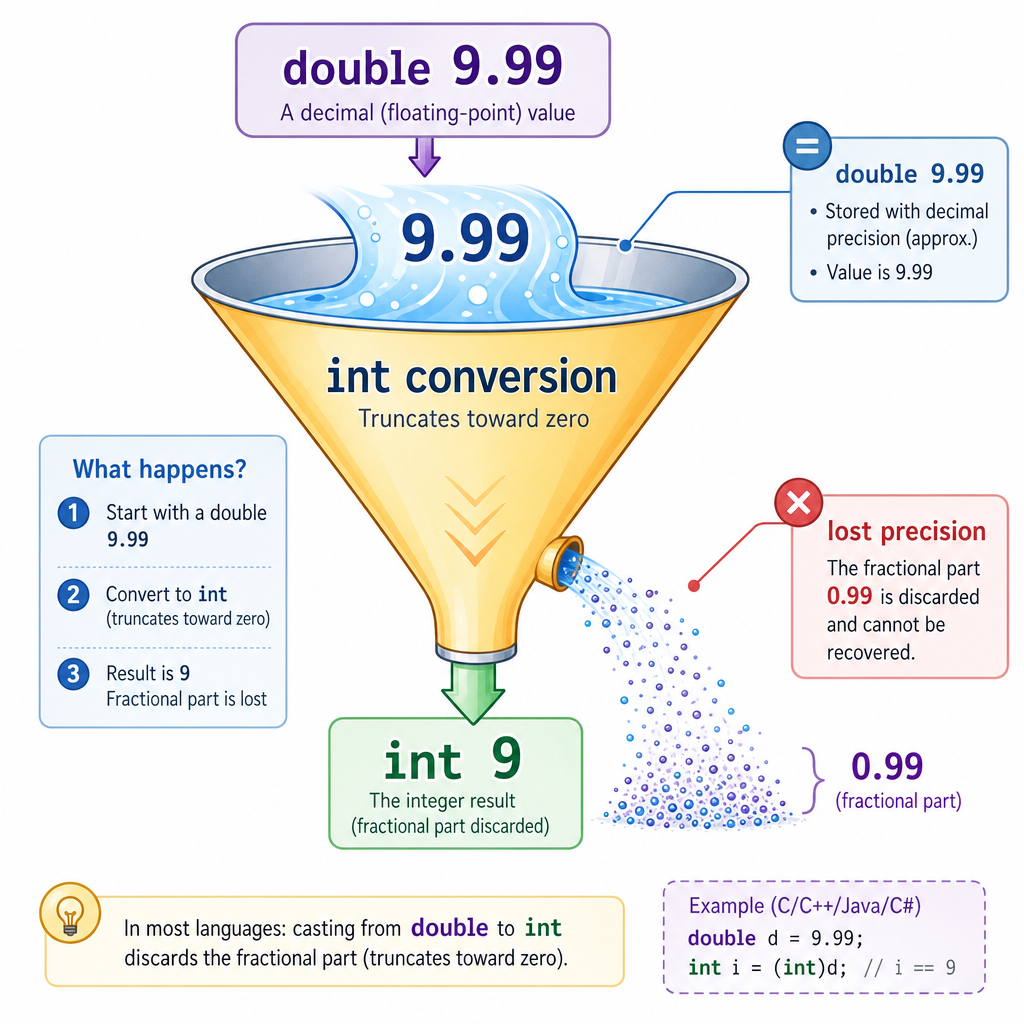
Example: storing a decimal value in an int drops the fractional part.
9.99 -> 9
That might be fine for counting whole items, but terrible for prices, probabilities, or measurements.
The takeaway: choose the type that matches the meaning of the data. In the next lesson, Operators, Conditions, and Loops, you'll use these typed values to compute results and control program flow.