Object Oriented Programming Class Principles
Read at your own pace. Code execution, quizzes, progress tracking, and the AI tutor are available in the interactive view with JavaScript enabled.
Fundamental Properties of Object Oriented Programming
Fundamental Properties of Object-Oriented Programming
In this lesson, we will discuss the four fundamental properties of Object-Oriented Programming. These are the building blocks of programming in the OOP paradigm. In fact, OOP was actually primarily invented to help programmers enforce and follow these four basic properties while writing code.
The four properties of OOP we'll cover are:
- Encapsulation
- Abstraction
- Inheritance
- Polymorphism
If a programming language supports these four properties, then it is classified as an OOP language. Java, C++, Python, and Javascript all belong in this category. However, for a language to be considered a Pure Object Oriented Programming Language, it must follow three additional rules. Those are:
- Each primitive type must be an object.
- Each user-defined type must be an object.
- All operations on objects must be performed by invoking a method associated with an object.
Pure OOP languages have a lot of limitations in terms of practical usage which is why they are pretty rare. The only pure OOP language that is close to popular is Smalltalk.
In this lesson, we will go through the four fundamental properties one by one and give examples of each. Instead of using the keyboard-monitor example, we will use a more trivial Shape example. We will design an object-oriented architecture to represent different kinds of shapes.

Encapsulation
Encapsulation
This rule/property is the easiest to understand among the four. This property dictates that all objects should be capsules and that all data related to an object should be inside that object.

The code below does not follow the rule of encapsulation. An object cannot access a property if the property is outside itself (i.e., outside the capsule). Thus, this code will not even compile since encapsulation says that all objects and methods in Java must be within an object.
// This is wrong, shapeMaxWidth is external to the class
shapeMaxWidth = 0;
public class Shape {
    int maxHeight;

    int getMaxArea() {
        return shapeWidth*height;
    }
}
// This is wrong, shapeMaxWidth is external to the class
int shapeMaxWidth = 0;
public class Shape
{
    int maxHeight;

    public int GetMaxArea()
    {
        return shapeWidth*height;
    }
}
// This is wrong, shapeMaxWidth is external to the class
int shapeMaxWidth = 0;
class Shape {
    int maxHeight;

    int getMaxArea() {
        return shapeWidth*height;
    }
};
# This is wrong, shapeMaxWidth is external to the class
shape_max_width = 0
class Shape:
    max_height = 0

    def get_max_area(self):
        return self.shape_width*self.height
// This is wrong, shapeMaxWidth is external to the class
var shapeMaxWidth = 0;
class Shape {
    constructor(maxHeight) {
        this.maxHeight = maxHeight;
    }

    getMaxArea() {
        return this.shapeWidth*this.height;
    }
}
/* This is wrong, shapeMaxWidth is external to the class */
var shapeMaxWidth = 0
type Shape struct {
    maxHeight     int
}

func (s Shape) getMaxArea() int {
    return shapeWidth*height
}
Encapsulation in Practice
Encapsulation in Practice
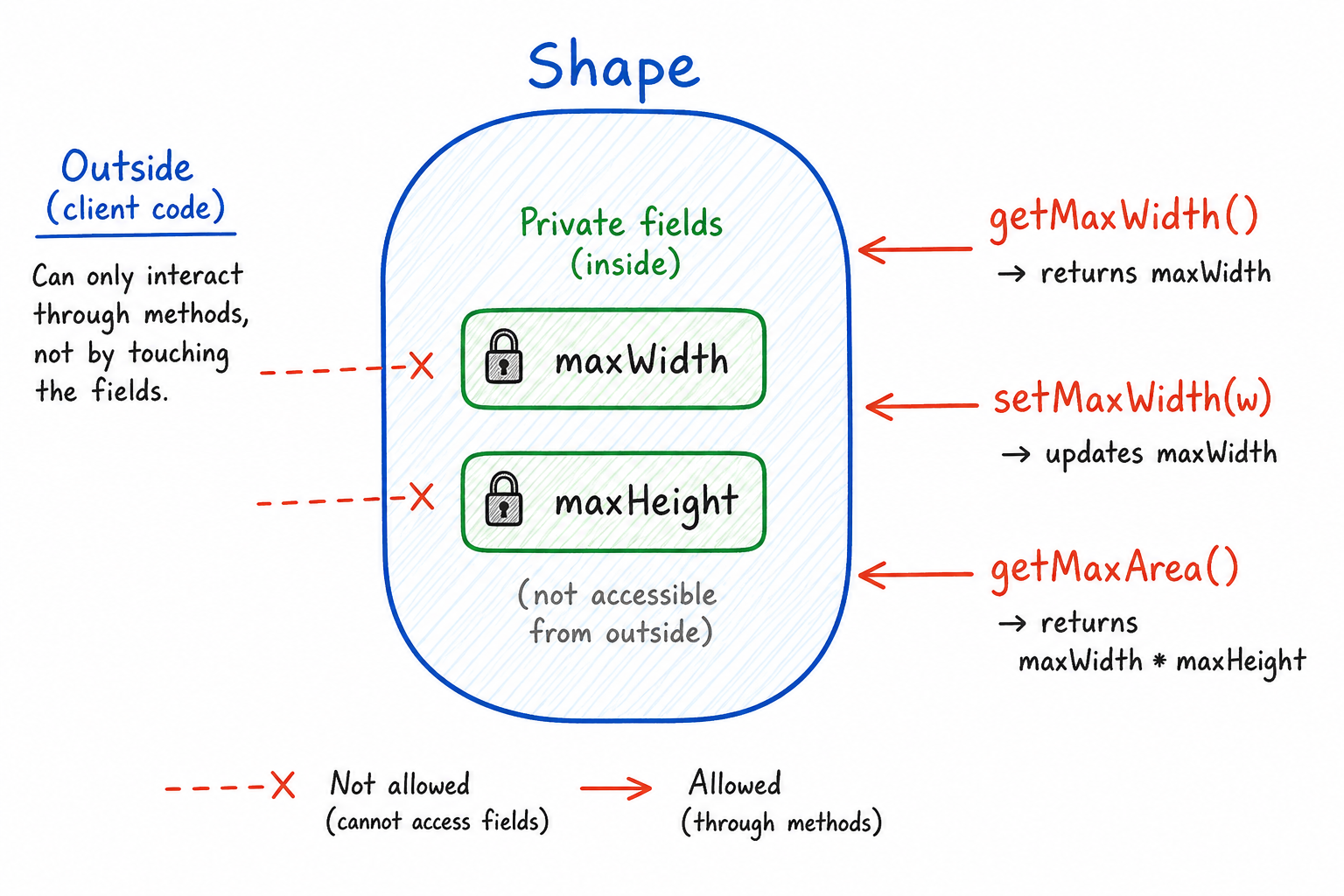
Putting data inside a class is the first step. In most real Java code, we also want to control how that data changes.
For example, if maxWidth and maxHeight are public, any other class can set them to an invalid value like -10. That breaks the idea of the object protecting its own state.
A better version keeps the fields private and exposes small public methods for reading or changing them safely.
```java
public class Shape {
    private int maxWidth;
    private int maxHeight;

    public int getMaxWidth() {
        return maxWidth;
    }

    public int getMaxHeight() {
        return maxHeight;
    }

    public void setMaxWidth(int maxWidth) {
        if (maxWidth > 0) {
            this.maxWidth = maxWidth;
        }
    }

    public void setMaxHeight(int maxHeight) {
        if (maxHeight > 0) {
            this.maxHeight = maxHeight;
        }
    }

    public int getMaxArea() {
        return maxWidth * maxHeight;
    }
}
```
quiz 1.5
Which line best describes abstraction in Object-Oriented Programming?
Abstraction
Abstraction
Abstraction in OOP is similar to the abstract data types (ADTs) we discussed in an earlier lesson. With ADTs, we do not need to know how a data structure is implemented. We only know the specifications of how it should behave.

Abstraction is also a way to tell the user of the class how to use the class without letting them know how it is implemented internally. With abstraction, you can "hide" all the decisions and processing steps within your Keyboard class.
Most programming languages have special keywords to utilize the concept of abstraction (e.g., public and private in Java). When designing a class, we can use these keywords to prevent anyone from calling certain functions from outside of the class. The outside user should never be able to know all the properties and methods of a class. They should only know the methods that are public and needed for the usage of the class.
Let's improve our Shape class by adding some abstractions to it. The end-user (inside the Main class) can only call the methods that are needed to use a Shape object.
// Shape.java
public class Shape {
    // To make a class thread-safe,
    // It is recommended to make all properties of object private
    // We will later inherit this class. protected is a keyword that allows inherited classes to access parent class properties.
    protected int maxWidth;
    protected int maxHeight;

    public int getMaxWidth() {
        return maxWidth;
    }

    public int getMaxHeight() {
        return maxHeight;
    }

    public int setMaxWidth(int maxWidth) {
        this.maxWidth = maxWidth;
    }

    public int getMaxHeight(int maxWidth) {
        this.maxHeight = maxHeight;
    }

    public int getMaxArea() {
        return maxWidth*maxHeight;
    }
}

// Now in the Main class, another programmer will use the Shape class public methods
// Main.java
public class Main {
    public static void main(String[] args) {
        Shape shape = new Shape();

        // Access public methods
        System.out.println(shape.getMaxHeight());
        System.out.println(shape.getMaxWidth());

        // Try to access private data -> Compilation error
        System.out.println(shape.maxWidth);
    }
}
// Shape.js
class Shape {
    // To make a class thread-safe,
    // It is recommended to make all properties of object private
    // We will later inherit this class. protected is a keyword that allows inherited classes to access parent class properties.
    maxWidth;
    maxHeight;

    getMaxWidth() {
        return this.maxWidth;
    }

    getMaxHeight() {
        return this.maxHeight;
    }

    setMaxWidth(maxWidth) {
        this.maxWidth = maxWidth;
    }

    setMaxHeight(maxHeight) {
        this.maxHeight = maxHeight;
    }

    getMaxArea() {
        return this.maxWidth*this.maxHeight;
    }
}

// Now another programmer will use the Shape's public methods

const shape = new Shape();

// Access public methods
console.log(shape.getMaxHeight());
console.log(shape.getMaxWidth());

// Try to access private data -> Compilation error
console.log(shape.maxWidth);
# Shape.py
class Shape:
    # To make a class thread-safe,
    # It is recommended to make all properties of object private
    # We will later inherit this class. protected is a keyword that allows inherited classes to access parent class properties.
    def __init__(self):
        self._max_width = None
        self._max_height = None

    @property
    def max_width(self):
        return self._max_width

    @property
    def max_height(self):
        return self._max_height

    @max_width.setter
    def max_width(self, max_width):
        self._max_width = max_width

    @max_height.setter
    def max_height(self, max_height):
        self._max_height = max_height

    def get_max_area(self):
        return self._max_width * self._max_height

# Now another programmer will use the Shape's public methods

shape = Shape()

# Access public methods
print(shape.max_height)
print(shape.max_width)

# Try to access private data -> Python doesn't prevent this but it's against the style guide
print(shape._max_width)
// Shape.cpp
class Shape {
    // To make a class thread-safe,
    // It is recommended to make all properties of object private
    // We will later inherit this class. protected is a keyword that allows inherited classes to access parent class properties.
    protected:
        int maxWidth;
        int maxHeight;
    public:
        int getMaxWidth(){
            return maxWidth;
        }

        int getMaxHeight(){
            return maxHeight;
        }

        void setMaxWidth(int maxWidth){
            this->maxWidth = maxWidth;
        }

        void setMaxHeight(int maxHeight){
            this->maxHeight = maxHeight;
        }

        int getMaxArea(){
            return maxWidth*maxHeight;
        }
};

// Now another programmer will use the Shape's public methods

int main(){
    Shape shape;

    // Access public methods
    cout << shape.getMaxHeight();
    cout << shape.getMaxWidth();

    // Try to access protected data -> Compilation error
    cout << shape.maxWidth;
}
// Shape.cs
public class Shape {
    // To make a class thread-safe,
    // It is recommended to make all properties of object private
    // We will later inherit this class. protected is a keyword that allows inherited classes to access parent class properties.
    protected int maxWidth;
    protected int maxHeight;

    public int GetMaxWidth(){
        return maxWidth;
    }

    public int GetMaxHeight(){
        return maxHeight;
    }

    public void SetMaxWidth(int maxWidth){
        this.maxWidth = maxWidth;
    }

    public void SetMaxHeight(int maxHeight){
        this.maxHeight = maxHeight;
    }

    public int GetMaxArea(){
        return maxWidth*maxHeight;
    }
}

// Now in the Main class, another programmer will use the Shape class public methods
public class MainClass {
    public static void Main(string[] args) {
        Shape shape = new Shape();

        // Access public methods
        Console.WriteLine(shape.GetMaxHeight());
        Console.WriteLine(shape.GetMaxWidth());

        // Try to access protected data. CS0122: 'Shape.maxWidth' is inaccessible due to its protection level
        Console.WriteLine(shape.maxWidth);
    }
}
// Shape.go
type Shape struct {
    // Go does not have classes, only structs. Field name capitalized (made public) to mimic inherited class access.
    MaxWidth  int
    MaxHeight int
}

func (s *Shape) getMaxWidth() int {
    return s.MaxWidth
}

func (s *Shape) getMaxHeight() int {
    return s.MaxHeight
}

func (s *Shape) setMaxWidth(maxWidth int) {
    s.MaxWidth = maxWidth
}

func (s *Shape) setMaxHeight(maxHeight int) {
    s.MaxHeight = maxHeight
}

func (s *Shape) getMaxArea() int {
    return s.MaxWidth * s.MaxHeight
}

// Now another programmer will use the Shape's public methods

func main() {
    shape := Shape{}

    // Access public methods
    fmt.Println(shape.getMaxHeight())
    fmt.Println(shape.getMaxWidth())

    // Try to access private data. Go does not have private variables in the same sense, but unexported (lowercased) variables would be equivalent.
    fmt.Println(shape.MaxWidth)
}
A method that returns a property of an object is known as a getter method. A method that sets a property value is known as a setter method. These are often used in Java to make properties private and accessible only through methods. You could also do some validation or calculation before returning a property if you are using a getter or setter. We will learn more about getters and setters in a later lesson.
Inheritance
Inheritance
The biggest draw of OOP is its inheritance property.
Inheritance is the mechanism that binds two classes in a parent-child relationship. In this relationship, the child can access all the properties and methods of the parent. An object can originate from a more specific type of the parent class which allows you to inherit that object as a child from its parent class. If the behavior of the child class needs to change, we can override or add to the methods of the parent class to work as we want. We cannot change the function signature though.
In the Shape class example, think of a Circle or a Rectangle. Both of these objects also need a getMaxArea method, a maxWidth property, and a maxHeight property. Instead of reimplementing the same methods for these new classes by copy-pasting, we can just inherit these two classes from the Shape class.
Let's implement it now! Java has a keyword extends which applies inheritance to a class. See the example below.
// Circle.java
public class Circle extends Shape {
    // Here, we don't need to define maxHeight and maxWidth. They are already defined
    // Later we will learn how to initialize these when we learn about constructors

    // Adding new properties
    private int radius;

    // Adding new methods
    public int getRadius() { return radius; }
    public void setRadius(int radius) { this.radius = radius; }
    public double getArea() {
        return 3.14*radius*radius;
    }
}

// Rectangle.java
public class Rectangle extends Shape {
    private int height;
    private int width;

    // Adding new methods
    public int getHeight() { return height; }
    public int getWidth() { return width; }
    public void setWidth(int width) { this.width = width; }
    public void setHeight(int height) { this.height = height; }
    public int getArea() {
        return height*width;
    }
}

// Main.java
public class Main {
    public static void main(String[] args) {
        Circle circle = new Circle();
        // Calling circle's own methods
        System.out.println(circle.getArea());
        // Calling parent classes methods
        System.out.println(circle.getMaxArea());
    }
}
// Circle.cs
public class Circle : Shape {
    // Here, we don't need to define maxHeight and maxWidth. They are already defined
    // Later we will learn how to initialize these when we learn about constructors

    // Adding new properties
    private int radius;

    // Adding new methods
    public int getRadius() { return radius; }
    public void setRadius(int radius) { this.radius = radius; }
    public double getArea() {
        return 3.14*radius*radius;
    }
}

// Rectangle.cs
public class Rectangle : Shape {
    private int height;
    private int width;

    // Adding new methods
    public int getHeight() { return height; }
    public int getWidth() { return width; }
    public void setWidth(int width) { this.width = width; }
    public void setHeight(int height) { this.height = height; }
    public int getArea() {
        return height*width;
    }
}

// Program.cs
public class Program {
    public static void Main(string[] args) {
        Circle circle = new Circle();
        // Calling circle's own methods
        Console.WriteLine(circle.getArea());
        // Calling parent classes methods
        Console.WriteLine(circle.getMaxArea());
    }
}
// Circle.h
class Circle : public Shape {
    private:
        int radius; // Adding new properties
    public:
        int getRadius() { return radius; }  // Adding new methods
        void setRadius(int radius) { this->radius = radius; }
        double getArea() {
            return 3.14*radius*radius;
        }
};

// Rectangle.h
class Rectangle : public Shape {
    private:
        int height;
        int width;
    public:
        int getHeight() { return height; }  // Adding new methods
        int getWidth() { return width; }
        void setWidth(int width) { this->width = width; }
        void setHeight(int height) { this->height = height; }
        int getArea() {
            return height*width;
        }
};

// main.cpp
int main() {
    Circle circle;
    // Calling circle's own methods
    std::cout << circle.getArea() << '\n';
    // Calling parent classes methods
    std::cout << circle.getMaxArea() << '\n';
    return 0;
}
class Circle(Shape):
    # Here, we don't need to define maxHeight and maxWidth. They are already defined
    # Later we will learn how to initialize these when we learn about constructors

    # Adding new properties
    radius = 0

    # Adding new methods
    def getRadius(self):
        return self.radius

    def setRadius(self, radius):
        self.radius = radius

    def getArea(self):
        return 3.14 * self.radius * self.radius


class Rectangle(Shape):
    height = 0
    width = 0

    # Adding new methods
    def getHeight(self):
        return self.height

    def getWidth(self):
        return self.width

    def setWidth(self, width):
        self.width = width

    def setHeight(self, height):
        self.height = height

    def getArea(self):
        return self.height * self.width


if __name__ == "__main__":
    circle = Circle()  # Instantiating Circle Class
    # Calling circle's own methods
    print(circle.getArea())
    # Calling parent classes methods
    print(circle.getMaxArea())
// Circle.go
type Circle struct {
    // Here, we don't need to define maxHeight and maxWidth. They are already defined
    // Later we will learn how to initialize these when we learn about constructors

    // Adding new properties
    Shape
    radius int
}

// Adding new methods
func (c *Circle) getRadius() int {
    return c.radius
}

func (c *Circle) setRadius(radius int) {
    c.radius = radius
}

func (c *Circle) getArea() float64 {
    return 3.14 * float64(c.radius) * float64(c.radius)
}

// Rectangle.go
type Rectangle struct {
    Shape
    height int
    width  int
}

// Adding new methods
func (r *Rectangle) getHeight() int {
    return r.height
}

func (r *Rectangle) getWidth() int {
    return r.width
}

func (r *Rectangle) setWidth(width int) {
    r.width = width
}

func (r *Rectangle) setHeight(height int) {
    r.height = height
}

func (r *Rectangle) getArea() int {
    return r.height * r.width
}

// main.go
func main() {
    circle := Circle{}  // Instantiating Circle Struct
    // Calling circle's own methods
    fmt.Println(circle.getArea())
    // Calling parent classes methods
    fmt.Println(circle.getMaxArea())
}
Note that, inheritance is only allowed if the two objects can be thought of as the same or similar. A circle is a shape. A rectangle is also a shape.
On the other hand, if we wanted to implement a Line class, then it could not be inherited from Shape since a line is not a shape. Also, it should not have methods like getArea. However, a shape can contain a number of lines. We will discuss this more when we talk about Composition and Association in a later lesson.
quiz 1
Which keyword in Java is used to inherit class A from class B?
Polymorphism
Polymorphism
The last of the four fundamental properties of OOP is polymorphism. Polymorphism is a property that says all objects must act like all its parent types from which it is inherited. It can also act like other types (e.g., interfaces). In this section, we will discuss only the first part and leave interfaces for another lesson.

Let's take our Shape class example and build a program with user inputs. In our console program, the user will select a number of different shapes and input the necessary properties of those shapes. Our program will then calculate the total area of all the shapes and output the sum!
The first thing we need for each shape is a method that takes values from the user. Below is the code for it. Notice that we are using an annotation @Override to override a method. This helps the IDE to identify your mistake if you accidentally create a new method instead of overriding an existing method (e.g. change parameter order or type).
```java
// Shape.java
public class Shape {
    protected int maxWidth;
    protected int maxHeight;

    // Getters and Setters
    public int getMaxWidth() { return maxWidth; }
    public int getMaxHeight() { return maxHeight; }
    public void setMaxWidth(int maxWidth) { this.maxWidth = maxWidth; }
    public void setMaxHeight(int maxHeight) { this.maxHeight = maxHeight; }
    public int getMaxArea() { return maxWidth*maxHeight; }

    public double getArea() {
        return getMaxArea();
    }

    public void inputFromUser() {
        Scanner sc= new Scanner(System.in);
        System.out.print("Please input maxHeight :");
        this.maxHeight = sc.nextInt();
        System.out.print("Please input maxWidth :");
        this.maxWidth = sc.nextInt();
        System.out.println("Shape input successful");
    }
}

// Circle.java
public class Circle extends Shape {
    protected int radius;

    // Getters and Setters
    public int getRadius() { return radius; }
    public void setRadius(int radius) { this.radius = radius; }

    @Override
    public double getArea() {
        return 3.14*radius*radius;
    }

    @Override
    public void inputFromUser() {
        Scanner sc= new Scanner(System.in);
        System.out.print("Please input radius :");
        this.radius = sc.nextInt();
        System.out.println("Circle input successful");
    }
}


// Rectangle.java
public class Rectangle extends Shape {
    protected int height;
    protected int width;

    // Getters and Setters
    public int getHeight() { return height; }
    public int getWidth() { return width; }
    public void setWidth(int width) { this.width = width; }
    public void setHeight(int height) { this.height = height; }

    @Override
    public double getArea() {
        return (double)height*width;
    }

    @Override
    public void inputFromUser() {
        Scanner sc = new Scanner(System.in);
        System.out.print("Please input height :");
        this.height = sc.nextInt();
        System.out.print("Please input width :");
        this.width = sc.nextInt();
        System.out.println("Rectangle input successful");
    }
}
```
```csharp
// Shape.cs
public abstract class Shape {
    protected int maxWidth;
    protected int maxHeight;

    // Getters and Setters
    public int getMaxWidth() { return maxWidth; }
    public int getMaxHeight() { return maxHeight; }
    public void setMaxWidth(int maxWidth) { this.maxWidth = maxWidth; }
    public void setMaxHeight(int maxHeight) { this.maxHeight = maxHeight; }

    public int getMaxArea() { return maxWidth*maxHeight; }

    public virtual double getArea() {
        return getMaxArea();
    }

    public void inputFromUser() {
        Console.Write("Please input maxHeight :");
        this.maxHeight = Convert.ToInt32(Console.ReadLine());
        Console.Write("Please input maxWidth :");
        this.maxWidth = Convert.ToInt32(Console.ReadLine());
        Console.WriteLine("Shape input successful");
    }
}

// Circle.cs
public class Circle: Shape {
    protected int radius;

    // Getters and Setters
    public int getRadius() { return radius; }
    public void setRadius(int radius) { this.radius = radius; }

    public override double getArea() {
        return 3.14*radius*radius;
    }

    public override void inputFromUser() {
        Console.Write("Please input radius :");
        this.radius = Convert.ToInt32(Console.ReadLine());
        Console.WriteLine("Circle input successful");
    }
}

// Rectangle.cs
public class Rectangle: Shape {
    protected int height;
    protected int width;

    // Getters and Setters
    public int getHeight() { return height; }
    public int getWidth() { return width; }
    public void setWidth(int width) { this.width = width; }
    public void setHeight(int height) { this.height = height; }

    public override double getArea() {
        return (double)height*width;
    }

    public override void inputFromUser() {
        Console.Write("Please input height :");
        this.height = Convert.ToInt32(Console.ReadLine());
        Console.Write("Please input width :");
        this.width = Convert.ToInt32(Console.ReadLine());
        Console.WriteLine("Rectangle input successful");
    }
}
```
```cpp
// Shape.cpp
class Shape {
    protected:
        int maxWidth, maxHeight;

        // Getters and Setters
        int getMaxWidth() { return maxWidth; }
        int getMaxHeight() { return maxHeight; }
        void setMaxWidth(int maxWidth) { this->maxWidth = maxWidth; }
        void setMaxHeight(int maxHeight) { this->maxHeight = maxHeight; }

    public:
        int getMaxArea() { return maxWidth*maxHeight; }

        virtual double getArea() {
            return getMaxArea();
        }
};

// Circle.cpp
class Circle : public Shape {
    protected:
        int radius;

        // Getters and Setters
        int getRadius() { return radius; }
        void setRadius(int radius) { this->radius = radius; }

    public:
        double getArea() override {
            return 3.14*radius*radius;
        }
};


// Rectangle.cpp
class Rectangle : public Shape {
    protected:
        int height, width;

        // Getters and Setters
        int getHeight() { return height; }
        int getWidth() { return width; }
        void setWidth(int width) { this->width = width; }
        void setHeight(int height) { this->height = height; }

    public:
        double getArea() override {
            return (double)height*width;
        }
};
```
```python
# Shape.py
class Shape:
    def __init__(self):
        self._maxWidth = 0
        self._maxHeight = 0

    # Getters and Setters
    @property
    def maxWidth(self):
        return self._maxWidth

    @maxWidth.setter
    def maxWidth(self, maxWidth):
        self._maxWidth = maxWidth

    @property
    def maxHeight(self):
        return self._maxHeight

    @maxHeight.setter
    def maxHeight(self, maxHeight):
        self._maxHeight = maxHeight

    def getMaxArea(self):
        return self._maxWidth*self._maxHeight

    def getArea(self):
        return self.getMaxArea()

# Circle.py
class Circle(Shape):
    def __init__(self):
        super().__init__()
        self._radius = 0

    # Getters and Setters
    @property
    def radius(self):
        return self._radius

    @radius.setter
    def radius(self, radius):
        self._radius = radius

    def getArea(self):
        return 3.14*self._radius*self._radius

# Rectangle.py
class Rectangle(Shape):
    def __init__(self):
        super().__init__()
        self._height = 0
        self._width = 0

    # Getters and Setters
    @property
    def height(self):
        return self._height

    @height.setter
    def height(self, height):
        self._height = height

    @property
    def width(self):
        return self._width

    @width.setter
    def width(self, width):
        self._width = width

    def getArea(self):
        return self._height*self._width
```
The Wrong Way
The Wrong Way
Our classes are ready. Now we can write the main program. If we did not know about polymorphism, we would have had to do something like the program below.
```java
// This is not good practice
public class Main {
    public static void main(String[] args) {
        Scanner sc = new Scanner(System.in);
        System.out.print("Enter number of shapes to calculate : ");
        int n = sc.nextInt();
        ArrayList<Double> areas = new ArrayList<>();
        for(int i = 0; i<n; i++) {
            System.out.print("Enter the shape type : \n1) Rectangle\n2) Square\n3) Circle\nInput : ");
            int select = sc.nextInt();
            double area;
            switch(select) {
                case 1:
                    Rectangle rect = new Rectangle();
                    rect.inputFromUser();
                    area = rect.getArea();
                    areas.add(area);
                break;

                case 2:
                    Square square = new Square();
                    square.inputFromUser();
                    area = square.getArea();
                    areas.add(area);
                break;

                case 3:
                    Circle circle = new Circle();
                    circle.inputFromUser();
                    area = circle.getArea();
                    areas.add(area);
                break;

                default:
                    System.out.print("Please Enter a valid Value");
                    i--;
            }
        }

        // We calculate the average from the areas list
        Double average = areas.stream().mapToDouble(val -> val).average().orElse(0.0);
        System.out.println("The average of all shapes' area is : " + average);

        sc.close();
    }
}
```

```javascript
// This is not good practice
const readline = require('readline').createInterface({
  input: process.stdin,
  output: process.stdout
})

console.log("Enter number of shapes to calculate : ")
readline.question(answer => {
  const n = parseInt(answer)
  const areas = []

  for(let i = 0; i<n; i++) {
    console.log("Enter the shape type : \n1) Rectangle\n2) Square\n3) Circle\nInput : ")

    readline.question(shape => {
      const select = parseInt(shape)

      switch(select) {
        case 1:
            let rect = new Rectangle();
            rect.inputFromUser();
            let area = rect.getArea();
            areas.push(area);
            break;

        case 2:
            let square = new Square();
            square.inputFromUser();
            area = square.getArea();
            areas.push(area);
            break;

        case 3:
            let circle = new Circle();
            circle.inputFromUser();
            area = circle.getArea();
            areas.push(area);
            break;

        default:
            console.log("Please Enter a valid Value");
            i--;
    }
  })

  // We calculate the average from the areas list
  const average = areas.reduce((a, b) => a + b, 0) / areas.length
  console.log("The average of all shapes' area is : " + average)
  readline.close()
})
```
```go
// This is not good practice
package main

import (
	"fmt"
	"bufio"
	"os"
	"strconv"
)

func main() {
	scanner := bufio.NewScanner(os.Stdin)
	fmt.Print("Enter number of shapes to calculate : ")

	scanner.Scan()
	n, _ := strconv.Atoi(scanner.Text())
	var areas []float64

	for i := 0; i<n; i++ {
		fmt.Print("Enter the shape type : \n1) Rectangle\n2) Square\n3) Circle\nInput : ")
		scanner.Scan()
		select, _ := strconv.Atoi(scanner.Text())
		var area float64

		switch(select) {
			case 1:
				rect := new(Rectangle)
				rect.inputFromUser()
				area = rect.getArea()
				areas = append(areas, area)
				break

			case 2:
				square := new(Square)
				square.inputFromUser()
				area = square.getArea()
				areas = append(areas, area)
				break

			case 3:
				circle := new(Circle)
				circle.inputFromUser()
				area = circle.getArea()
				areas = append(areas, area)
				break

			default:
				fmt.Print("Please Enter a valid Value")
				i--
		}

	}

	// We calculate the average from the areas list
	sum := 0.0
	for _, area := range areas {
		sum += area
	}
	average := sum / float64(len(areas))
	fmt.Println("The average of all shapes' area is : ", average)
}
```
```python
# This is not good practice
n = int(input("Enter number of shapes to calculate : "))
areas = []
for i in range(n):
    print("Enter the shape type : \n1) Rectangle\n2) Square\n3) Circle\nInput : ", end="")
    select = int(input())
    area = 0
    if select == 1:
        rect = Rectangle()
        rect.inputFromUser()
        area = rect.getArea()
        areas.append(area)
    elif select == 2:
        square = Square()
        square.inputFromUser()
        area = square.getArea()
        areas.append(area)
    elif select == 3:
        circle = Circle()
        circle.inputFromUser()
        area = circle.getArea()
        areas.append(area)
    else:
        print("Please Enter a valid Value")
        i -= 1
# We calculate the average from the areas list
average = sum(areas)/len(areas)
print("The average of all shapes' area is : " + str(average))
```
```cpp
// This is not good practice
#include <iostream>
#include <vector>
using namespace std;

int main() {
    int n;
    double area;
    vector<double> areas;
    cout << "Enter number of shapes to calculate : ";
    cin >> n;

    for(int i=0; i<n; i++) {
        cout << "Enter the shape type : \n1) Rectangle\n2) Square\n3) Circle\nInput : ";
        int select;
        cin >> select;
        switch(select) {
            case 1:
                Rectangle rect;
                rect.inputFromUser();
                area = rect.getArea();
                areas.push_back(area);
                break;
            case 2:
                Square square;
                square.inputFromUser();
                area = square.getArea();
                areas.push_back(area);
                break;
            case 3:
                Circle circle;
                circle.inputFromUser();
                area = circle.getArea();
                areas.push_back(area);
                break;
            default:
                cout << "Please Enter a valid Value";
                i--;
                break;
        }
    }
    // We calculate the average from the areas list
    double average = 0;
    for(const auto &val: areas) {
        average += val;
    }
    average /= n;
    cout << "The average of all shapes' area is : " << average;
}
```
```csharp
// This is not good practice
void Main() {
    var n = int.Parse(Console.ReadLine());
    var areas = new List<double>();
    for(var i=0; i<n; i++) {
        Console.WriteLine("Enter the shape type : \n1) Rectangle\n2) Square\n3) Circle\nInput : ");
        var select = int.Parse(Console.ReadLine());
        double area;
        switch(select) {
            case 1:
                Rectangle rect = new Rectangle();
                rect.InputFromUser();
                area = rect.GetArea();
                areas.Add(area);
                break;
            case 2:
                Square square = new Square();
                square.InputFromUser();
                area = square.GetArea();
                areas.Add(area);
                break;
            case 3:
                Circle circle = new Circle();
                circle.InputFromUser();
                area = circle.GetArea();
                areas.Add(area);
                break;
            default:
                Console.WriteLine("Please Enter a valid Value");
                i--;
                break;
        }
    }
    // We calculate the average from the areas list
    var average = areas.Average();
    Console.WriteLine($"The average of all shapes' area is : {average}");
}
```
Switch Case Pressure
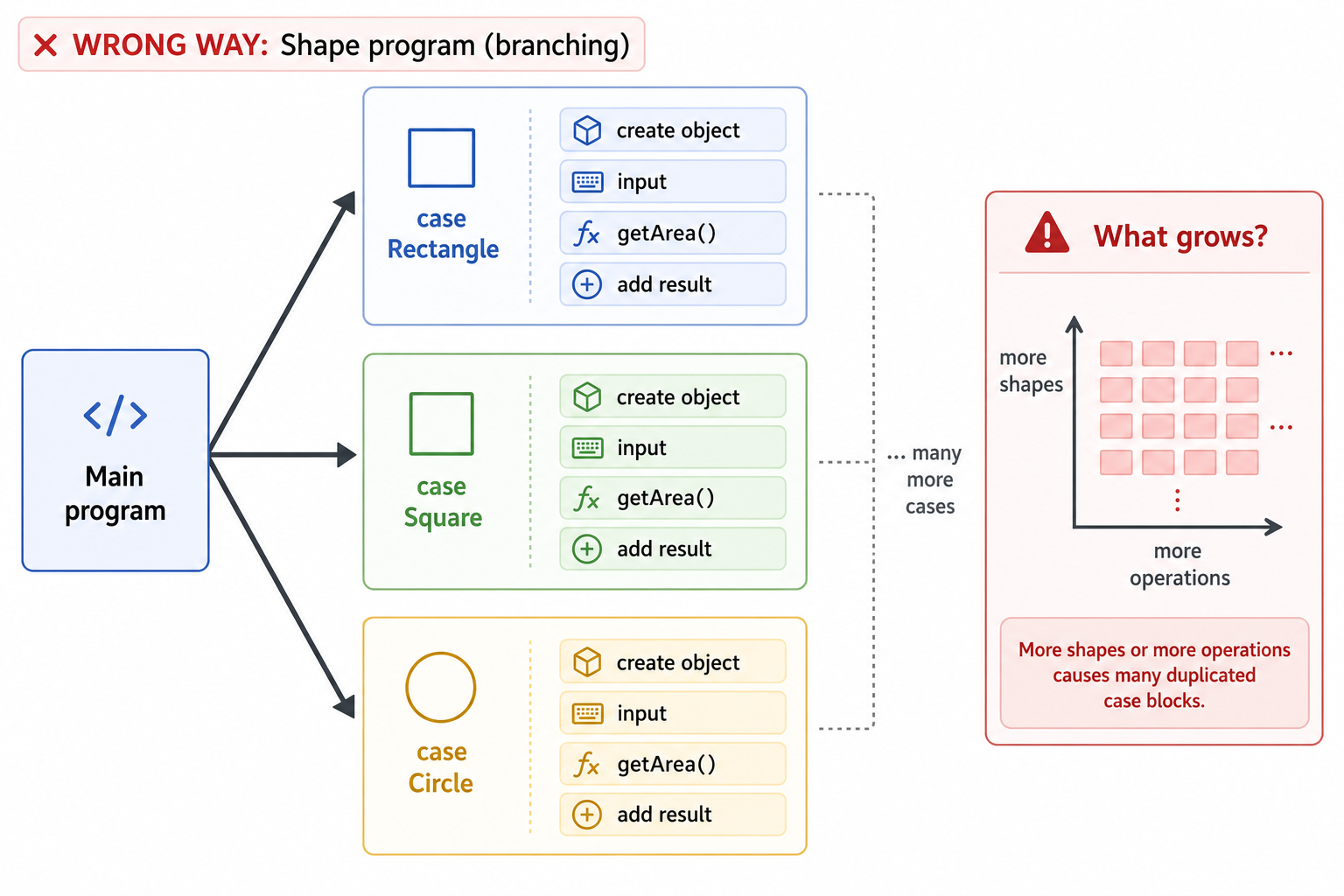
Before we move to the polymorphic version, pause on the shape of the current program.
The problem is not that switch is always bad. The problem is that every new shape and every new operation pushes more logic into the main program. That makes Main responsible for knowing too much.
Branching Gets Expensive
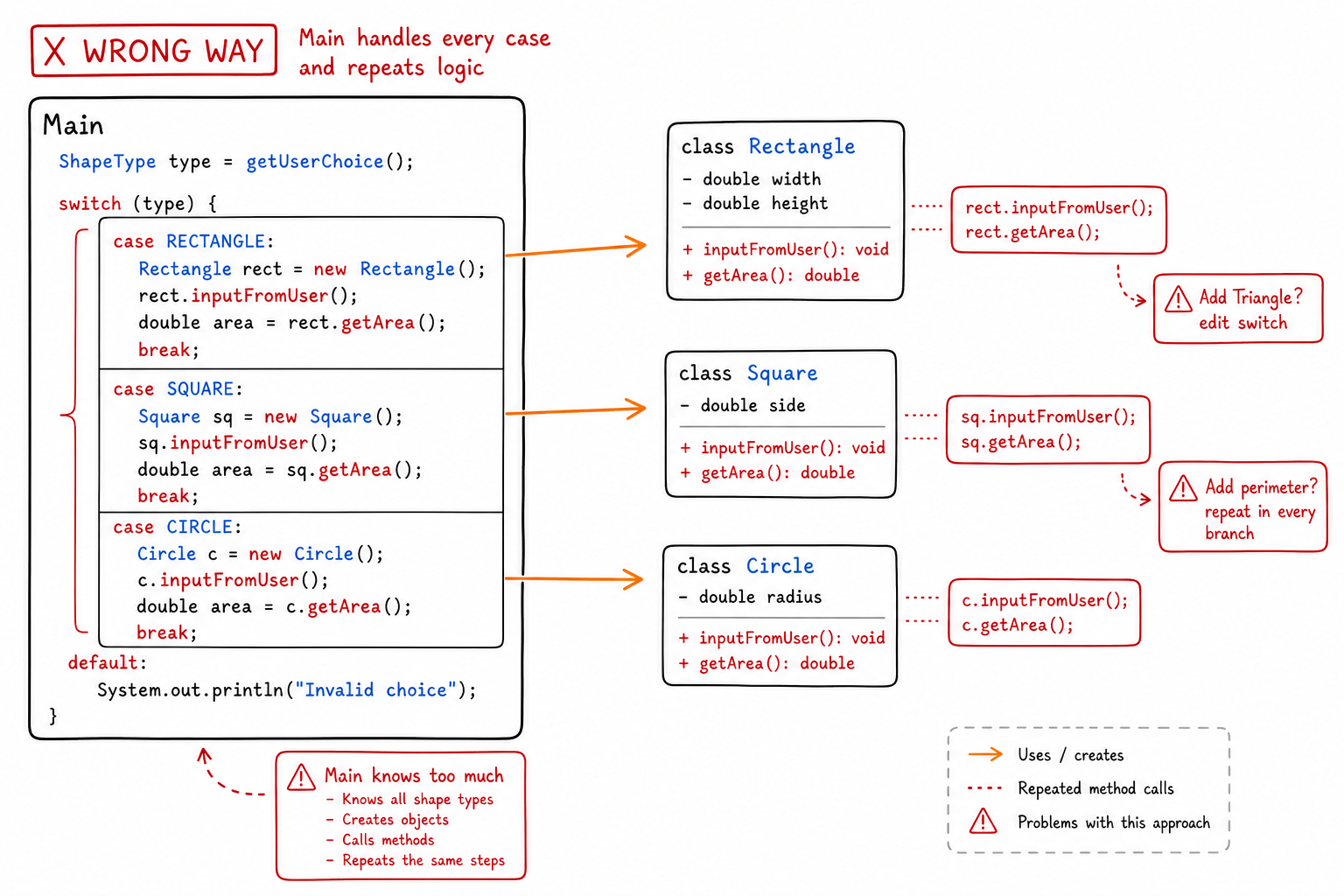
Before we fix the program, pause on what makes the switch version hard to maintain.
Every new shape forces the main program to learn about that shape directly. Every new operation, like area, perimeter, or drawing, creates another place where the same branching logic can spread.
The Polymorphism Way
The Polymorphism Way
The implementation above has several drawbacks. What if we wanted to do some other operations on the user's given shapes? We would have to do that operation on each object in each case block. What if you had hundreds of different shapes? You would need to update hundreds of blocks just to add a similar-looking line! We would also need more ArrayLists to hold the results.
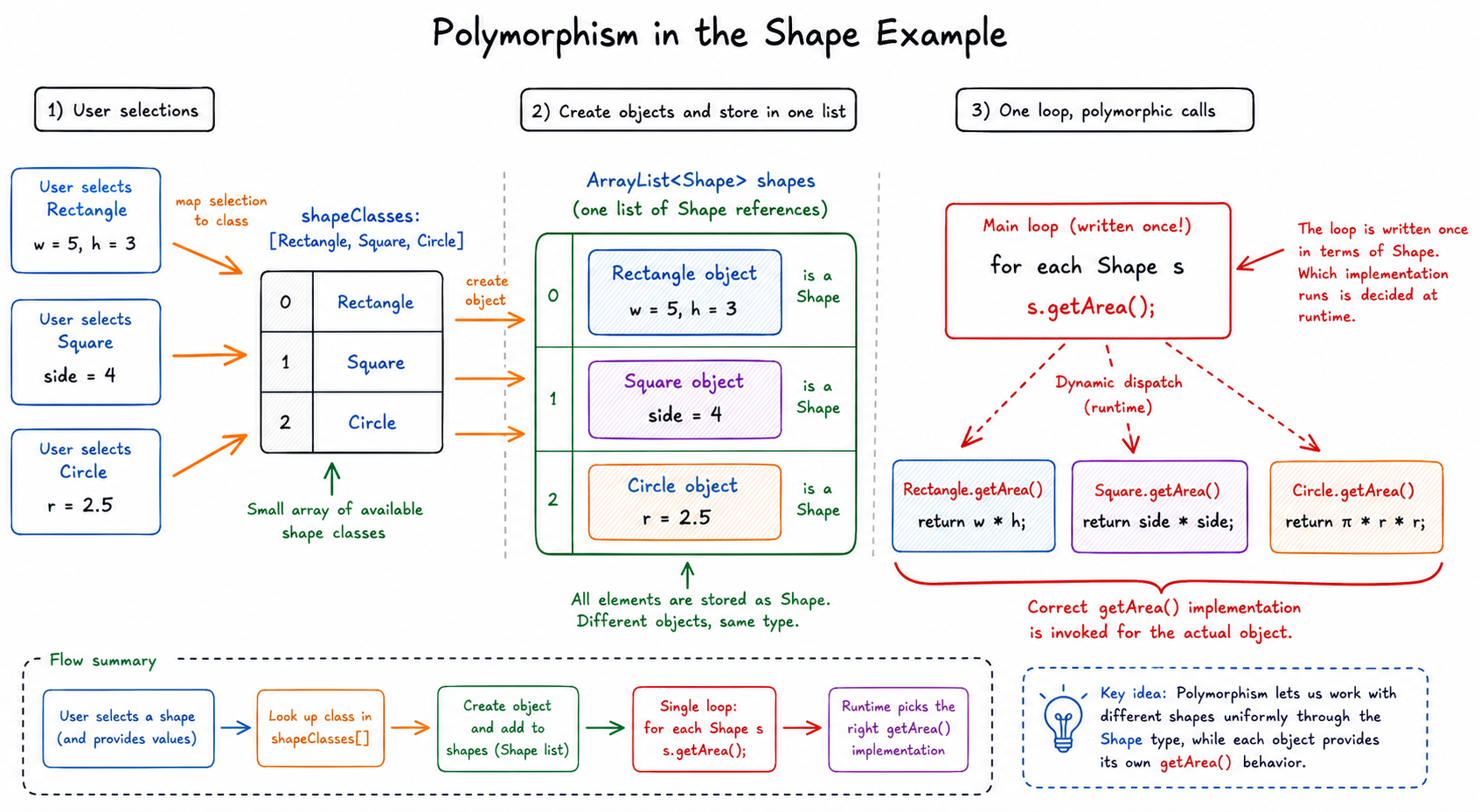
Polymorphism to the rescue! Let's re-implement this program using the concept of polymorphism. We know that all rectangles, circles, and squares are a type of Shape, so we can declare all of these as shapes and use a common rule for them. We will do the following things in our code:
- Create a shapeClasses array where all the blueprints (class references like Rectangle, Square, etc.) will be kept.
- When a user gives inputs to create an ith shape, we will automatically create an instance of that class from the shapeClasses array.
- Note that we create the (i-1)th shape according to the user input
isince arrays are 0 indexed.
- Note that we create the (i-1)th shape according to the user input
```java
public class Main {
    public static void main(String[] args) {
        Scanner sc = new Scanner(System.in);
        System.out.print("Enter number of shapes to calculate : ");
        int n = sc.nextInt();
        // Create a list of classes
        ArrayList<Class> shapeClasses = new ArrayList<>();
        // Popular with our 3 shapes
        shapeClasses.add(Rectangle.class); shapeClasses.add(Square.class); shapeClasses.add(Circle.class);
        // A list of user created shapes
        ArrayList<Shape> shapes = new ArrayList<>();
        for (int i = 0; i < n; i++) {
            System.out.print("Enter the shape type\n1) Rectangle\n2) Square\n3) Circle\nInput : ");
            int select = sc.nextInt();
            // Input validation
            if(select > 3 || select < 1) {
                System.out.print("Please Enter a valid Value"); i--; continue;
            }
            try {
                Shape shape = (Shape) shapeClasses.get(select-1).getDeclaredConstructor().newInstance();
                shape.inputFromUser();
                shapes.add(shape);
            } catch (Exception e) {
                e.printStackTrace();
            }
        }

        // Now we calculate the average from the shapes list
        Double average = shapes.stream().mapToDouble(val -> val.getArea()).average().orElse(0.0);
        System.out.println("The average of all shapes' area is : " + average);

        sc.close();
    }
}
```
javascript
```javascript
class Main {
    constructor() {
        this.shapeClasses = [Rectangle, Square, Circle];
        this.shapes = [];
    }

    shapesCalculation(n) {
        for (let i = 0; i < n; i++) {
            let select = prompt("Enter the shape type\n1) Rectangle\n2) Square\n3) Circle\nInput : ");
            if(select > 3 || select < 1) {
                console.log("Please Enter a valid Value");
                i--;
                continue;
            }
            let shape = new this.shapeClasses[select-1]();
            shape.inputFromUser();
            this.shapes.push(shape);
        }

        let total = this.shapes.reduce((sum, shape) => sum + shape.getArea(), 0);
        let average = total / this.shapes.length;
        console.log("The average of all shapes' area is : " + average);
    }
}
```

python
```python
class Main:
    def __init__(self):
        self.shapeClasses = [Rectangle, Square, Circle]
        self.shapes = []

    def shapesCalculation(self, n):
        for i in range(n):
            select = int(input("Enter the shape type\n1) Rectangle\n2) Square\n3) Circle\nInput : "))
            if select > 3 or select < 1:
                print("Please Enter a valid value")
                continue
            shape = self.shapeClasses[select-1]()
            shape.inputFromUser()
            self.shapes.append(shape)

        total = sum(shape.getArea() for shape in self.shapes)
        average = total / len(self.shapes) if self.shapes else 0
        print(f"The average of all shapes' area is : {average}")
```

cpp
```cpp
class Main {
public:
    vector<Shape*> shapes;
    vector<Shape*> shapeClasses = {new Rectangle(), new Square(), new Circle()};

    void shapesCalculation(int n) {
        for (int i = 0; i < n; i++) {
            cout << "Enter the shape type\n1) Rectangle\n2) Square\n3) Circle\nInput : ";
            int select;
            cin >> select;
            if(select > 3 || select < 1) {
                cout << "Please enter a valid value";
                continue;
            }
            shapes.push_back(shapeClasses[select-1]);
            shapes.back()->inputFromUser();
        }

        double total = 0.0;
        for (Shape* shape : shapes) {
            total += shape->getArea();
        }
        double average = (shapes.size() ? total/shapes.size() : 0);
        cout << "The average of all shapes' area is : " << average << endl;
    }
};
```

csharp
```csharp
class MainClass {
    ArrayList shapeClasses = new ArrayList() { typeof(Rectangle), typeof(Square), typeof(Circle) };
    ArrayList shapes = new ArrayList();

    public void ShapesCalculation(int n) {
        for (int i = 0; i < n; i++) {
            Console.WriteLine("Enter the shape type\n1) Rectangle\n2) Square\n3) Circle\nInput : ");
            int select = Convert.ToInt32(Console.ReadLine());
            if (select > 3 || select < 1) {
                Console.WriteLine("Please Enter a valid value");
                continue;
            }
            var shape = (Shape)Activator.CreateInstance((Type)shapeClasses[select-1]);
            shape.InputFromUser();
            shapes.Add(shape);
        }

        double total = 0;
        foreach (Shape shape in shapes) {
            total += shape.GetArea();
        }
        double average = (shapes.Count > 0 ? total/shapes.Count : 0);
        Console.WriteLine("The average of all shapes' area is : " + average);
    }
}
```

go
```go
type Main struct {
	ShapeClasses []Shape
	Shapes       []Shape
}

func (m *Main) shapesCalculation(n int){
	for i := 0; i < n; i++ {
		fmt.Println("Enter the shape type\n1) Rectangle\n2) Square\n3) Circle\nInput : ")
		var select int
		fmt.Scanln(&select)
		if select > 3 || select < 1 {
			fmt.Println("Please enter a valid value")
			continue
		}
		shape := m.ShapeClasses[select-1]
		shape.inputFromUser()
		m.Shapes = append(m.Shapes, shape)
	}

	var total float64
	for _, shape := range m.Shapes {
		total += shape.getArea()
	}
	var average float64
	if len(m.Shapes) != 0 {
		average = total / float64(len(m.Shapes))
	}
	fmt.Printf("The average of all shapes' area is : %f\n", average)
}
```
One Common Shape Type
The important shift is this: the list stores Shape references, but each object still keeps its real behavior.
So the loop does not need to ask, “Are you a rectangle, square, or circle?” It can simply say, “You are a Shape; give me your area.”

One Shape Pipeline
The polymorphic version changes the mental model from many special cases to one shared pipeline.
Once each object is stored as a Shape, the loop can ask the same question every time: “what is your area?” The object’s actual class decides how to answer.
Some Notes
Some notes:
- Ignore the
getDeclaredConstructorpart for now. - We are instantiating an object from the class with the
newInstancemethod instead of thenewkeyword. There are many more ways to instantiate an object. There are also several design patterns (e.g. Factory Design Pattern) to create objects. - Notice that we are putting all the subclasses of Shape (Rect, Circle, etc.) into the Shape type. This means that Rectangle, Circle, and Square act as Shape types which is an example of polymorphism.
- If a class in shapeClasses is not inherited from Shape, then the compiler will panic which is why we need a try-catch block.
Notice how much more concise the code becomes when compared to the previous one. Also, if we had to do some other stuff and call other methods, we can just add that command after the for loop just like how we called the getArea() method: writing it once and applying it to all shapes. This is the power of polymorphism. Later we will learn more about what polymorphism can do when we understand interfaces and adapters.
quiz 2
What is the console output of the below code snippet?
class A {
    public void methodCall() {
        System.out.println("Call from A");
    }
}

class B extends A {
    public void methodCall() {
        System.out.println("Call from B");
    }
}

public class Main {
    public static void main(String[] args) {
        A a = new B();
        a.methodCall();
    }
}
class A {
    methodCall() {
        console.log("Call from A");
    }
}

class B extends A {
    methodCall() {
        console.log("Call from B");
    }
}

let a = new B();
a.methodCall();
class A:
    def method_call(self):
        print("Call from A")


class B(A):
    def method_call(self):
        print("Call from B")


a = B()
a.method_call()
#include <iostream>
using namespace std;

class A {
public:
    virtual void methodCall() {
        cout << "Call from A";
    }
};

class B : public A {
public:
    void methodCall() override {
        cout << "Call from B";
    }
};

int main() {
    A* a = new B();
    a->methodCall();
    delete a;
    return 0;
}
class A
{
    public virtual void MethodCall()
    {
        Console.WriteLine("Call from A");
    }
}

class B : A
{
    public override void MethodCall()
    {
        Console.WriteLine("Call from B");
    }
}

class Program
{
    static void Main(string[] args)
    {
        A a = new B();
        a.MethodCall();
    }
}
package main

import "fmt"

type A struct{}

func (a *A) methodCall() {
    fmt.Println("Call from A")
}

type B struct {
    A
}

func (b *B) methodCall() {
    fmt.Println("Call from B")
}

func main() {
    a := &B{}
    a.methodCall()
}
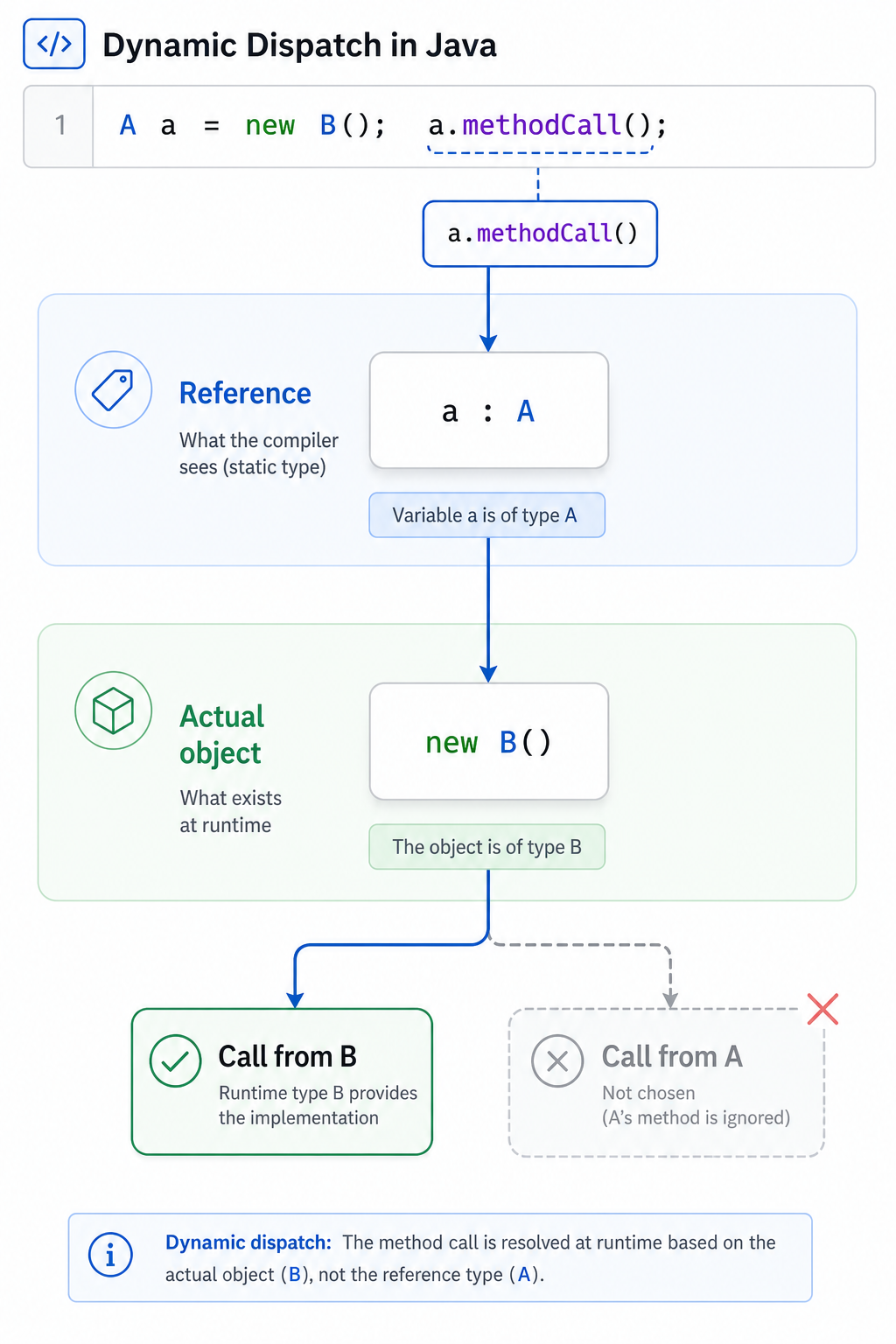
Reference vs Object
The quiz is testing a core polymorphism rule: the reference type controls what methods are allowed, but the actual object type controls which overridden implementation runs.
In A a = new B();, the variable is viewed as an A, but the object is still a B. So the method call resolves to B's override at runtime.
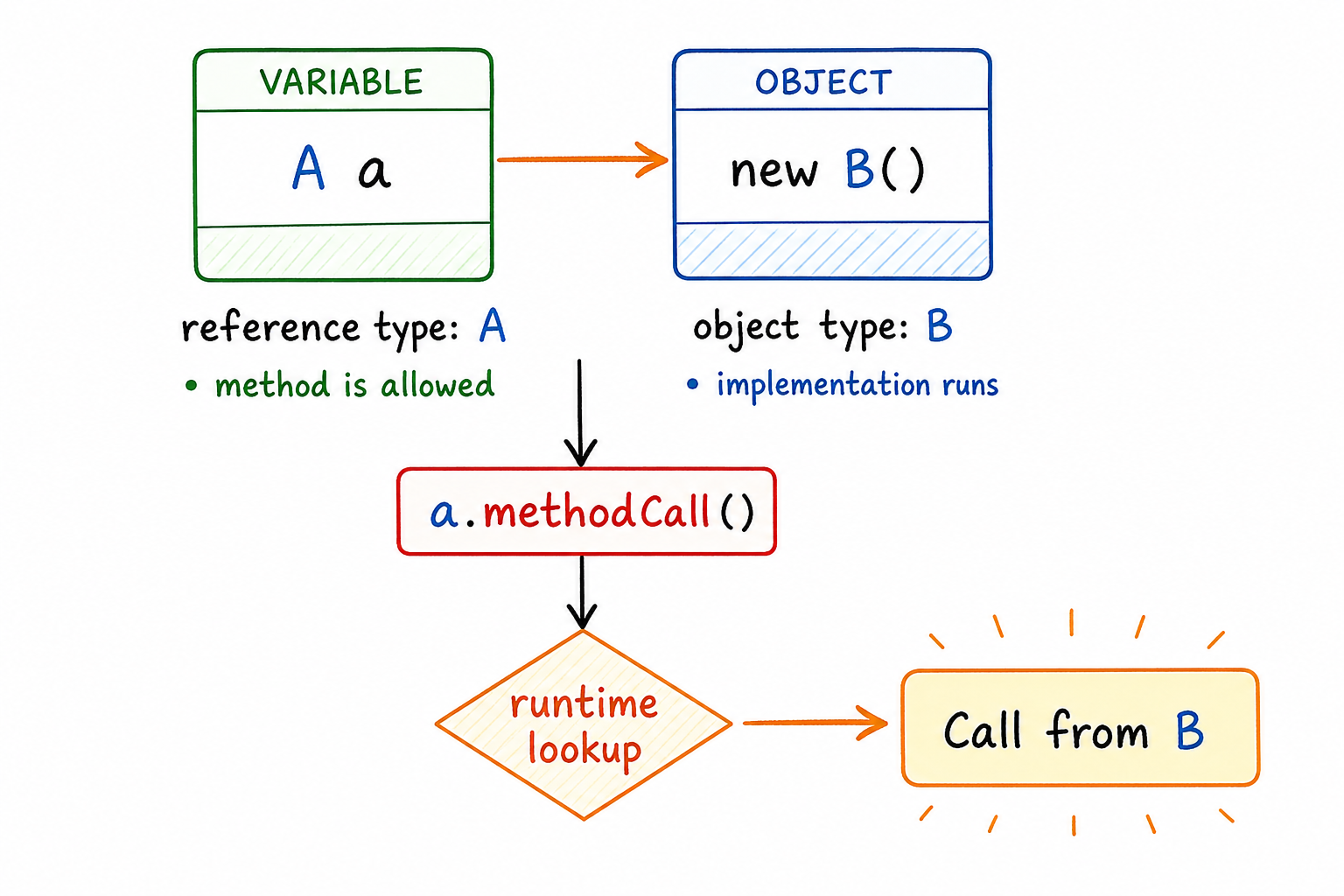
Runtime Method Choice
The quiz is testing the core rule behind polymorphism: the reference type controls what methods are allowed, but the object type controls which overridden method runs.
So when an A reference points to a B object, calling the shared method resolves to B’s implementation at runtime.
Conclusion
Conclusion
Whoa! Today was a big day for you. You have covered all the fundamental concepts of OOP. Although the basics are now out of the way, there are still a ton of things you need to know. In our next lesson, we will cover more core aspects of OOP including constructors, destructors, virtual methods, and abstract classes.
One Pager Cheat Sheet
One Pager Cheat Sheet
- This lesson covers the four fundamental properties of
Object-Oriented Programmingand explains howEncapsulation,Abstraction,Inheritance, andPolymorphismhelp create an OOP language such as Java, C++, Python, or JavaScript, and the conditions for it to become a Pure OOP Language. - Encapsulation dictates that all data related to an object should be
insidethe object, meaning that an object cannot access properties if they areoutsideitself. - Abstraction in OOP is utilizing special keywords to prevent anyone from calling certain functions from outside of the class and letting users of the class only use the methods that are
publicand needed to use the class. - Inheritance allows code to be reused by creating a parent-child relationship between two classes, where one class can access all the properties and methods of the other, enabling objects to be created from a more specific type of the parent class.
- Java's keyword
extendsallows programmers to create more specific classes by inheriting properties and methods from a parent class, while adding or overriding existing methods and properties as needed. - The last of the four fundamental properties of OOP is Polymorphism, which enables objects to act like their parent types, as well as other types (e.g. interfaces).
-
Polymorphismallows us to avoid writing cumbersome code for our main program. - - Without polymorphism, each new shape or operation creates more branching inside the caller.
- - Without polymorphism,
Mainbecomes tightly coupled to every concrete class and every operation. - We can use the concept of
Polymorphismto create an array of shapes, where each input from the user is an instance of the corresponding class from the array. - - Polymorphism lets one
Shapepipeline call the right subclass method for each object. - - Polymorphism lets one
Shapeloop work across many concrete shape objects. - We can use polymorphism to more concisely apply a single command to multiple types of objects, such as the
getArea()method, with theforloop in this example. - The code snippet demonstrates polymorphism, allowing an object of type
Ato refer to a different typeB, and use the corresponding implementation of the same method when called. - - In overridden method calls, runtime dispatch follows the actual object type, not just the reference type.
- - In method overriding, the actual object type determines the implementation that executes.
- You have learned the fundamentals of
Object-Oriented Programming (OOP), and in the next lesson, you will explore moreadvanced conceptssuch as constructors, destructors, virtual methods, and abstract classes.