Transactions in SQL
Read at your own pace. Code execution, quizzes, progress tracking, and the AI tutor are available in the interactive view with JavaScript enabled.
Introduction
Transactions in SQL

Introduction
A collection of one or more SQL statements that communicate with a database is known as a SQL transaction. A transaction on a table is, for instance, when a record is added to, updated, or deleted from it. Transactions in SQL are crucial for preserving database integrity in cases of concurrent execution of multiple related operations or concurrent interactions with the database. Every transaction starts with a particular task and finishes when every task in the group is successfully completed. A single task failure causes the entire transaction to fail. A transaction can therefore only have one of two outcomes: success or failure.
Properties of SQL Transactions
Properties of SQL Transactions
By definition, a database transaction needs to be atomic, consistent, isolated, and durable. The abbreviation These are frequently referred to as ACID properties.
- Atomicity – This property guarantees the successful completion of all tasks inside the work unit. So, in case any task fails, all prior operations are rolled back to their initial states and the transaction is aborted at the point of failure.
- Consistency – This property makes sure that after a successful committed transaction, the database's states are changed appropriately.
- Isolation – This property allows transactions to function transparently and independently of one another.
- Durability – This property makes sure that a committed transaction's outcome or impact endures in the event of a system malfunction.
ACID Example
ACID Example
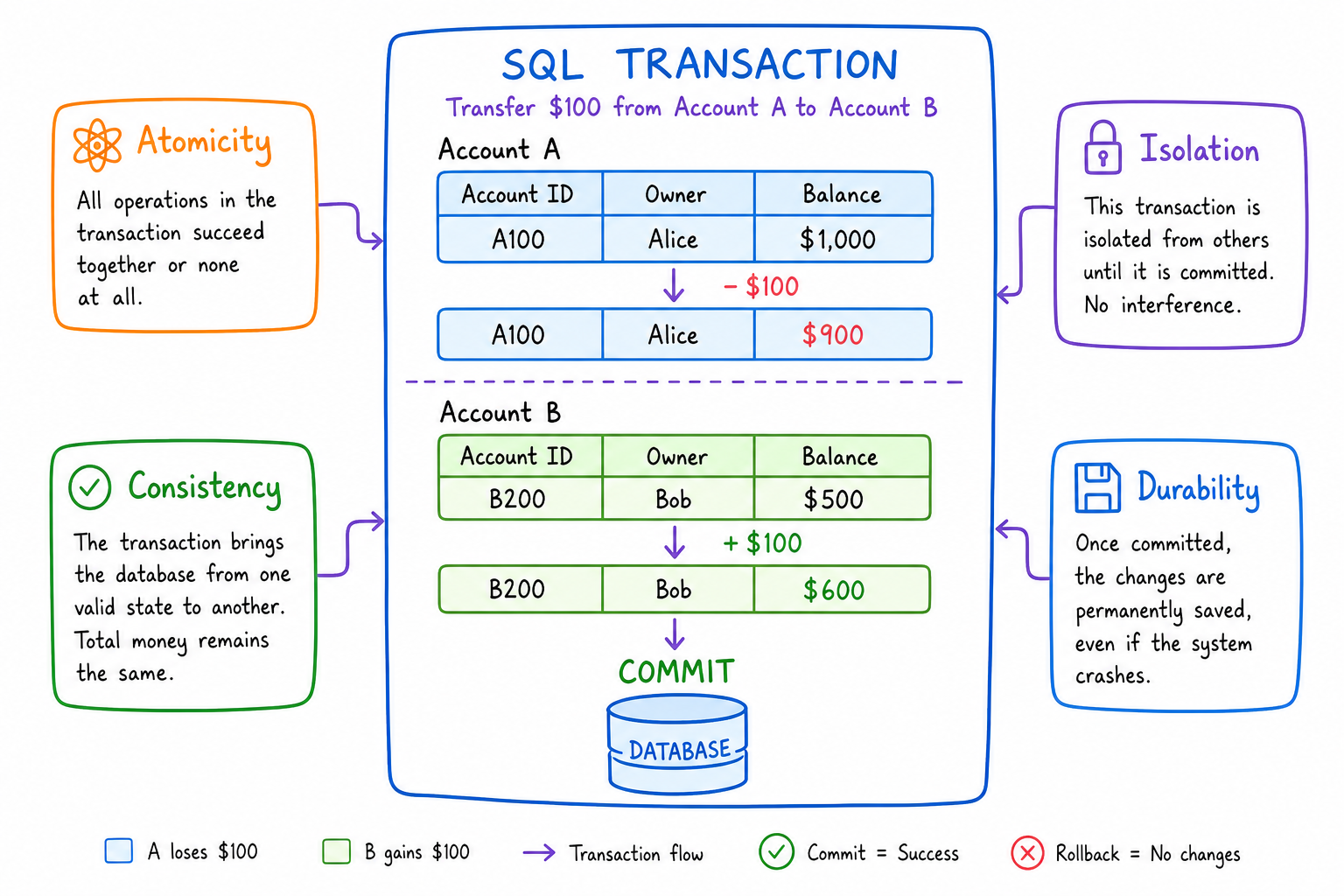
A common way to understand the ACID properties is to think about a money transfer between two bank accounts.
If we transfer $100 from Account A to Account B, the database should not only subtract the money from Account A. It should also add the money to Account B. If the second step fails, the first step must be undone.
So, in this example:
- Atomicity means both account updates happen, or neither happens.
- Consistency means the total money in the system stays valid after the transaction.
- Isolation means another transaction should not see the transfer halfway completed.
- Durability means once the transfer is committed, it remains saved even if the system crashes afterward.
Question 1
The property that ensures that a transaction involving two or more processes is guaranteed to either commit all of the processes, or none of the processes is known as .....................
Savepoint Example
Savepoint Example
A SAVEPOINT is useful when we do not want to undo the entire transaction. Instead, we can create a point inside the transaction and roll back only to that point.
For example, suppose we insert a new order and then update the number of items ordered. If we decide the update should not happen, but the insert should remain part of the transaction, we can roll back to the savepoint before committing.
```sql
-- Start the transaction
BEGIN TRANSACTION

-- First SQL statement
INSERT INTO Table2
VALUES(15, 8112, '2021-11-12', 'Nadia', 'Female', 'Stuttgart', 'Germany', 17, 7)

-- Create a savepoint after the insert
SAVEPOINT inserted_order

-- Second SQL statement
UPDATE Table2
SET NumberOfItems = 5
WHERE CustomerID = 2

-- Undo only the update, not the insert
ROLLBACK TO inserted_order

-- Save the remaining change
COMMIT TRANSACTION
```
Transaction Control
Transaction Control
The commands used to manage transactions are as follows:
- BEGIN TRANSACTION – This command marks the start of each transaction.
- COMMIT – This command saves the changes to the database in a permanent manner.
- ROLLBACK – This command reverses any modifications, returning them to their original condition.
- SAVEPOINT – this command enables us to roll back transactions in parts rather than all at once by establishing points within groups of transactions.
- RELEASE SAVEPOINT – This command is used to delete an existing SAVEPOINT.
- SET TRANSACTION – This command gives us the ability to give a transaction a name and specify whether we want it to be read-only, read/write, or to belong to a certain rollback segment.
Examples of Transactions
Examples of Transactions
For the next two examples of SQL transactions, we will use the following table:

Question 2
Which command is used when we want to undo only part of a transaction by returning to a previously marked point?
Commit Example
Commit Example
So, the steps and commands we should follow and write when creating a COMMIT Transaction are: 1. BEGIN TRANSACTION to start the transaction 2. Various SQL statements such as INSERT, UPDATE… 3. COMMIT command to finish the transaction and save the changes.
Take a look at the following example where we insert a new order in the table shown above and we also update the number of items ordered of an already existing order in the database:
-- Start the transaction
BEGIN TRANSACTION
-- SQL Statements
 INSERT INTO Table2 VALUES(15, 8112, 2021-11-12, ‘Nadia’, ‘Female’, Stuttgart, Germany, 17, 7)
 UPDATE Table2 SET NumberOfItems = 5 WHERE CustomerID = 2
 -- Commit changes
COMMIT TRANSACTION
The INSERT and UPDATE statements cannot be reverted back once the transaction has been committed. If there are no errors, we will see the resulting table shown below, with each transaction's SQL query having been individually executed:

Rollback Example
Rollback Example
All changes have to be stopped immediately if an error with any of the SQL-grouped statements occurs. Rollback refers to this action of undoing changes in such scenarios. Any transactions that haven't been recorded to the database yet will be rolled back using the ROLLBACK command, allowing us to start from the beginning of the transaction. Only actions taken after the last COMMIT or ROLLBACK command can be reversed with this command.
For example, let’s write a transaction for deleting all orders where the customer’s age is over 40, and then undo the changes, like so:
-- Start the new transaction
BEGIN TRANSACTION
-- SQL Statements
 DELETE FROM Table2 WHERE Age > 40
 -- undo changes
ROLLBACK TRANSACTION
After the execution of the transaction, the resulting table would look exactly the same as before, because we rolled back the changes.
True or False?
After a commit statement is executed, there is a way for the database to regain its previous state.
One Pager Cheat Sheet
One Pager Cheat Sheet
- A SQL transaction is a collection of one or more SQL statements that communicate with a database, typically used for preserving database integrity in cases of concurrent execution of multiple related operations or interactions.
- By guaranteeing atomicity, ensuring consistency, allowing for isolation, and providing durability,
SQL Transactionsuphold theACIDproperties. - - ACID means a transaction should be all-or-nothing, valid, independent, and permanent after commit.
- Atomicity is a ACID property that ensures that a transaction is
either fully committed or not at all, preventing anyinconsistent datafrom being stored in the database. - - A SAVEPOINT lets us roll back part of a transaction without canceling the entire transaction.
- The
transaction controlcommandsBEGIN TRANSACTION,COMMIT,ROLLBACK,SAVEPOINT,RELEASE SAVEPOINTandSET TRANSACTIONare used to manage, save, reverse and name transactions. - We will
perform two SQL transactionson the table shown to illustrate examples of transactions. - - Use ROLLBACK TO SAVEPOINT when only part of the current transaction should be undone.
- By running a BEGIN TRANSACTION, entering various SQL statements such as INSERT, UPDATE commands and then COMMIT TRANSACTION, all the changes will be saved to the database and cannot be reverted back.
- All changes during a SQL transaction are undone using the
ROLLBACKcommand, so that the resulting table looks exactly the same as before. - The only way to recover the database to its previous state after a
COMMITstatement is executed is by executing aROLLBACKcommand, however this will only reverse actions taken after the last COMMIT or ROLLBACK command.