Introduction to Regular Expressions
Read at your own pace. Code execution, quizzes, progress tracking, and the AI tutor are available in the interactive view with JavaScript enabled.
Why Regex Matters
Welcome to the Regex Course
Regular expressions are a compact language for describing text patterns.
As an intermediate Python developer, you already know how to work with strings. Regex gives you a sharper tool for cases where plain string methods become repetitive or fragile:
- finding emails, IDs, dates, or labels in text
- validating user input
- cleaning messy logs or datasets
- extracting features from text before machine learning workflows
In this first lesson, we will build the mental model: a regex pattern is a small program that scans text for matches. Later lessons will add the special symbols that make regex powerful.
Pattern Meets Text
The Core Idea
A regular expression is a pattern. You give that pattern to a regex engine, along with some text.
The engine answers questions like:
- Does this pattern appear anywhere?
- Where does it appear?
- What exact text matched?
For now, we will start with the simplest kind of pattern: a literal pattern. A literal pattern matches the exact characters you write.
Example: the pattern cat matches the text cat inside concatenate, cat photo, and wildcat.
```python
import re

texts = ["cat photo", "wildcat", "dog photo", "concatenate"]
pattern = "cat"

for text in texts:
    match = re.search(pattern, text)
    print(f"{text!r} ->", "MATCH" if match else "no match")
```
Literal Pattern Check
Which string would be matched by the literal regex pattern model?
Python Regex Basics
Python's re Module
Python includes regex support in the built-in re module.
Three common starting functions are:
-
re.search(pattern, text)— finds the first match anywhere in the text -
re.findall(pattern, text)— returns all non-overlapping matches -
re.sub(pattern, replacement, text)— replaces matches
In this lesson, focus on what these functions do. The upcoming lessons will expand what patterns can express.
```python
import re

text = "model accuracy improved; model latency increased"
pattern = "model"

first = re.search(pattern, text)
all_matches = re.findall(pattern, text)
updated = re.sub(pattern, "classifier", text)

print("First match:", first.group() if first else None)
print("All matches:", all_matches)
print("Updated text:", updated)
```
Search Anywhere
re.search("data", "clean data pipeline") can succeed even though data is not at the beginning of the string.
The Regex Engine
A Useful Mental Model
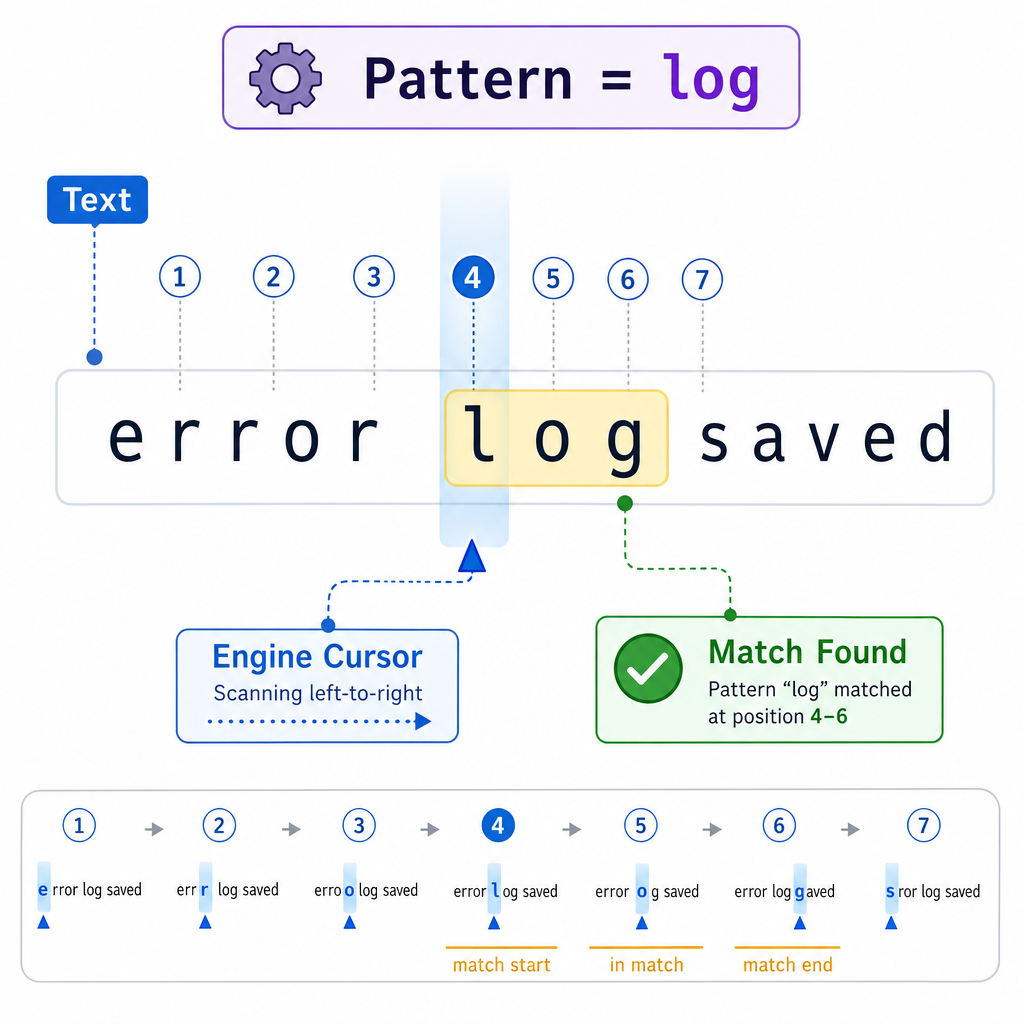
Think of the regex engine as moving through text from left to right.
For a simple literal pattern like log, it tries to line up the pattern with the text:
text:    error log saved
pattern:       log
result:        ^^^ match
If the characters line up, you get a match. If they do not, the engine keeps scanning.
This left-to-right scanning model will help when we introduce richer pattern syntax in the next lessons.
Complete The Call
Complete the Python call that finds the first occurrence of the literal pattern "loss" anywhere in text:
____("loss", text)
Match Objects
Matches Carry Information
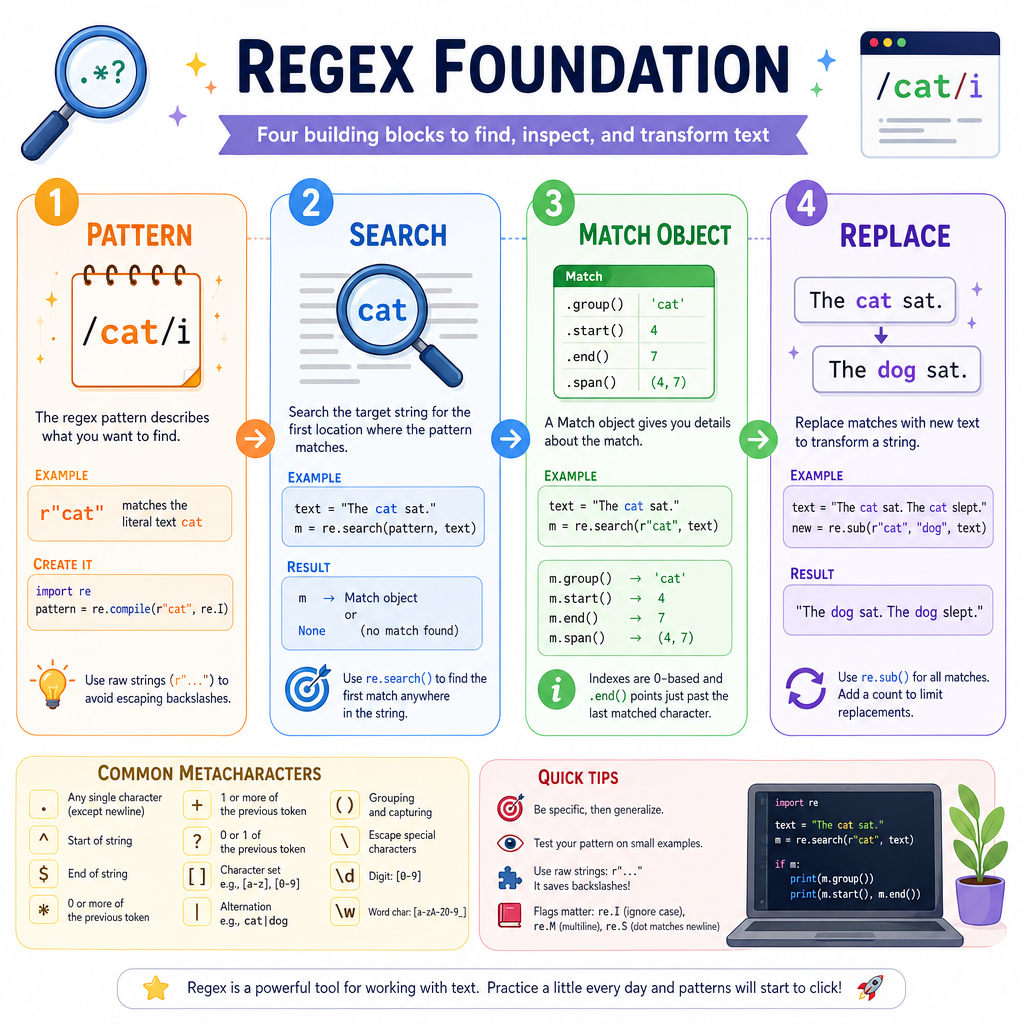
When re.search() succeeds, it returns a match object.
A match object can tell you:
- the exact matched text with
.group() - where the match starts with
.start() - where it ends with
.end()
This matters in real programs because you often need more than a yes/no answer. For example, in an ML data-cleaning pipeline, you might locate a label, extract it, and store its position for debugging.
```python
import re

text = "experiment_id=42 status=complete"
pattern = "status"

match = re.search(pattern, text)

if match:
    print("Matched text:", match.group())
    print("Start index:", match.start())
    print("End index:", match.end())
else:
    print("No match found")
```
Regex In Workflows
Where Regex Fits
Regex is rarely the whole application. It is usually one step in a larger text-processing workflow.
A common pipeline looks like this:
raw text -> regex search/extract/replace -> cleaned fields -> analysis/modeling
For machine learning projects, regex often helps before modeling begins:
- removing boilerplate from scraped text
- extracting structured labels from logs
- standardizing inconsistent tokens
- checking whether records follow an expected format
The key skill is learning when a pattern is clear and maintainable.
Function Purpose
Which Python re function is best suited for replacing every occurrence of a matched pattern with new text?
What Comes Next
Lesson Recap
You now have the foundation:
- A regex is a pattern for matching text.
- Literal patterns match exact character sequences.
- Python's
remodule lets you search, find all matches, and replace matches. - Successful searches return match objects with useful location information.
Next, we will move beyond literal text into metacharacters and character classes, where regex starts expressing flexible patterns instead of only exact strings.