Enhancing your Document-Oriented Database
Read at your own pace. Code execution, quizzes, progress tracking, and the AI tutor are available in the interactive view with JavaScript enabled.
From Scans To Speed
Why this lesson matters
In Creating a Document-Oriented Database, we built a tiny document database that could insert documents, retrieve them, and scan through them with basic matching.
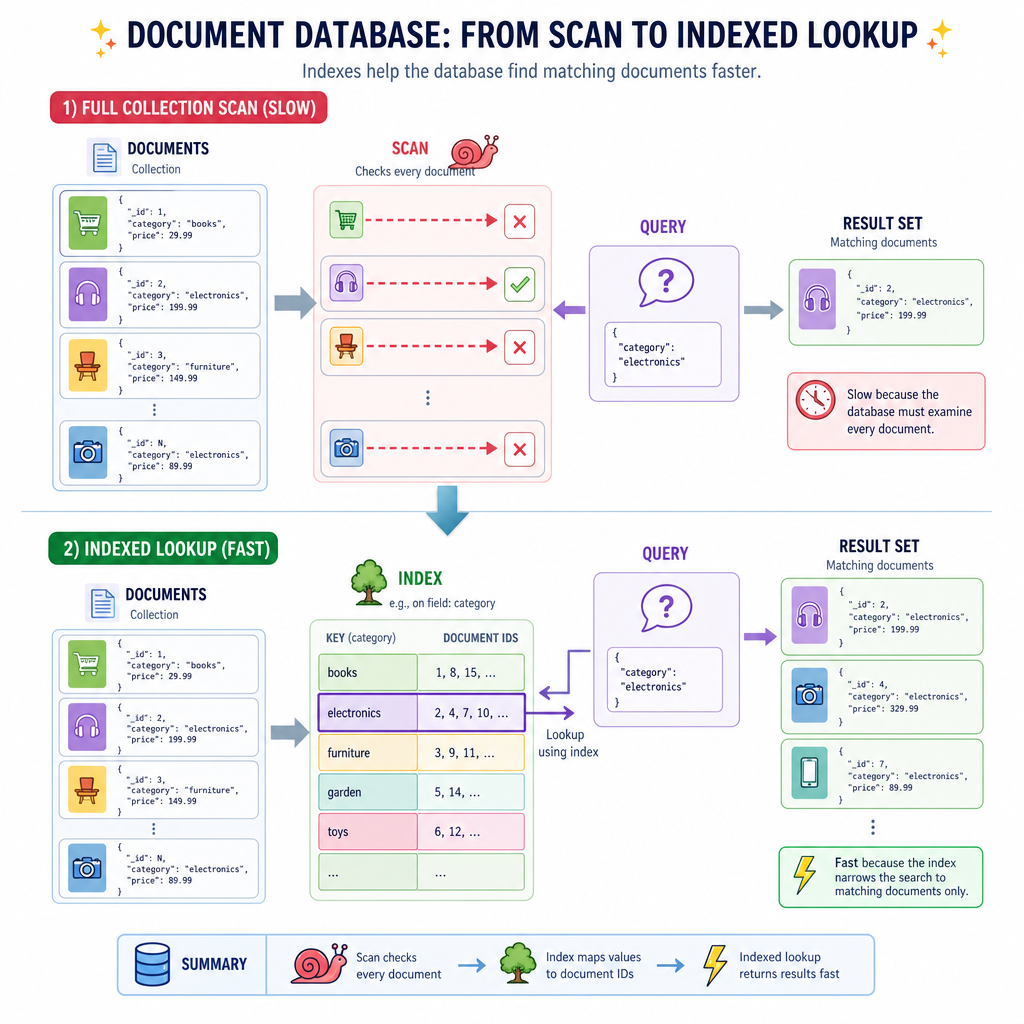
That scan-based design is correct, but it has a ceiling:
find({"symbol": "AAPL"})
        ↓
check every document
        ↓
return matches
That is fine for 10 documents. It is painful for 10 million.
Today we will enhance our document database in a MongoDB-like direction by adding:
- richer query operators
- field and nested-field lookup
- indexes for faster reads
- a tiny query planner
- projection, sorting, and limiting as query utilities
We are still building a primitive datastore, not a production MongoDB clone. But after this lesson, the internals of document queries should feel much less magical.
Richer Query Language
Matching beyond equality
Our previous document database could match simple shapes like:
{'type': 'trade'}
MongoDB-style querying becomes more useful when filters can express comparison and membership:
{'price': {'$gt': 100}}{'status': {'$in': ['open', 'pending']}}{'profile.age': {'$gte': 18}}
The important design idea: a query is just structured data. We can interpret that data with a small matching engine.
Below, dot paths let us query nested documents without changing the physical storage format.
```python

def get_path(doc, path):
    current = doc
    for part in path.split('.'):
        if not isinstance(current, dict) or part not in current:
            return None
        current = current[part]
    return current


def value_matches(actual, expected):
    if isinstance(expected, dict):
        for op, target in expected.items():
            if op == '$gt' and not (actual is not None and actual > target):
                return False
            if op == '$gte' and not (actual is not None and actual >= target):
                return False
            if op == '$lt' and not (actual is not None and actual < target):
                return False
            if op == '$in':
                if isinstance(actual, list):
                    if not any(item in target for item in actual):
                        return False
                elif actual not in target:
                    return False
        return True
    return actual == expected


def matches(doc, query):
    return all(value_matches(get_path(doc, field), expected)
               for field, expected in query.items())


docs = [
    {'_id': 1, 'symbol': 'AAPL', 'price': 188, 'profile': {'sector': 'tech'}},
    {'_id': 2, 'symbol': 'JPM', 'price': 197, 'profile': {'sector': 'finance'}},
    {'_id': 3, 'symbol': 'NVDA', 'price': 92, 'profile': {'sector': 'tech'}},
]

query = {'price': {'$gt': 100}, 'profile.sector': 'tech'}
print([doc['_id'] for doc in docs if matches(doc, query)])
```
Operator Semantics
Given this query:
{
  'profile.age': {'$gte': 30},
  'tags': {'$in': ['ai']}
}
Which document should match?
Index Mental Model
An index is a shortcut map
A collection scan asks every document: do you match?
An index asks a more direct question: where are the documents that probably match?
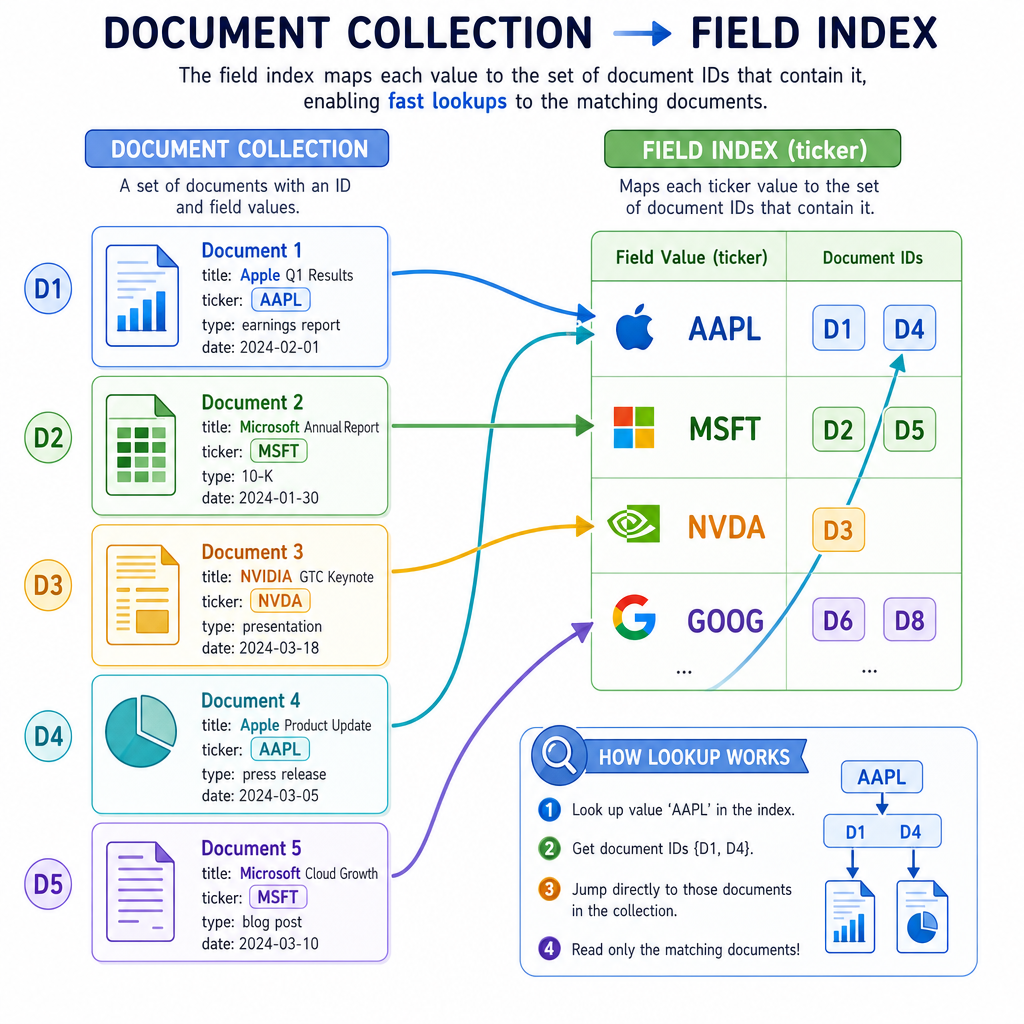
For a field like symbol, an equality index can look like this:
symbol index
------------
AAPL  → {1, 8, 12}
MSFT  → {2, 5}
NVDA  → {3, 9, 10}
Then a query like:
{'symbol': 'NVDA'}
can jump straight to document ids {3, 9, 10} instead of scanning the whole collection.
The tradeoff is the classic datastore tradeoff from Data Store Fundamentals:
- faster reads for indexed queries
- extra memory for index structures
- slower writes because indexes must stay synchronized
Build Field Index
A simple single-field index
Let us implement the smallest useful index: a mapping from one field value to a set of document ids.
This supports equality queries like:
{'tier': 'gold'}
It does not yet support every MongoDB index type. But it captures the essential mechanism: precompute lookup paths during writes so reads can avoid scanning later.
```python
from collections import defaultdict


def get_path(doc, path):
    current = doc
    for part in path.split('.'):
        if not isinstance(current, dict) or part not in current:
            return None
        current = current[part]
    return current


class FieldIndex:
    def __init__(self, field):
        self.field = field
        self.map = defaultdict(set)

    def add(self, doc_id, doc):
        value = get_path(doc, self.field)
        if value is not None:
            self.map[value].add(doc_id)

    def find(self, value):
        return set(self.map.get(value, set()))


customers = {
    1: {'name': 'Ada', 'tier': 'gold'},
    2: {'name': 'Linus', 'tier': 'silver'},
    3: {'name': 'Grace', 'tier': 'gold'},
}

index = FieldIndex('tier')
for doc_id, doc in customers.items():
    index.add(doc_id, doc)

print('gold customer ids:', sorted(index.find('gold')))
print('bronze customer ids:', sorted(index.find('bronze')))
```
Index Tradeoff
True or false?
Adding an index always makes both reads and writes faster because the database has more information available.
Use An Index
Add a tiny query planner
A database does not just store indexes. It decides whether a query can use one.
Our first query planner can be very small:
- If the query is a single equality condition on an indexed field, use the index.
- Otherwise, fall back to the scan query flow from the previous lesson.
This is the beginning of query planning: choosing an execution path based on available data structures.
```python
from collections import defaultdict


def get_path(doc, path):
    current = doc
    for part in path.split('.'):
        if not isinstance(current, dict) or part not in current:
            return None
        current = current[part]
    return current


def matches(doc, query):
    return all(get_path(doc, field) == expected for field, expected in query.items())


class FieldIndex:
    def __init__(self, field):
        self.field = field
        self.map = defaultdict(set)

    def add(self, doc_id, doc):
        value = get_path(doc, self.field)
        if value is not None:
            self.map[value].add(doc_id)

    def find(self, value):
        return set(self.map.get(value, set()))


class MiniDocumentDB:
    def __init__(self):
        self.docs = {}
        self.indexes = {}
        self.next_id = 1

    def insert(self, doc):
        doc_id = self.next_id
        self.next_id += 1
        stored = dict(doc)
        stored['_id'] = doc_id
        self.docs[doc_id] = stored
        for index in self.indexes.values():
            index.add(doc_id, stored)
        return doc_id

    def create_index(self, field):
        index = FieldIndex(field)
        for doc_id, doc in self.docs.items():
            index.add(doc_id, doc)
        self.indexes[field] = index

    def find(self, query):
        plan = 'collection scan'
        candidate_ids = set(self.docs.keys())

        if len(query) == 1:
            field, expected = next(iter(query.items()))
            if field in self.indexes and not isinstance(expected, dict):
                plan = f'index lookup on {field}'
                candidate_ids = self.indexes[field].find(expected)

        results = [self.docs[doc_id] for doc_id in candidate_ids
                   if matches(self.docs[doc_id], query)]
        print('plan:', plan)
        return results


db = MiniDocumentDB()
db.insert({'symbol': 'AAPL', 'sector': 'tech'})
db.insert({'symbol': 'JPM', 'sector': 'finance'})
db.insert({'symbol': 'NVDA', 'sector': 'tech'})
db.create_index('symbol')

print(db.find({'symbol': 'NVDA'}))
print(db.find({'sector': 'tech'}))
```
Index Lookup Blank
Fill in the blank:
A basic equality index maps a field value to a set of document ____.
Query Utilities
Make results useful
Finding matching documents is only part of a document database query. Applications usually need the results shaped.
Common MongoDB-like utilities include:
- projection: return only selected fields
- sort: order results by one or more fields
- limit: cap the number of returned documents
- skip: move past the first N matches, often for pagination
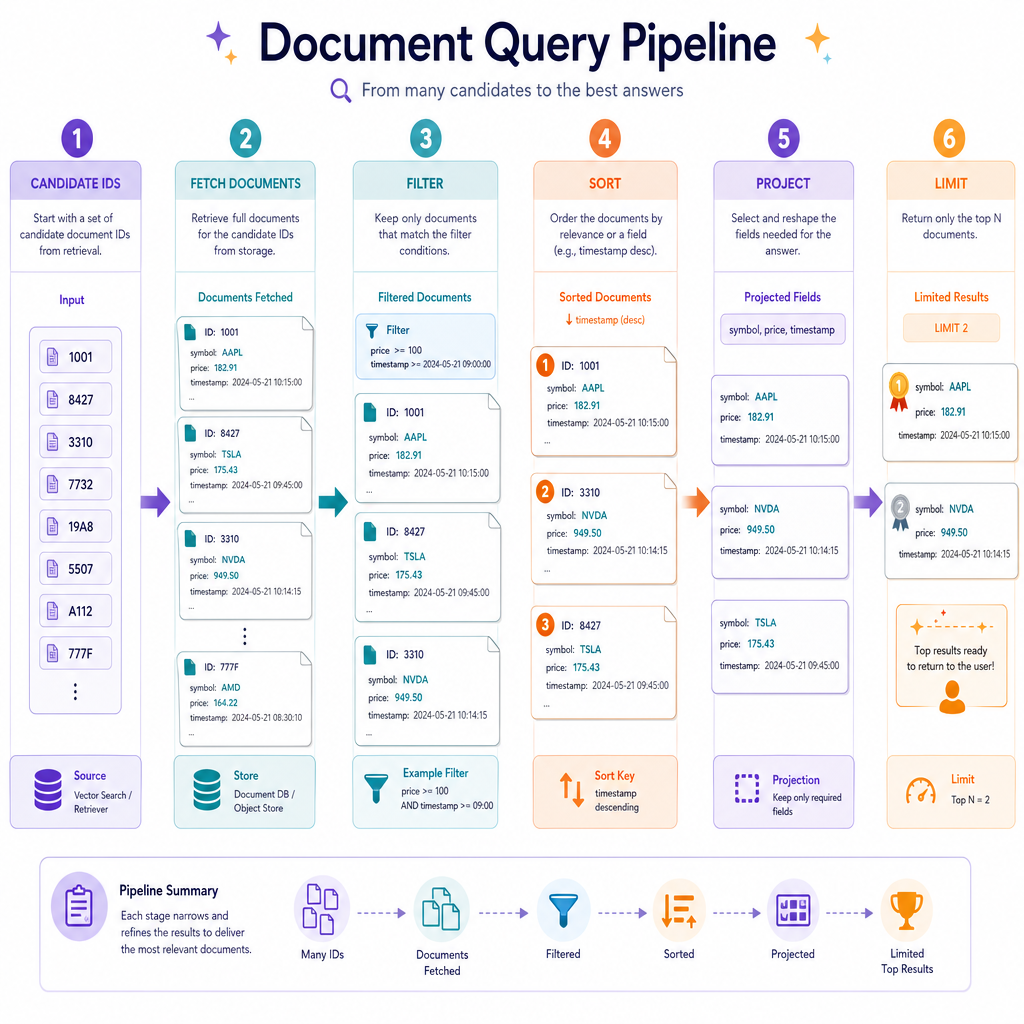
A simple execution pipeline might look like:
candidate ids
     ↓
fetch documents
     ↓
filter exact matches
     ↓
sort
     ↓
project fields
     ↓
limit results
For example, a finance app might query recent trades, sort by timestamp, project only symbol, price, and quantity, then limit to the latest 50.
The order matters. If you project away a field before sorting on it, the sort no longer has the data it needs.
What Changed
From tiny document store to query engine
We started this lesson with the scan-based document database from Creating a Document-Oriented Database.
Now it has the core pieces of a more MongoDB-like system:
- nested field access with dot paths
- comparison and membership operators
- single-field equality indexes
- automatic index maintenance during insert
- a tiny planner that chooses index lookup or collection scan
- result-shaping utilities like projection, sorting, and limiting
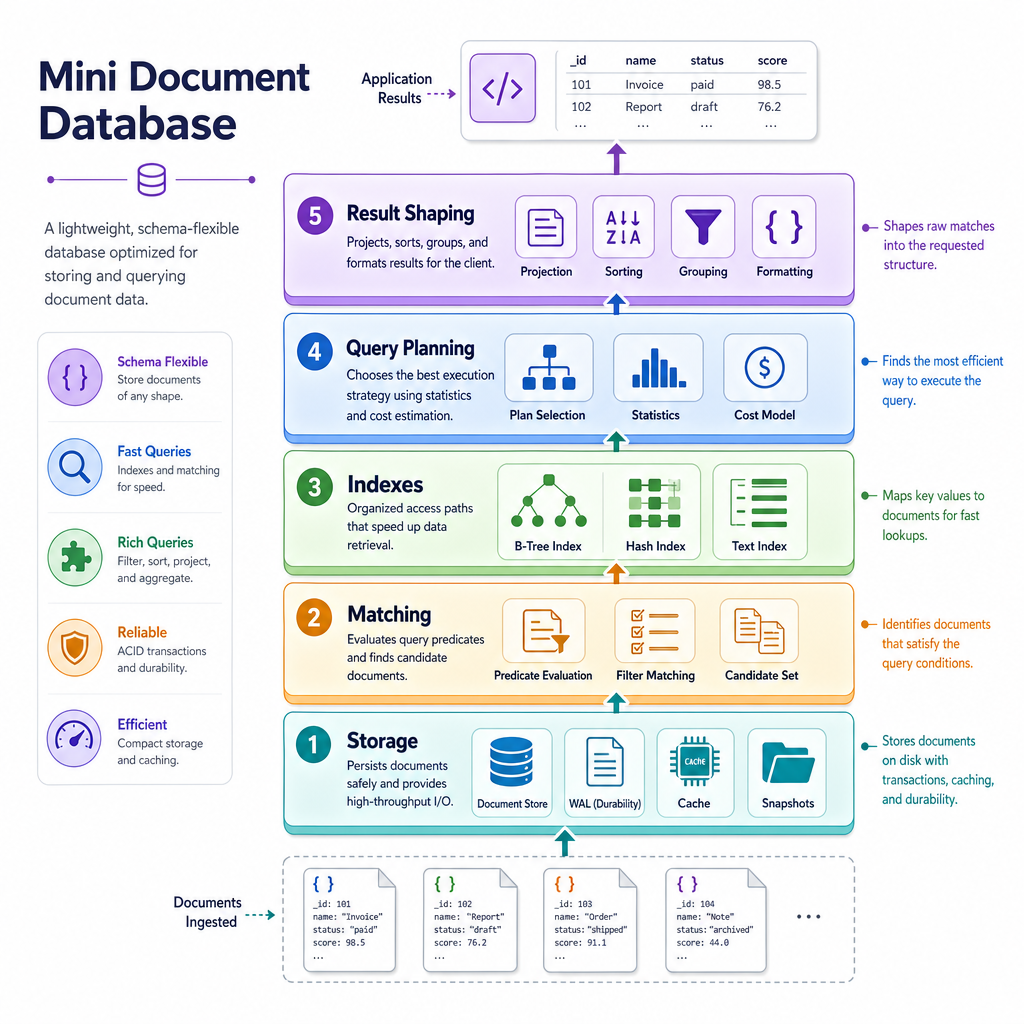
The central lesson is that document databases are not just flexible JSON-like storage. They are a stack of cooperating mechanisms:
storage → matching → indexes → planning → result shaping
Next, we will shift data models again and explore how a relational database system organizes rows, tables, and constraints.