Building a Relational Database System
Read at your own pace. Code execution, quizzes, progress tracking, and the AI tutor are available in the interactive view with JavaScript enabled.
Back To Tables
Why relational databases now?
In Creating a Document-Oriented Database and Enhancing your Document-Oriented Database, we stored flexible documents and then sped up lookups with field indexes.
Now we shift back to SQL-style systems: a relational database is built around structured relations, not flexible documents.
In this lesson, we will build the core mental model behind PostgreSQL-like systems:
- A table is a relation.
- A row is a tuple.
- A column is an attribute.
- A schema defines what shape data must have.
- Queries are combinations of relational algebra operations.
We will stay intentionally small: in-memory tables, simple schemas, selection, projection, and joins. The next lesson will refine this into a more database-like system.

Relations Not Spreadsheets
The relational model
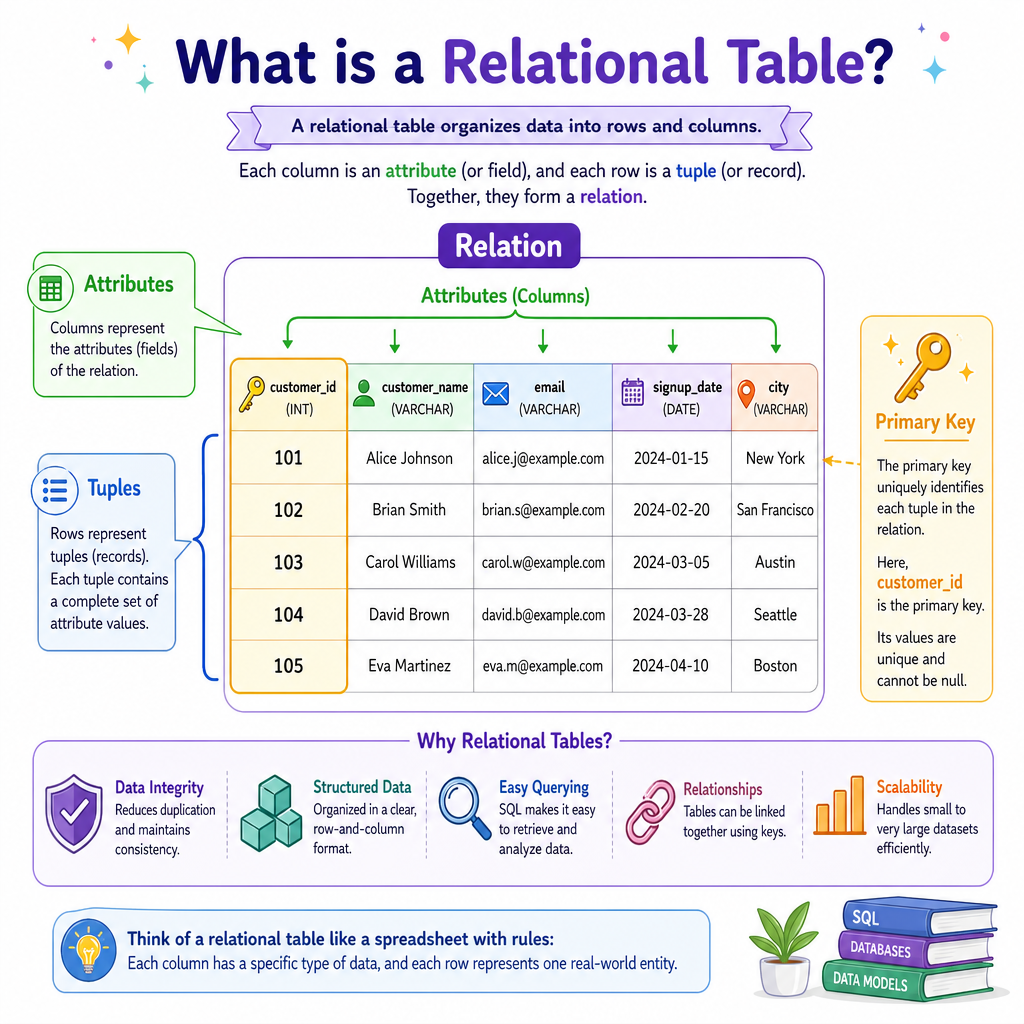
A spreadsheet and a relational table may look similar, but the relational model is stricter.
A relation has:
- A fixed set of named attributes:
customer_id,email,created_at - A set of tuples: the rows
- Rules about valid values: data types, uniqueness, required fields
Example relation:
customer_id email tier 1 ada@example.com premium 2 grace@example.com standardA key distinction: the relational model treats a table as a set of facts. The order of rows is not part of the meaning.
This matters for software engineering and finance systems: if a trades table says trade T123 belongs to account A9, that fact should remain true regardless of how rows happen to be stored in memory.
Schema Purpose
In a relational database, what is the main job of a schema?
A Relation Class
Start with a table primitive
As in earlier lessons, we begin with the smallest useful data structure and wrap behavior around it.
For a relational table, the primitive is:
-
columns: the schema order -
rows: tuple data matching that schema -
insert: validate row shape -
select: keep rows matching a predicate -
project: keep only certain columns
This is not PostgreSQL, but it is the seed of a relational engine.
```python
from dataclasses import dataclass, field

@dataclass
class Relation:
    name: str
    columns: tuple[str, ...]
    rows: list[tuple] = field(default_factory=list)

    def insert(self, **values):
        unknown = set(values) - set(self.columns)
        missing = set(self.columns) - set(values)
        if unknown or missing:
            raise ValueError(f'schema mismatch: unknown={unknown}, missing={missing}')
        self.rows.append(tuple(values[col] for col in self.columns))

    def select(self, predicate):
        result = Relation(f'{self.name}_selected', self.columns)
        for row in self.rows:
            record = dict(zip(self.columns, row))
            if predicate(record):
                result.rows.append(row)
        return result

    def project(self, *cols):
        indexes = [self.columns.index(col) for col in cols]
        result = Relation(f'{self.name}_projected', tuple(cols))
        for row in self.rows:
            result.rows.append(tuple(row[i] for i in indexes))
        return result

    def as_dicts(self):
        return [dict(zip(self.columns, row)) for row in self.rows]

customers = Relation('customers', ('customer_id', 'email', 'tier'))
customers.insert(customer_id=1, email='ada@example.com', tier='premium')
customers.insert(customer_id=2, email='grace@example.com', tier='standard')
customers.insert(customer_id=3, email='linus@example.com', tier='premium')

premium_emails = customers.select(lambda r: r['tier'] == 'premium').project('email')

print('All customers:')
print(customers.as_dicts())
print('Premium emails:')
print(premium_emails.as_dicts())
```
Row Order
A correct relational model should treat the physical order of rows as part of a table's meaning.
Normal Forms
Why normalization exists
Relational databases shine when facts are split into well-structured relations.
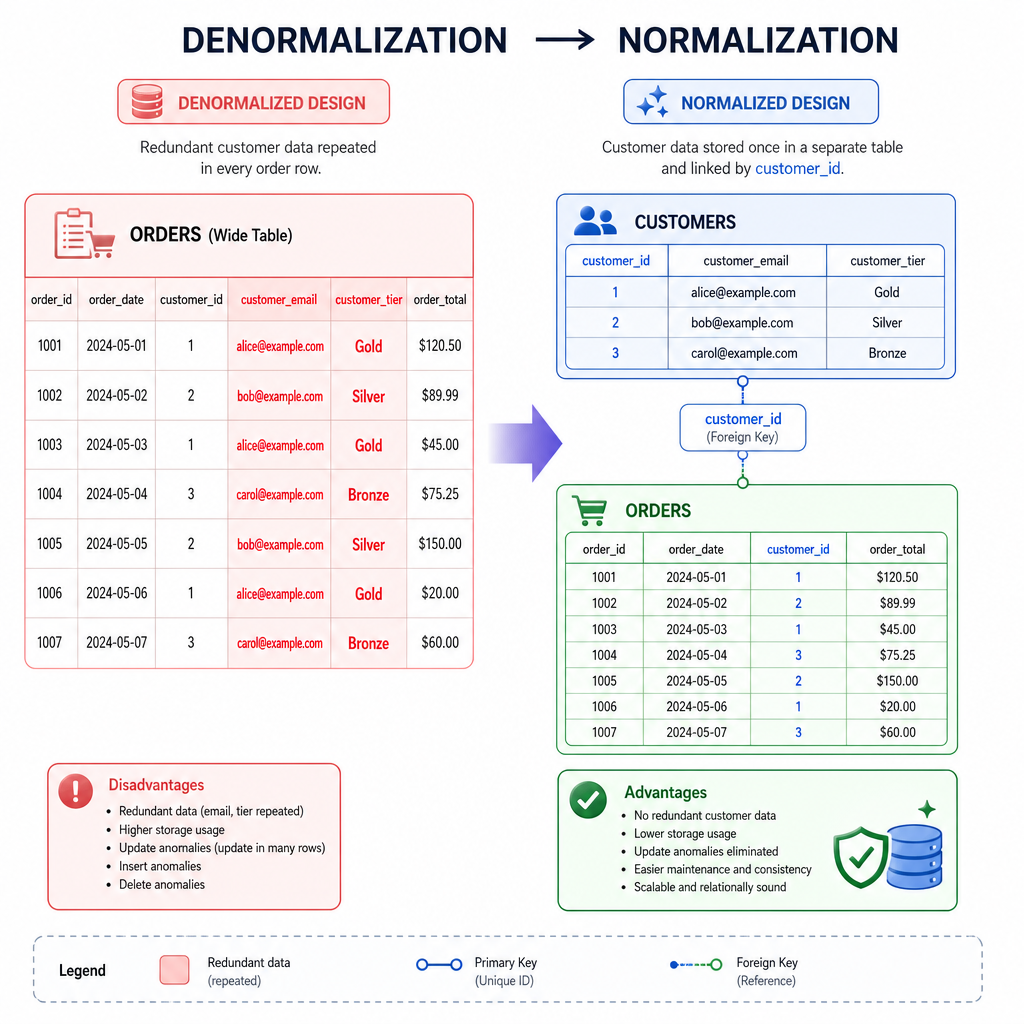
Imagine storing customer data directly inside every order:
order_id customer_email customer_tier total 10 ada@example.com premium 120 11 ada@example.com premium 75If Ada changes tiers, multiple rows must be updated. That creates risk: some rows may say premium, others may say standard.
A normalized design separates facts:
customers(customer_id, email, tier)orders(order_id, customer_id, total)
Practical normal forms:
- 1NF: values are atomic; no lists hidden inside one cell.
- 2NF: non-key facts depend on the whole key.
- 3NF: non-key facts depend on the key, not on other non-key facts.
The goal is not academic purity. The goal is fewer update bugs and clearer data ownership.
Relational Algebra
Queries are algebra pipelines
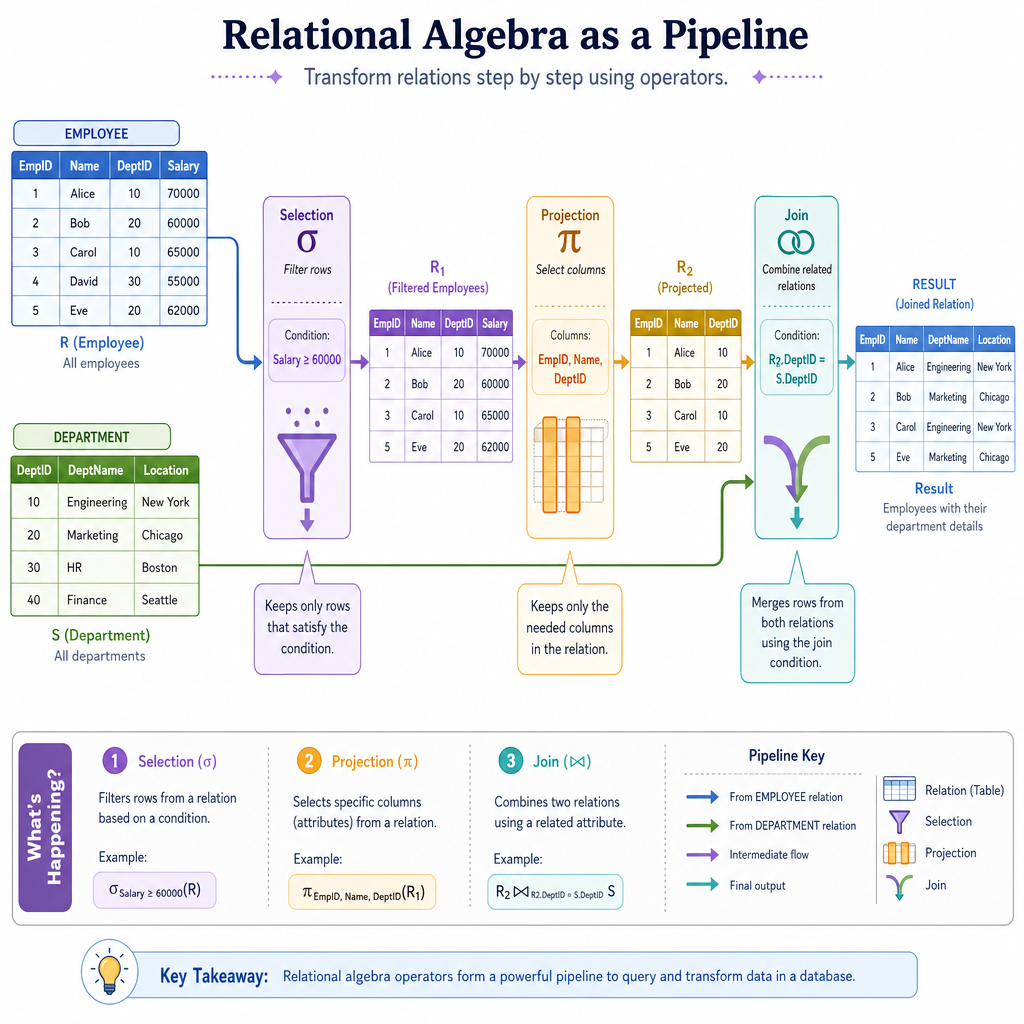
SQL feels like a language, but underneath it maps to relational algebra.
Core operations:
-
Selection: keep rows that match a condition.
- Example: customers where
tier = 'premium'
- Example: customers where
-
Projection: keep selected columns.
- Example: only
email
- Example: only
-
Join: combine related rows from two relations.
- Example: orders with their customer emails
- Union / difference: combine or subtract compatible relations.
The important idea: each operation takes relations as input and returns a new relation as output.
That means queries can be composed like data pipelines:
orders -> select high value -> join customers -> project email,total
Nested Loop Join
Build the simplest join
A join connects facts split across tables.
For example:
-
orders.customer_idtells us who placed an order. -
customers.customer_idtells us the customer's email and tier.
The most straightforward join is a nested loop join:
- For every row on the left table...
- Scan every row on the right table...
- If the join keys match, emit a combined row.
This is not the fastest strategy, but it is the clearest starting point.
```python
from dataclasses import dataclass

@dataclass
class Relation:
    name: str
    columns: tuple[str, ...]
    rows: list[tuple]

    def as_dicts(self):
        return [dict(zip(self.columns, row)) for row in self.rows]

def nested_loop_join(left, right, left_col, right_col):
    left_idx = left.columns.index(left_col)
    right_idx = right.columns.index(right_col)

    right_output_cols = tuple(col for col in right.columns if col != right_col)
    output_cols = left.columns + right_output_cols
    output_rows = []

    for left_row in left.rows:
        for right_row in right.rows:
            if left_row[left_idx] == right_row[right_idx]:
                right_values = tuple(
                    right_row[i]
                    for i, col in enumerate(right.columns)
                    if col != right_col
                )
                output_rows.append(left_row + right_values)

    return Relation(f'{left.name}_join_{right.name}', output_cols, output_rows)

customers = Relation(
    'customers',
    ('customer_id', 'email', 'tier'),
    [(1, 'ada@example.com', 'premium'), (2, 'grace@example.com', 'standard')]
)

orders = Relation(
    'orders',
    ('order_id', 'customer_id', 'total'),
    [(101, 1, 250), (102, 2, 80), (103, 1, 125)]
)

joined = nested_loop_join(orders, customers, 'customer_id', 'customer_id')

print('Joined orders with customer details:')
for row in joined.as_dicts():
    print(row)
```
Name The Operation
In relational algebra, the operation that keeps only selected columns from a relation is called ______.
Tiny SQL Surface
Wrap it as a mini database
Now we can expose a small database interface.
We will not build a full SQL parser here. Instead, we map the spirit of SELECT ... FROM ... WHERE ... onto Python methods:
-
create_tabledefines a relation. -
insertadds validated tuples. -
selectapplies row filtering and column projection.
This gives us a primitive relational database: structured tables plus composable query behavior.
```python
class MiniRelDB:
    def __init__(self):
        self.tables = {}

    def create_table(self, name, columns):
        if name in self.tables:
            raise ValueError(f'table already exists: {name}')
        self.tables[name] = {
            'columns': tuple(columns),
            'rows': []
        }

    def insert(self, table_name, **values):
        table = self.tables[table_name]
        columns = table['columns']
        if set(values) != set(columns):
            raise ValueError('insert must match table schema exactly')
        table['rows'].append(tuple(values[col] for col in columns))

    def select(self, table_name, columns='*', where=lambda row: True):
        table = self.tables[table_name]
        source_columns = table['columns']

        if columns == '*':
            selected_columns = source_columns
        else:
            selected_columns = tuple(columns)

        selected_indexes = [source_columns.index(col) for col in selected_columns]
        results = []

        for raw_row in table['rows']:
            row = dict(zip(source_columns, raw_row))
            if where(row):
                results.append({
                    col: raw_row[source_columns.index(col)]
                    for col in selected_columns
                })

        return results

# Demo: a tiny finance-flavored relational database.
db = MiniRelDB()
db.create_table('accounts', ('account_id', 'owner', 'balance'))

db.insert('accounts', account_id='A1', owner='Ada', balance=1500)
db.insert('accounts', account_id='A2', owner='Grace', balance=700)
db.insert('accounts', account_id='A3', owner='Linus', balance=2300)

large_accounts = db.select(
    'accounts',
    columns=('owner', 'balance'),
    where=lambda row: row['balance'] >= 1000
)

print('Accounts with balance >= 1000:')
for account in large_accounts:
    print(account)
```