New Features: Export Your Solutions in Bulk, Translate and Read Tutorials, Clip Notes
We've added three incredibly useful new features to help you land your dream job! With the help of feedback from our wonderful community, we continue to make AlgoDaily the world's best one-stop shop solution for coding interview prep.
We hope you like what you find, and that it helps you feel more confident in tackling technical interviews. Here's what we've landed:
Want To Save Your Solutions? Export Them in Bulk
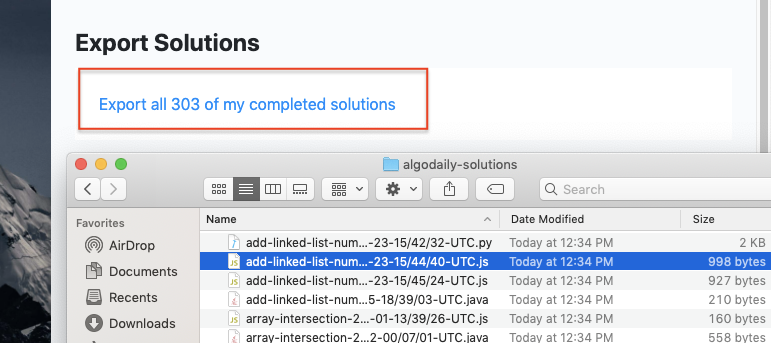
Many students create GitHub repositories for their AlgoDaily solutions. This could be for reference down the line, or to create a portfolio of code samples. Regardless, we'd like to make it easier for you. You now have the option to easily export all your solutions on the settings page.
Selection Menu to Share, Lookup, and Read Via Speech to Text
AlgoDaily has text content-- LOTS of it. The students who derive the most out of the course tend to be active readers; that is, they like to play with the materials by highlighting, writing it down, sharing quotes, etc.
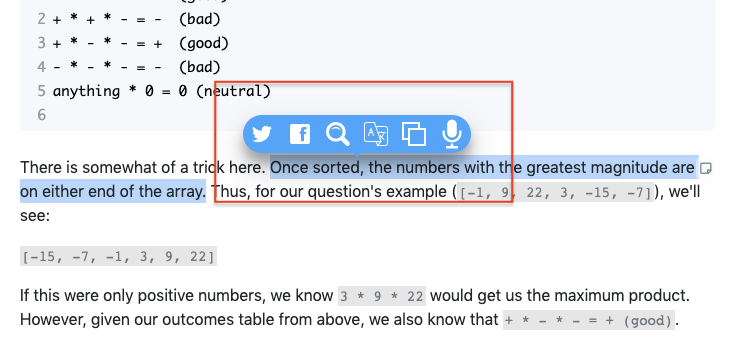
Now, any text selection on the site will trigger a helpful menu that let's you share the quote on social, look it up in a small window on Google, translate the text, or even have it read to you!
Clip and Save Screens as Notes
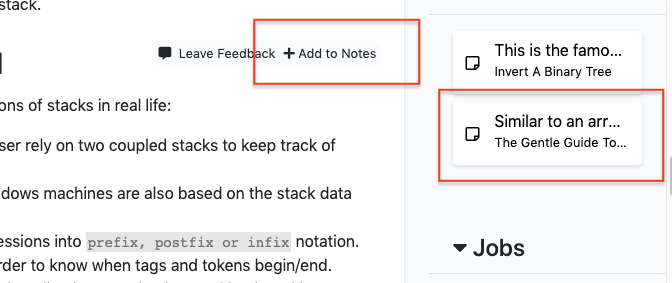
Finally, we're thrilled to announce we're building out a flash cards feature. Eventually, you'll be able to review concepts with spaced repetition. As the first iteration, you can now clip and save chunks of content in each tutorial to Notes in the right hand side. To do so, hover over any floating note icon to the upper right of a content blob, and click "Add to Notes". In the future, you'll be able to save all your notes in one place, and render it as a PDF.
Some of these features are exclusive to premium members.
One interview pattern at a time.
Join 53,000+ engineers getting a visual coding problem and explanation each day.